iMac Mail Has Been Rendered Useless.

This is my third time attempting to post my question. What does this mean, and where am I supposed to look for "Account Preferences" for my email accounts?


Below is just ONE of several problems I've been having with iMac Mail.


The pro-forma FAQ that another contributor very kindly posted in reply to my previous initial post was completely worthless.


Finally, both my gmail accounts are now "unconnectable," stuck as I am in in a perpetual loop of verifying with Safari, and still not being able ADD these accounts.


What happened?


[Image Edited by Moderator to Remove Personal Information]

Posted on Jul 9, 2019 8:18 PM

Reply
24 replies

Jul 9, 2019 8:43 PM in response to Arnel Nacino

Mail>Preferences>Accounts, but has been rendered mostly useless with the Auto setup eMail accounts.


Note, it would've been better to continue with the original post or at lest copy what did NOT work so every helper doesn't need to research what it was that didn't help. :)


To find out if it's system wide or user specific, try this...

Open System Preferences>Users & Groups, unlock the lock, click on the little plus icon, make a new admin account, log out & into the new account.

Does it work in the new account?

Jul 11, 2019 4:06 PM in response to Arnel Nacino

What version of macOS are we talking about?


If your running an older macOS hence older mail, I suggest you try an other email client. I use Thunderbird. Running a third party email client means you can get the latest email standards.

----------------------------------------

google is on a security binge.


You could have run into Google rating Apple Mail insecure.

Here is a google page about it.


Control access to less secure apps - G Suite Admin Help


Less secure apps & your Google Account - Google Account Help


You need to scroll down to less secure apps.


Jul 10, 2019 10:59 AM in response to Arnel Nacino

Your screenshots are probably being dropped because you are revealing your e-mail addresses.

How are you setting up your e-mail accounts, you need to do it through System Preferences> Internet Accounts

when the panel opens click on Add Other Account, then click on Mail Account, on the dropdown that appears give your account a name then fill out your e-mail address and then enter your password for that e-mail address.

Jul 23, 2019 10:36 AM in response to Arnel Nacino

I think you have enough memory.


My Dad's 2008 iMac got strange glitches like finder not display all files in a folder. I wrote it off as my Dad doing strange things until I saw finder not displaying all files in a folder. I bought an external harddrive. Re-install macOS and all third party apps from scratch Problem want away for awhile but came back. Just strange glitches with the finder. I convinced the parents to buy a new iMac.


I'd run etrecheck. Etrecheck will analyze your machine and software and report back. Experienced users have found the reported information useful when diagnosing problems. Post results here so others can view. The proprietary stuff in the report gets filtered. You may want to start a new thread. Include a link to this thread.


Install and run


-- Download etrecheck.  Goto the  EtreCheck  download page.  The download link is at the bottom of the screen

-- Install etrecheck. Goto your download folder. Double click on EtreCheckPro.zip

-- drag the app to the application folder if you wish.

-- Double click on etrecheck to run.   The first five runs are free.


How to report etrecheck data.


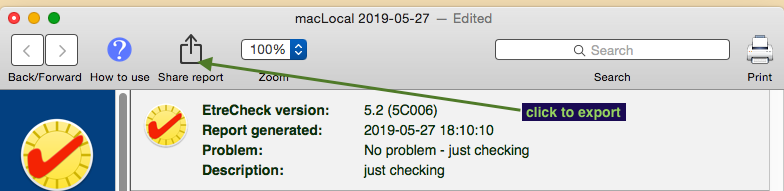
When the report is done, click on the export icon.


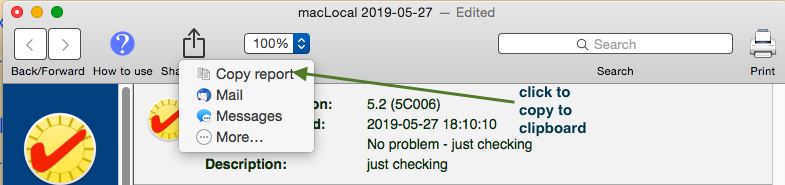
click on "Copy report" to copy to the clipboard


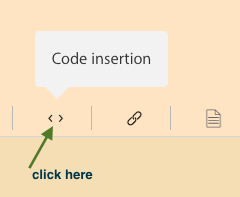
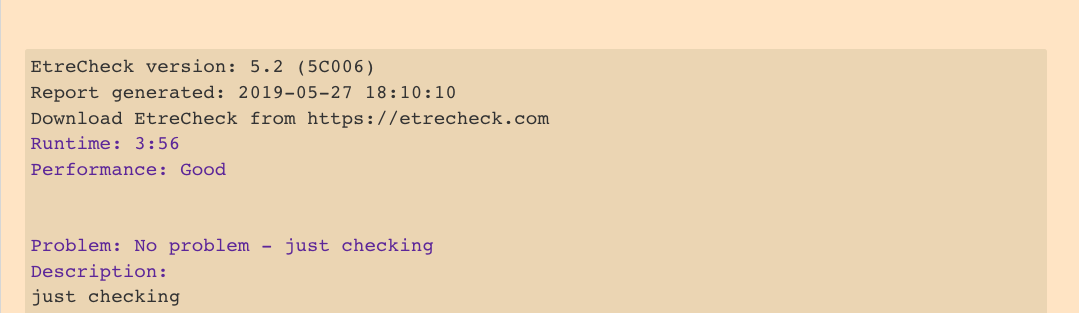
Get back in your web browser and access your discussion. Create a new reply. Click on the <> code icon. Paste you etrecheck output into the code block.


which results in...


Robert
PS. You may find Old Toad's write up helpful.
How to use the Add Text Feature When Post… - Apple Community





Jul 9, 2019 9:27 PM in response to BDAqua

Thank you for reaching out, and for your attempt to help. Trying to find help on this forum has been the most aggravating, most vexing exercise. It didn't used to be like this.


I wish I could help you help me but the screenshots I've been posting keep getting edited out, and I'm just tired of dealing with this essentially non-functional Mail app.


Using Account Doctor or whatever it's called, doesn't help. Yahoo, gmail and occasionally iCloud email accounts are affected, and I can't connect any of these accounts on my iMac. The accounts are reachable on my other Apple devices, just not on my iMac.


For example, yahoo.com leaves me this rather cryptic message after failing to connect:


"Online Status: Connections to the server "imap.mail.yahoo.com" on the default ports timed out."


What am I supposed to do with this message?


Jul 11, 2019 3:14 PM in response to Arnel Nacino

The infernal loop.


First, in attempting to add a gmail account, I go through the steps outlined above from the Settings/Internet Accounts menu and get this:


Followed by this:

It would appear that the gmail accounts have been added but when I return to Mail, I get various and sundry and not very helpful messages like, Login Failed; "Enter the password for the account, "****@gmail.com*** and "Open Safari."


I do open Safari and go through the steps but I get more messages back at Mac Mail: "Connection Failed," "Take All Accounts Online," (doesn't work), "Account Error," and, "Online Status. Connections to the server "imap.mail.yahoo.com" on the default data ports have timed out." "Cancel" and "Try Again."


So in short, I'm having problems connecting with yahoo mail, gmail, and pretty regularly now, iCloud mail.

Jul 11, 2019 5:02 PM in response to rccharles

Thank you for your response. My iMac tells me that I'm on Mojave, and that my software is up to date.


Curiously, and apparently spontaneously, the gmail accounts have fixed themselves, WHEN the whole Mail programme is up and running properly.


The one remaining, persistent bugabear is the yahoo.com account. That never connects no matter whether iMac Mail gets all the other email mailboxes running, or not.

This thread has been closed by the system or the community team. You may vote for any posts you find helpful, or search the Community for additional answers.

iMac Mail Has Been Rendered Useless.

Welcome to Apple Support Community
A forum where Apple customers help each other with their products. Get started with your Apple Account.
