Web Browser for OS X 10.4


I own an old white iMac running OS X 10.4 which still functions, but when I try to use Safari or Firefox to browse the web I get "security violation" issues. I assume these old browsers don't have the latest secure (https) features. Any solutions out there or must I discard this otherwise nice computer? These days any computer without a web browser is crippled.


Posted on Jul 10, 2019 11:32 AM

Reply
Question marked as Top-ranking reply

Posted on Jul 10, 2019 12:33 PM

The answer depends on which "White iMac" you have. There are at least three broad families of iMacs that at some point had white cases. Please do "About this Mac" and see what that says about your processor and post it here. that should look something like this:
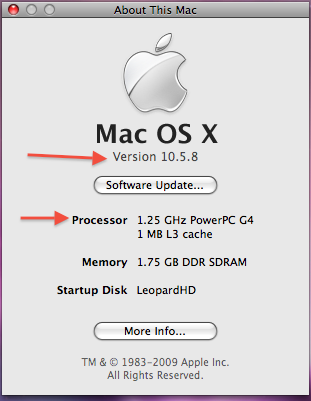

The second red arrow is where you will find your processor information. Please tell us what your computer shows there.


If this is a PowerPC Mac, this is the browser most of use still dinking with old Macs use:

http://www.floodgap.com/software/tenfourfox/

TenFourFox is a modified version of FireFox that lets old Macs use the web without sites saying the browser is unsupported due to being "too old." I use it on a G4 eMac running OS 10.5.


The only downside is that almost no web sites are optimized for PowerPC Macs any more. Therefor any page is a slow load but it will at least load. TenFourFox does not use plugins so you cannot view videos.


If "About this Mac" shows you have an Intel processor, we may need to do more looking for compatible browser.


8 replies
Question marked as Top-ranking reply

Jul 10, 2019 12:33 PM in response to ND1L

The answer depends on which "White iMac" you have. There are at least three broad families of iMacs that at some point had white cases. Please do "About this Mac" and see what that says about your processor and post it here. that should look something like this:


The second red arrow is where you will find your processor information. Please tell us what your computer shows there.


If this is a PowerPC Mac, this is the browser most of use still dinking with old Macs use:

http://www.floodgap.com/software/tenfourfox/

TenFourFox is a modified version of FireFox that lets old Macs use the web without sites saying the browser is unsupported due to being "too old." I use it on a G4 eMac running OS 10.5.


The only downside is that almost no web sites are optimized for PowerPC Macs any more. Therefor any page is a slow load but it will at least load. TenFourFox does not use plugins so you cannot view videos.


If "About this Mac" shows you have an Intel processor, we may need to do more looking for compatible browser.

Jul 10, 2019 1:33 PM in response to ND1L

As you suspected the issue is related to using HTTPS, specifically the cryptographic protocols SSL and TLS that provide both authentication and data encryption over the Internet. Older versions of OS X only supported SSL or TLS v1.0. Most, if not all, of today's websites require, at least, TLS v1.2, in order to create a secure connection when you preface a URL with HTTPS. TLS v1.2 support was added with OS X 10.10.4 (Mavericks). Tiger OS X 10.4 only supported SSL v3.0 & TLS v1.0

Jul 11, 2019 7:50 AM in response to TheLittles

Encryption is what Gets in the Way Here.

On my 2002 iBook,1.3 is the version number of Safari.


Try creating a guest network in System Preferences > Do NOT Disable the broadcast (SSID), and just use WEP. All works fine from there. It seems encryption is what gets in the way. So, disabling encryption in isn't the best, but do so on a guest network, and see where is goes from there.


As a network, name it something that ends in 'guest', and try it.


It should work fine. : 0)

Jul 11, 2019 8:35 AM in response to TheLittles

I'm not sure I follow your proposed solution to the OP. You are proposing substituting one weak security link (SSL) for another (WEP) ... is that correct? Also, what does the wireless encryption standard (WEP, WPA, or WPA2) have to do with the IP cryptographic protocols SSL & TLS? Are you saying that by disabling either WPA or WPA2, and enabling WEP, a pre-Mavericks Mac can run a web browser that supports TLS v1.2?

Jul 10, 2019 8:58 PM in response to ND1L

Is your router AC? AC is Dual Band, and back then you would have had Wireless A (5GHz) or perhaps Wireless B (2.4 GHz). HTTPS is, of course, encryption.


For Note: This 2002 iBook of mine works like a charm on my Nighthawk AC1900 Modem/Router. I've never had any troubles between both devices, whatsoever to this date. So, perhaps it’s configurations and compatibility that is getting in the way here.


I’ll add the Browser Versions later to this discussion.


[Edited by Moderator]

This thread has been closed by the system or the community team. You may vote for any posts you find helpful, or search the Community for additional answers.

Web Browser for OS X 10.4

Welcome to Apple Support Community
A forum where Apple customers help each other with their products. Get started with your Apple Account.

