Missed call sound allert

Hello,

Is there a setting or an application, that can help me to receive notification for missed calls with sound or ringing ?

For now I get notification only on my lock screen, but when I leave my phone for a couple of hours I can’t look at it all the time. Sometimes the call are very important and I can’t call back.


Greetings

Posted on Jul 26, 2019 4:21 AM

Reply
3 replies

Jul 26, 2019 5:17 PM in response to veselina100

Hi veselina100,


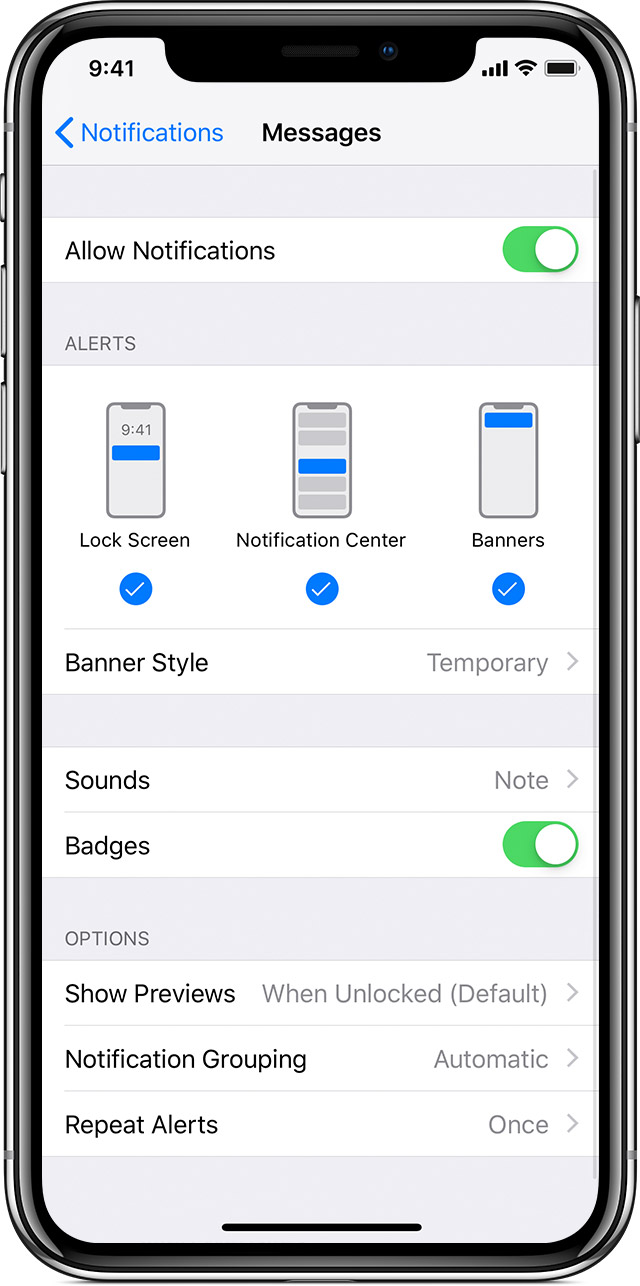
Welcome to Apple Support Communities. I understand that you'd like to receive an audible notification when you've missed a call. I know how important it is to be notified of missed calls right away; I'd like to help. You can absolutely use audible notifications for the Phone app; take a look at the steps below to change the alert style and sound used for notifications:


"

Change alert styles

To add or change an alert style for a notification:

    1. Go to Settings > Notifications.
    2. Select an app under Notification Style. 
    3. Choose a type of alert and banner style. 

You can also turn sounds and badges on or off."


Use notifications on your iPhone, iPad, and iPod touch


Best Regards.

Jul 27, 2019 8:53 AM in response to Teddy_B

Hello, thank you for the answer, but it’s not helpful for me. I want to receive notification with sound when I have missed call, and this notification must repeats in every 5 or 10min for example, till I open it. I see that this is possible only for messages notification. And also the repeating is only with vibration, there is no sound. I know that for Android this is possible with an app. Is it possible for IOS?

This thread has been closed by the system or the community team. You may vote for any posts you find helpful, or search the Community for additional answers.

Missed call sound allert

Welcome to Apple Support Community
A forum where Apple customers help each other with their products. Get started with your Apple Account.