Dual Sim Message composing between both numbers

Help! When composing a message to a contact with an existing thread, the bubble which gives an option between primary and secondary number does not appear. The bubble only appears when composing a new message to a contact with whom I do not have an existing thread. Once a new message has been created with (let’s say my primary number) how is it possible to send a message to the same contact now using my secondary number?

I have tried every possible setting, including changing the contact’s setting (last used, or always use ...) seems that setting is for voice calling not text messages.

Please please help! I would love to see that option bubble appear when composing a message period, regardless of existing thread or not. Hope someone can help me. Thank you!

iPhone XS Max

Posted on Aug 3, 2019 4:55 PM

Reply
Question marked as Top-ranking reply

Posted on Aug 6, 2019 5:26 PM

I asked the same question earlier today and then I stumbled upon your question.

Yes, there seems to be no way of doing this very basic thing in iPhone yet. My Windows phone had this feature - it simply maintained two separate differently colored threads for two lines, each showing all received messages (from the same number) on both the lines! Such a simple and delightful solution. This way it was ensured that even by mistake I'll not use an unintended line for sending a message.

In iPhone, it's very likely to use the line (for sending a message in an existing thread) that you didn't want to use.


There are three very cumbersome workarounds:

  1. If the recipient of your message replies to your other line, then that line automatically becomes the active-line on that thread.
  2. If you turn off temporarily the sim for the active line in the thread in question and then try to message on the thread, iPhone will complain and give you the option of changing the line.
  3. Delete the thread and start over for that contact (if you may want to count this as an option).


This feature is a must requirement for dual sim phones.

The answer provided by SravanKrA isn't related at all to your question, I don't think he bothered to read or understand your question.


Here is the link to my question: https://discussions.apple.com/thread/250538167.


Similar questions

3 replies
Question marked as Top-ranking reply

Aug 6, 2019 5:26 PM in response to AlinaN14

I asked the same question earlier today and then I stumbled upon your question.

Yes, there seems to be no way of doing this very basic thing in iPhone yet. My Windows phone had this feature - it simply maintained two separate differently colored threads for two lines, each showing all received messages (from the same number) on both the lines! Such a simple and delightful solution. This way it was ensured that even by mistake I'll not use an unintended line for sending a message.

In iPhone, it's very likely to use the line (for sending a message in an existing thread) that you didn't want to use.


There are three very cumbersome workarounds:

  1. If the recipient of your message replies to your other line, then that line automatically becomes the active-line on that thread.
  2. If you turn off temporarily the sim for the active line in the thread in question and then try to message on the thread, iPhone will complain and give you the option of changing the line.
  3. Delete the thread and start over for that contact (if you may want to count this as an option).


This feature is a must requirement for dual sim phones.

The answer provided by SravanKrA isn't related at all to your question, I don't think he bothered to read or understand your question.


Here is the link to my question: https://discussions.apple.com/thread/250538167.


Aug 3, 2019 6:00 PM in response to AlinaN14

Going by the link at the bottom of this post following is what I gather is...


  • Either have Primary as iMessage or Secondary both cannot be used for iMessage
  • Both Primary and Secondary can be used for SMS


Also read the three bullet points below, which also is extracted from the link at the bottom of this post


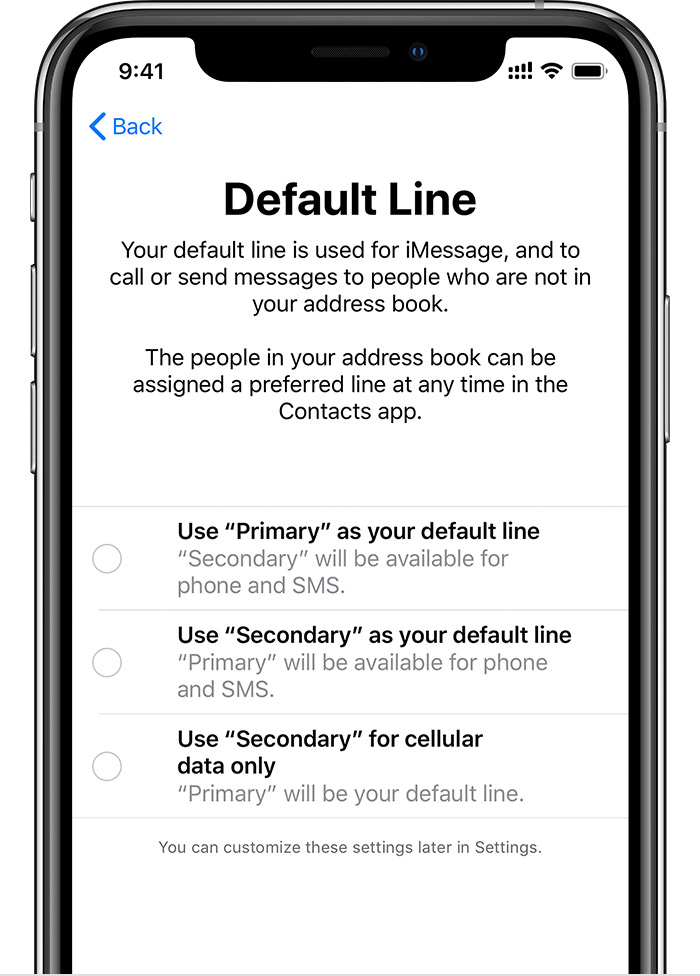
Choose how your plans work together

Set your default number, which iMessage and FaceTime use and which you will use when you call or send a message to someone who isn't in your Contacts app.

On this screen, choose a number to be your default, or you can choose which number is to be used only for cellular data. Your other number will be your default. 


  • Use Primary as your default line: If you select this option, Primary will be used by default for voice, SMS, Data, iMessage, and FaceTime. Secondary will be available just for voice and SMS.


  • Use Secondary as your default line: If you select this option, Secondary will be used for voice, SMS, Data, iMessage, and FaceTime. Primary will be available just for voice and SMS.


  • Use Secondary for cellular data only: You might want to select this option if you're traveling internationally and you want to keep Primary for voice, SMS, iMessage, and FaceTime. This will allow you to use Secondary for data.


Using Dual SIM with an eSIM - Apple Support

https://support.apple.com/en-us/HT209044

Aug 4, 2019 11:15 AM in response to SravanKrA

While all the above information is true, it still does not solve the issue I have. I am looking for an option to interchangeably select from which number I am sending a text message. Adjusting the primary or secondary iMessage default in message settings doesn’t do it either. Regardless of what I set it to, my texts will constantly send from primary. Even if I set all settings to secondary. Very frustrating

This thread has been closed by the system or the community team. You may vote for any posts you find helpful, or search the Community for additional answers.

Dual Sim Message composing between both numbers

Welcome to Apple Support Community
A forum where Apple customers help each other with their products. Get started with your Apple Account.