That's ok. I will do my best to explain.
You can verify your Apple TV model here
Identify your Apple TV model - Apple Support
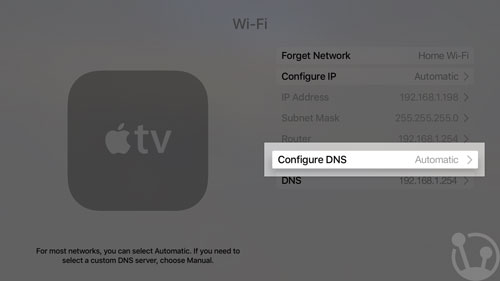
DNS is what determines how the content is sent to your Apple TV. It needs to be set on auto to ensure it is using the one supplied by your internet service provider. To verify go to settings - general - network (for 2nd and 3rd gen) or settings - network (4th gen and 4K). You would select your network and where it shows Configure DNS is should say auto or automatic, if says manual it needs to be changed. I posted a screenshot from a current Apple TV, it may look a little different if you have an older model.
In order to troubleshoot you would need to bypass the Wifi and connect an ethernet cable from your router to the Apple TV. If it connects properly then that will verify an issue with your wifi network.
istumbler and netstumbler are used to run diagnostics for your network. One is for Mac and the other for PC. You will see values for signal strength, noise, nearby networks. If you are unsure of how to read the report you can post the results here.
You can also take the Apple TV to another location to test on a different network.

