Updates on iPhones

This is crazy, I have unlimited data and only use my data as my internet was such crap I got rid of it,. Apple why do you get to decide if I want to use my data or not to update my phone? This is just plane crazy... is there a work around??

iPhone 6s

Posted on Aug 30, 2019 11:26 AM

Reply
7 replies

Aug 30, 2019 11:28 AM in response to Helpmefixapple

What update? Who are you addressing this to?


Apple Support Community Forum


This is Apple Support Community forum, for user to user interaction for information & idea sharing between users, if need be, extend support on technical knowhow in handling Apple products from more experienced fellow user, Apple Inc is neither here nor they are listening. 


Hence, we are unable to help with any of the following:


For these questions, you may contact Apple Inc or your local Authorised Apple vendor directly. 


Thank you for your understanding and support.


Contact - Official Apple Support

https://support.apple.com/en-in/contact

Aug 30, 2019 11:32 AM in response to Helpmefixapple

Requesting you to be more specific in your queries next time.


"Ask the right questions if you're going to find the right answers." - Vanessa Redgrave


There are two major Updates in an iPhone / iPad:

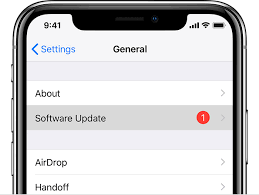
  1. iOS Update (Optional): Released by Apple Inc basically for improvements, security and bug fixes. Does not affect Data, Calls & SMSs if not updated
  1. Carrier Update (Required): Released by your Cellular Service provider (Carrier Update), affects your Outgoing / Incoming calls, SMS, Data etc..
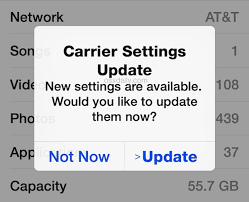


How to Update Carrier Settings

You can manually check for and install a carrier settings update with these steps: Make sure your device is connected to a Wi-Fi or cellular network. Tap Settings > General > About. If an update is available, you'll see an option to update your carrier settings.

Update your carrier settings on your iPhone or iPad - Apple Support


How to update iOS

Go to Settings > General > Software Update > Automatic Updates, then turn off AutomaticUpdates. At any time, you can check for and install software updates. Go to Settings > General > Software Update. The screen shows the currently installed version of iOS and whether an update is available.

Update iOS software on iPhone - Apple Support

This thread has been closed by the system or the community team. You may vote for any posts you find helpful, or search the Community for additional answers.

Updates on iPhones

Welcome to Apple Support Community
A forum where Apple customers help each other with their products. Get started with your Apple Account.


