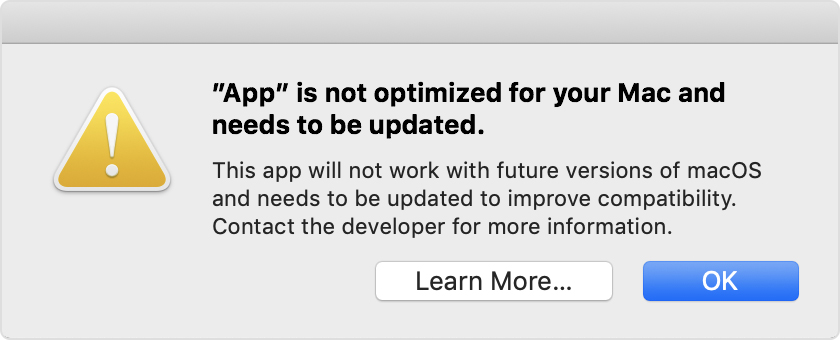
MacBook PRO Pop up Notifications -

How can this be removed? I receive this notification every other month to UP DATE my EPSON PRINTER! BUT - I have NO EPSON Products and this is what the notification pops up for! I dumped the Epson Printer about 4 yrs ago! HELP!

MacBook Pro

Posted on Sep 7, 2019 4:59 PM

Reply
Question marked as Top-ranking reply

Posted on Sep 8, 2019 12:18 PM

KcK9 wrote:

... I do NOT even have the EPSON Software installed on my computer!


Your Mac disagrees with you.


To determine the 32 bit software on your Mac, open (Apple menu) > About This Mac > System Report... > Software.


  • 32 bit applications can be found under Applications.
  • 32 bit extensions can be found under Extensions.
  • 32 bit frameworks can be found under Frameworks.


Additional information may be found under Legacy Software, along with the Reason it is considered "legacy software".


Or, as I wrote, upgrade to Catalina. Any remaining 32 bit software will be inert and the dialog will no longer appear.

6 replies
Question marked as Top-ranking reply

Sep 8, 2019 12:18 PM in response to KcK9

KcK9 wrote:

... I do NOT even have the EPSON Software installed on my computer!


Your Mac disagrees with you.


To determine the 32 bit software on your Mac, open (Apple menu) > About This Mac > System Report... > Software.


  • 32 bit applications can be found under Applications.
  • 32 bit extensions can be found under Extensions.
  • 32 bit frameworks can be found under Frameworks.


Additional information may be found under Legacy Software, along with the Reason it is considered "legacy software".


Or, as I wrote, upgrade to Catalina. Any remaining 32 bit software will be inert and the dialog will no longer appear.

Sep 8, 2019 9:21 AM in response to John Galt

WOW - Not helpful at ALL! I read the 32-Bit on Apple prior to emailing my question! As I stated in my original question - EPSON PRINTER update pops up on my MacBook Pro Home Page! I haven't used any EPSON PRODUCTS for 4 Years - HOW do I remove the pop up notification? I do NOT even have the EPSON Software installed on my computer!

Sep 8, 2019 6:03 PM in response to John Galt

Ok - Thanks - I did locate EPSON in ALL of the above Locations. How can I delete? My MacBook Pro States it is UPDATED and is showing MacOS Mojave 10.14.6 - Are you saying CATALINA is to next update after MOJAVE? If so - How do I update since my laptop is stating it is ALREADY Updated? Can I take my MacBook Pro to the apple store to remove? IF so - cost? Thanks for your help!

Sep 8, 2019 7:28 PM in response to KcK9

If you find their locations, you can simply drag them to the Trash. I wouldn't modify anything without a contingency plan though, just in case you inadvertently trash something you need. Among contingency plans, Time Machine is the most comprehensive: Back up your files with Time Machine on Mac.


The next macOS version will be Catalina; yes.


In Apple's terminology, new macOS versions are called upgrades whereas incremental updates to existing versions are called updates. macOS 10.14.6 is its most recent update.


Can I take my MacBook Pro to the apple store to remove?


Yes, but if you don't want to take the time and investigate those apps yourself it would be much easier to simply contact Apple over the phone: Contact Support. You might have to pay them $29 for the trouble.


I really, really wouldn't be concerned about that dialog though.

This thread has been closed by the system or the community team. You may vote for any posts you find helpful, or search the Community for additional answers.

MacBook PRO Pop up Notifications -

Welcome to Apple Support Community
A forum where Apple customers help each other with their products. Get started with your Apple Account.