“If” function correctly returns “null” value but Counta function still counts that cell as 1

When I do an if function that returns a “null” value to a cell and subsequently do a Counta function on the same null value cell, the count is 1. Shouldn’t it be zero? I would like it to be zero.

Posted on Sep 11, 2019 2:15 PM

Reply
Question marked as Top-ranking reply

Posted on Sep 11, 2019 10:09 PM

From the Function Browser article on COUNTA:
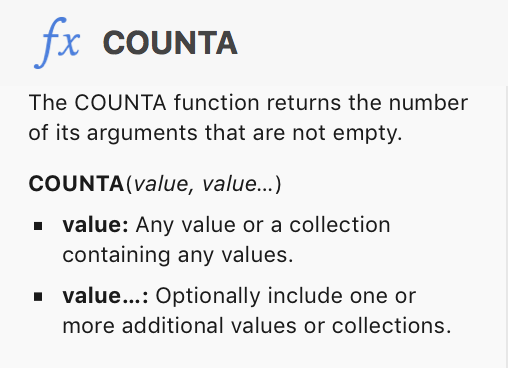

A null string is a text value with zero length, meaning a cell containing a null string does 'contain a value,' and will be counted by COUNTA


IF the values in the cells that are to be included the count are Numbers, numeric expressions, or date and time values. consider using COUNT.
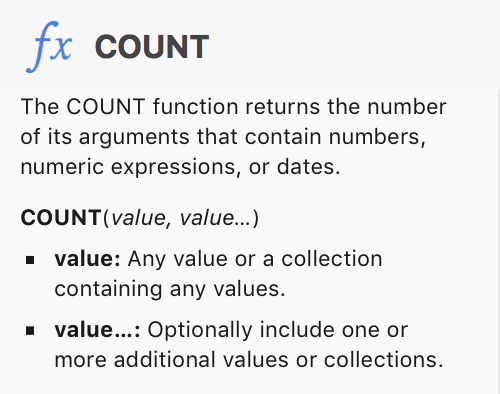
COUNT ignores text values, including null strings. t includes zeros, provided the zero value is expressed as a numeral or 'numeric expression.'


COUNTIF, and COUNTIFS count cells containing values that meet a secified condition (COUNTIF) or all conditions in a set of more than one condition (COUNTIFS).
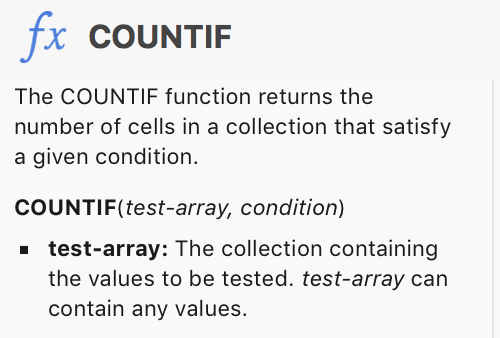

In SGIII's example above, COUNTIF counts all of the cells in the named range (column D, not including the header row or the footer row),meeting the condition that their content is not equal to ( "<>" ) a null string ( "" ).


Given the description in the initial question, SG's take seems to be the best available solution.


Note in the image below that SG's formula omits the cells containing a null string (yellow fill) and omits cells that are empty (grey fill) but does include cells containing the numeral zero (blue-grey fill). Zero is a number, so this is expected behaviour.
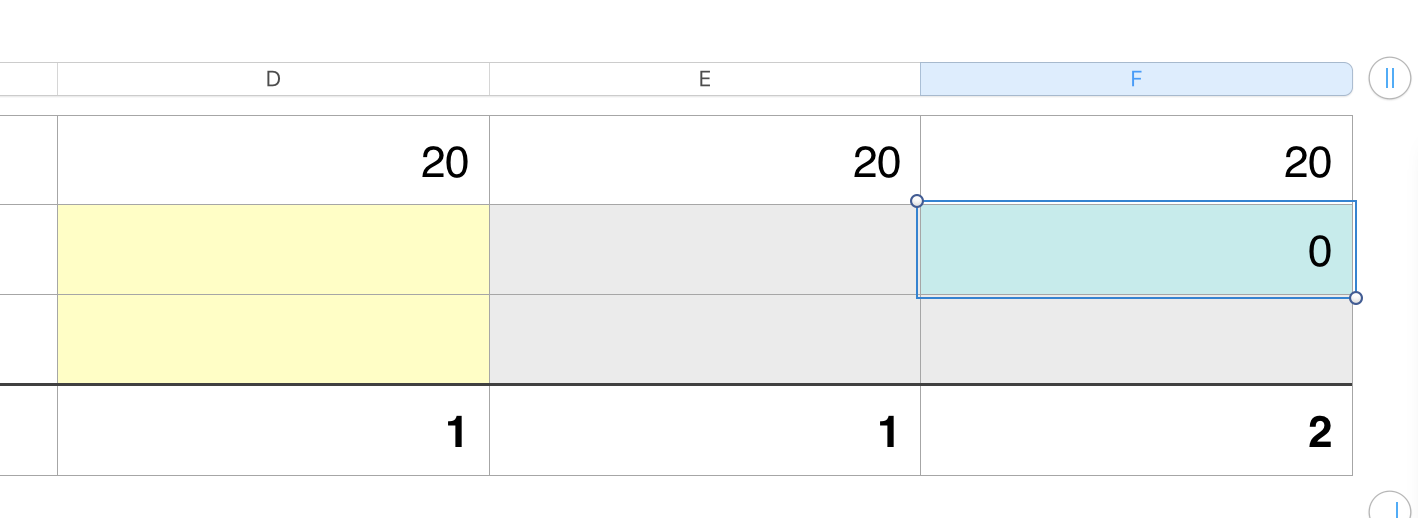
D4: COUNTIF(D,"<>"&"")                                    E4: COUNTIF(E,"<>"&"")                           F4: COUNTIF(F,"<>"&"")


Regards,

Barry

12 replies
Question marked as Top-ranking reply

Sep 11, 2019 10:09 PM in response to Almoore1951

From the Function Browser article on COUNTA:


A null string is a text value with zero length, meaning a cell containing a null string does 'contain a value,' and will be counted by COUNTA


IF the values in the cells that are to be included the count are Numbers, numeric expressions, or date and time values. consider using COUNT.

COUNT ignores text values, including null strings. t includes zeros, provided the zero value is expressed as a numeral or 'numeric expression.'


COUNTIF, and COUNTIFS count cells containing values that meet a secified condition (COUNTIF) or all conditions in a set of more than one condition (COUNTIFS).


In SGIII's example above, COUNTIF counts all of the cells in the named range (column D, not including the header row or the footer row),meeting the condition that their content is not equal to ( "<>" ) a null string ( "" ).


Given the description in the initial question, SG's take seems to be the best available solution.


Note in the image below that SG's formula omits the cells containing a null string (yellow fill) and omits cells that are empty (grey fill) but does include cells containing the numeral zero (blue-grey fill). Zero is a number, so this is expected behaviour.

D4: COUNTIF(D,"<>"&"")                                    E4: COUNTIF(E,"<>"&"")                           F4: COUNTIF(F,"<>"&"")


Regards,

Barry

Sep 16, 2019 6:57 AM in response to Badunit

Badunit wrote:

the term "blank" should mean the same thing in all situations. Consistency is good. Inconsistency is bad.


Maybe the problem is that "spreadsheetese" (or whatever you want to call it) is a "language" that has developed over time.😀


Languages tend to have inconsistencies, where one term can mean different things depending on the context.


In this context, instead of...


=COUNTA(<range to count>)


... one can simply use:


=COUNTIF(<range to count>,"<>"&"")


As posted way up near the top of this thread.


SG

Sep 15, 2019 5:15 PM in response to t quinn

In my opinion, the term "blank" should mean the same thing in all situations. Consistency is good. Inconsistency is bad.


ISBLANK says a null string is not blank,

COUNTBLANK says a null string is blank,

COUNTA says a null string is not "empty" (blank)

IF(B1=""...) returns TRUE when B1 is totally devoid of everything or when it has a null string so it says "blank" is the same as a null string.


I am sure we can blame it on Microsoft. Numbers needs to be just as inconsistent as Excel for compatibility.

This thread has been closed by the system or the community team. You may vote for any posts you find helpful, or search the Community for additional answers.

“If” function correctly returns “null” value but Counta function still counts that cell as 1

Welcome to Apple Support Community
A forum where Apple customers help each other with their products. Get started with your Apple Account.

