iPad OS 13.1.2 - Safari tabs not reopening after crash

I'm running iPad OS 13.1.2 on my iPad Pro, and I've noticed that Safari seems to be pretty unstable. I've had it crash a few times since I updated, and when I restart, all of my open tabs are gone, with the exception of the tab that I was viewing during the crash. I do most of my work on my iPad and I need to hop back and forth between several research tabs, so this has put a major spanner into the works for me.


I'm assuming that there's really nothing to be done unless Apple recognizes the bug and fixes it in a future release. Anyone else have this issue?

iPad Pro 12.9-inch, 3rd Gen, Wi-Fi

Posted on Oct 9, 2019 5:01 PM

Reply
63 replies

Nov 17, 2019 10:00 PM in response to Alexzil

Hi, try swiping up from bottom of screen to open the app switcher to view your open apps. Then go through them and look for other Safari windows. Each one will say how many tabs it has open. Your lost Safari tabs are most likely in another window and when you’re opening the app you’re accessing a new window.

it’s painful to start with but when you’re used to it it’s quite useful.

Oct 25, 2019 1:44 PM in response to Chappsnet

I had this happen the other day too!! However, I discovered something very interesting today.


It seems that Safari on my iPad now has multiple WINDOWS as well as multiple tabs. After Safari crashed and I reopened it, it seemed like I had lost my tabs. However, Safari had just opened a new window!! My tabs were still there, just in another window.


However, this is the frustrating thing: the only place I’ve been able to change between windows is when I split the screen between another app and Safari. For instance, if I’m running YouTube, then I slide up from the bottom of the screen, hold down the Safari icon, and then drag it up to split the screen. On the Safari side, I now can see my multiple windows, each with multiple tabs! Once I select one though, I can’t find a way to go between them without going through this process again. So... still a problem.


I’ll also report the issue to Apple, but thought you might try this to find your missing tabs!


Nov 4, 2019 5:31 AM in response to Chappsnet

Same problem, using IPad Air 3rd Gen, just been onto Apple Support. To do with the latest update... Apparently I was opening a NEW Safari page, hence no previous tabs. Double clicking on the Home button brought up previous Safari pages with my tabs still on it. Still not clear why it gives me a new safari page in the 1st place but at least I can recover them now!

Nov 23, 2019 10:18 AM in response to Chappsnet

Well, as research is clearly an important task for you - and you seemingly associate a single “project” with an open window (instance) of Safari - try out this simple workflow...


Save Session


When you are taking a break from your session, you can easily save your all the open tabs for this session in a single step. To do so, touch-and-hold the book icon to the left of the address bar, and from the menu that appears choose the second option - Add Bookmarks for n Tabs (where n = the number of open tabs in this Safari window/instance); a New Folder dialogue will appear - give it a suitable name - and Save.


Close your window if you wish - or just treat this as saving where you are so far. Saving the state of the window not only saves all your open tabs, but also saves the entire history of each tab as well!


Restore Session


To restore a saved session, with a Safari window open (any window will do), open a new window; a page will appear with all your saved Favourites shown as individual icons. You will notice that your page of favourites includes one or more grouped sets of thumbnail icons (i.e., folders), one or more of which will have the folder name that you chose in the step above.


Touch-and-hold the folder icon that corresponds with the session that you wish to restore - the folder will expand and show an actions menu; choose the second option Open in New Tabs.
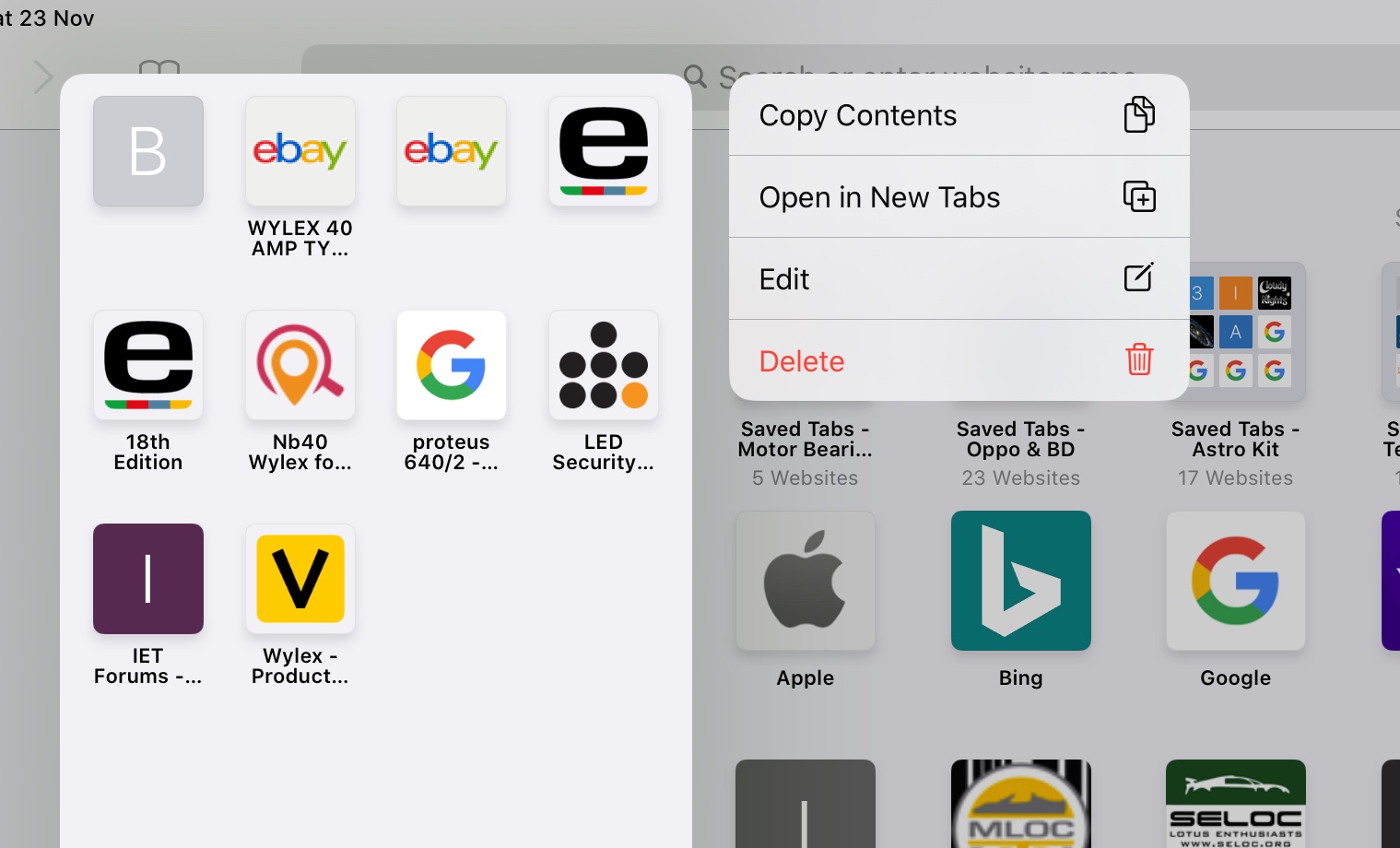


Now, all the tabs (and associated tab histories) will open in the new Safari Window - just as they were when you saved them. The new Safari window, with restored tabs, can be manipulated just like any other Safari window within iPadOS.


You can have as many saved sessions/folders as you like - all with unique names. So you could, for example, save your research project at various stages or times - ready for immediate recall at will. This save/restore process is very powerful - and is completely independent of the other mechanisms within Safari to restore closed windows or individual tabs. The saved sessions will persist and be synchronised with iCloud, like any other saved Favourite, until such time as you delete them.


I use this simple mechanism all the time - to manage individual (open) browsing sessions between, work, research and domestic - easily switching between them as needed. This process also protects you from the frustrations of an accidentally closed Safari window (or multiple windows).


I hope you find these tips helpful - particularly in light of your described usage.

Feb 14, 2020 11:49 PM in response to Chappsnet

I had a similar experience as 23/11 Chappnet. Holding the "+" button on the top tight in the safari window offers you the option to re-open recently closed tabs. I started opening recently closed tabs this way and it turned out that some tabs had been hidden behind (merged) behind other tabs. So opening one "recently closed tab" effectively opened more r.c.t.'s.

Still a lot useful history lost.....

Nov 23, 2019 7:16 AM in response to ingridcorina

This has actually helped to recall missing windows filled with tabs. For instance, this morning, I had a single window open with multiple tabs. As I tapped on one of the tabs - bam! - every tab disappeared except for the active tab. Gone. No other windows were open.


However, I decided to try something and tapped and held the overlapping tabs icon at the top right in the browser and selected merge, and - bam! - all my recently missing tabs returned. What seems to be going on is that these tabs are being recalled from a window that doesn't exist. Except that it does, as long as your current iOS session is running. If you get one of those iOS crashes, you're probably out of luck.


Everyone who's having this missing window/tabs problem should try this to see what happens. It's not a fix for this set of Safari bugs (huge bugs - inexcusable in a public release, but now well documented), but it might help you to recover your missing tabs. I'll try this the next time iOS crashes and Safari windows/tabs are missing.

Jan 28, 2020 2:40 AM in response to LotusPilot

I found a setting in iOS and iPadOS that resolved the issue for me!


Open Settings

Scoll down to Safari

Scoll down to the Tabs section

Select the Close Tabs option

Ensure that Manually is selected


I don’t remember what my devices were set to after upgrading to iOS/iPadOS 13.0, but changing Close Tabs to Manually prevents Safari from automatically closing tabs that haven’t been used for a while.


Please let me know if this resolves the issue for you too!


-JeffH

Nov 9, 2019 5:14 PM in response to Chappsnet

Not sure that this directly answers your question (Re crashes) but I think it addresses many of the responses...

iPadOS can have multiple instances of safari open at once. If you swipe up to open task switcher you may see more than one safari window. Each one has its own set of open tabs (so they haven’t disappeared, just in another window!)

So, once we know this we can use it to better organise, eg, use one for study or work and the other for play!

Nov 18, 2019 8:44 AM in response to ingridcorina

This may be part of the problem. I just accidentally dragged a graphic that I was holding on to get the menu for saving it to photos when it created a new 'instance' of Safari. So, I saw it side-by-side with the version of Safari that had multiple open tabs. First time I've seen this, and I had no idea how to get rid of that extra instance, as there was only one Safari icon on the toolbar, not two.


Then iOS crashed, and when it rebooted, Safari restarted and only showed the instance with the single image, not the instance with the multiple tabs. I have *no* idea how to get that other instance back, and it had critical info for a research project (lots of info gathering from multiple websites, etc.). All of my saved tabs seem to be gone.


I've tried to reproduce this (I hate the multiple instances), and noticed that if I closed Safari, only the last instance created will reappear. You will always lose the older versions. At least, that's how it works with me. Is there some way to recover them? I do know that this recover spontaneously occurred once after an iOS crash (the tabs had been missing for days prior to that), but I have no idea how to do this, if in fact that's a feature.

Nov 23, 2019 7:03 AM in response to ingridcorina

Well, good luck if research is part of your job and you have multiple windows open at any time. Because you might have opened some of those windows days previously, their history record may be buried far, far under more recent activity. IF it's there at all. I experimented on a window and found that many tabs didn't create any history at all. No pattern here, other than perhaps the type of coding on the particular website - database style, dynamic pages that don't really exist until called for. The history seems to not record all the variables required to reopen that particular instance. Ugh.

This thread has been closed by the system or the community team. You may vote for any posts you find helpful, or search the Community for additional answers.

iPad OS 13.1.2 - Safari tabs not reopening after crash

Welcome to Apple Support Community
A forum where Apple customers help each other with their products. Get started with your Apple Account.



