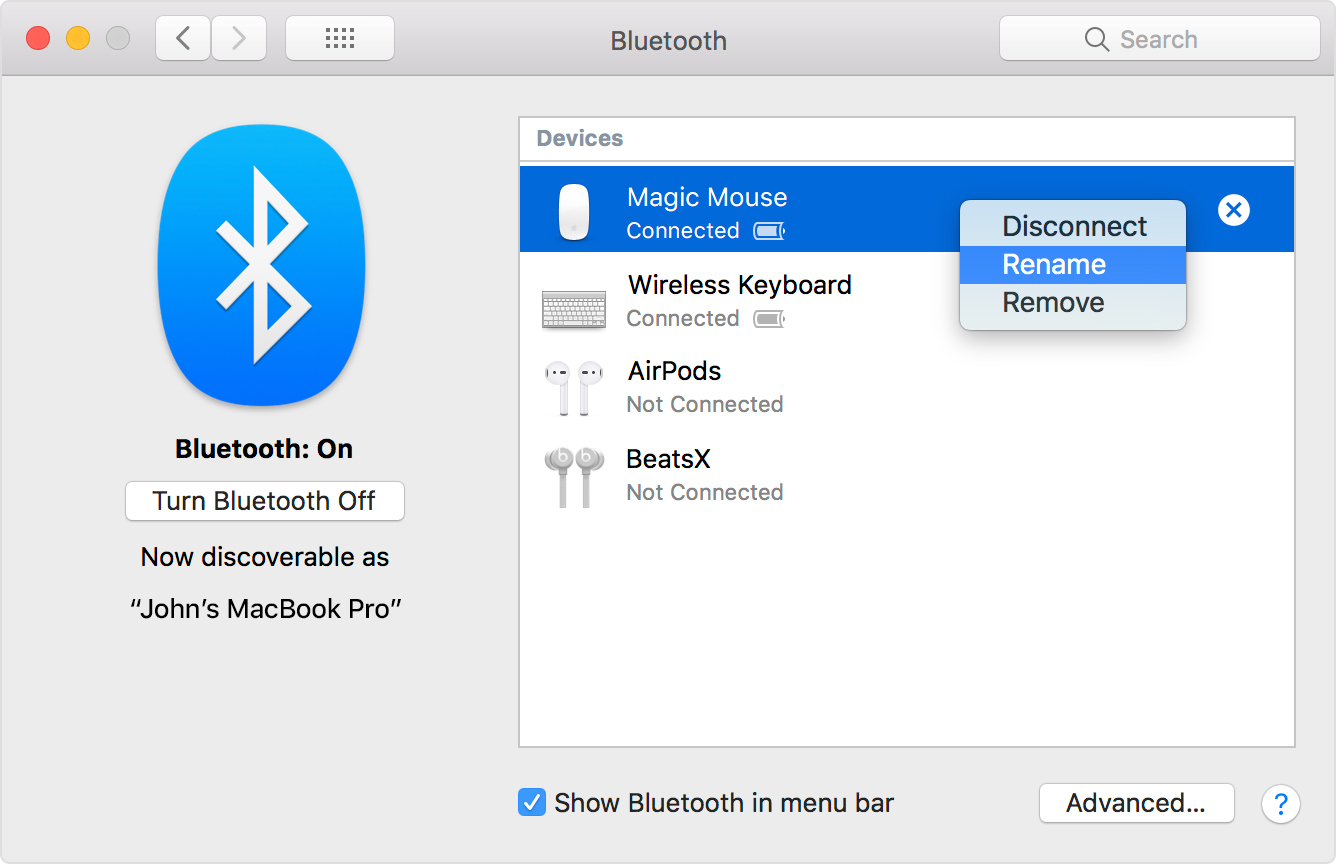
Apple bluetooth devices will NOT rename

I have tried all solutions that I can find, including renaming the devices in the com.apple.blutooh.plst. this is so friggin frustrating... Spent 5 hours now doing everything I found on the Web. Just no workiing.

I just upgraded to Catalina and purchased a second hand Apple wireless keyboard and touch pad... they are great but the name of the previous owner keeps persisting! I have gone into the debug and reset the devices wherein the name disappears and the address appears and then the name reappears!

Nothing seems to work... I am sooooo frustrated with this.

Posted on Oct 12, 2019 3:59 PM

Reply
3 replies

Oct 17, 2019 12:57 PM in response to Akiro in the midst

Hi Akiro in the midst,


Thank you for contacting Apple Support Communities. Based on what you stated, it seems like you want to rename the connected Bluetooth accessories. I would recommend you use this article for more information.


"Rename a Bluetooth accessory on your Mac

  1. Choose System Preferences from the Apple () menu, then click Bluetooth.
  2. Control-click the accessory, then click Rename in the shortcut menu. If you don't see Rename, make sure that your Bluetooth accessory is powered on, click Connect, then try again.          
  3. Enter a new name for the accessory, then click the Rename button.

The custom name that you give your accessory now appears in the Bluetooth menu of your Mac and in the Bluetooth section of System Preferences.*

* If you pair your Bluetooth accessory with a different Mac, your accessory might reset to its default name."


Change the name of a Bluetooth accessory


Please don't hesitate to let us know if the steps resolved your issue or if you need additional assistance.


Cheers.

Oct 17, 2019 3:20 PM in response to chris_g1

As I stated, I did all of these standard solutions... every one that seemed possible, including changing the preference files and going into debug mode. It was driving me crazy so I reinsatlled back to Mojave, changed their names to what I wanted and then reinstalled back into the latest upgrade - Catlina. It must be a programming bug in the OS. I still really like the functionality of Catalina. It is fast and responsive, manages m. I just did another majorly update today, so this, hopefully fixed more bugs like the bluetooth one. It manages memmory well and has seeming, so far, good app integration other than loosing some apps (with 32 bit dependencies, I think) which I can live with. There are still some things I would change but it flies great.

This thread has been closed by the system or the community team. You may vote for any posts you find helpful, or search the Community for additional answers.

Apple bluetooth devices will NOT rename

Welcome to Apple Support Community
A forum where Apple customers help each other with their products. Get started with your Apple Account.