MacBook 16-inch Fan Noise

We are testing two new 16-inch MacBook's before doing a rollout across our organization. Under low loads (25% cpu utilization), fan noise will get annoyingly loud. We're not doing any GPU related and more routine work such as: using web applications, debugging web pages, Microsoft Teams conferencing (audio/video) with a handful of people, Photos downloading from iCloud, Mac Mail downloading a new mailbox from Exchange.


We DID NOT notice this on our 2015 MacBooks and this might prevent us from continuing the 16-inch MacBook rollout in our organization.


Interested to hear others experiences.


Tim

MacBook Pro 16", macOS 10.15

Posted on Nov 21, 2019 11:34 AM

Reply
Question marked as Top-ranking reply

Posted on Dec 23, 2019 9:27 AM

All,


We are kind of wrapping up all our testing and working with the Apple Business Team to figure out how we move forward.


This thread is getting a little side tracked with monitors and so I wanted to point out that these issues discussed are completely unrelated to brand/model of monitors being used. That said, it IS related to having monitors connected and the internal GPU within the MacBook, along with the CPU and the overall heat that both generate.


In our final testings, we did clean installs with 10.15.2 and primarily tested an eGPU using a Razor Core and a Radeon RX Vega 64 so we could eliminate the internal GPU in the MBP.


It became really clear the combined heat from the internal Radeon Pro 5500m GPU and the i9-9880G CPU is too much for the current thermal management system, especially when using all USB-C ports. (I.e., for power, USB-C hub, USB-C to Display Port video cables).  From all the testing and heat generated by the unit, it looks like our Radeon Pro 5500m GPU is fried because we are seeing artifacts on text (laptop display and external monitors) but not when we use the eGPU.


Just so you understand our configuration with the eGPU:  We have one USB-C Hub connected to the MBP and one USB-C cable connected to the eGPU.  The one USB-C cable to the eGPU is powering the MBP but also the eGPU has the two Display Port cable to the monitors.  Now the MBP has two free USB-C ports.  This was producing about 38 degrees less heat in Airflow on the MBP.


When the eGPU is connected, we can push the MBP to about 60% CPU for sustained periods before hearing the fans at about 4500 RPM. But as many of us have noticed, when we don’t have an eGPU, we’re seeing this at 5% to 10% CPU.


We have installed Parallels and ran Windows 10 on three monitors on separate space and have done Geekbench tests and a variety of stress tests with the eGPU and its operating normally.  


Bottom line, the combination of using the GPU and CPU is pushing the MBP into heat conditions causing the FAN issues and in our case, possibly damage to the GPU.  


Apple had a similar issue with the 2018 MacBook Pro and people were starting to stick their machines inside a Freezer to see if they could avoid the CPU’s from stepping down prematurely.


Hopefully Apple can find a solution because these new 16 inch MBP could be incredible.


Please start a support case with Apple so we can get this resolved sooner than later and it will also protect you a bit more if you need to return your units beyond the return policy. Moving forward, its all on Apple!


Tim

4,224 replies

Apr 24, 2020 4:54 AM in response to TimUzzanti

If you are having thermal issues with your MBP 16" with external monitors, please call Apple support and escalate the issue to engineers. Use the word escalate right away to save time. You can tell them explicitly the dGPU is drawing a lot of power and generating a lot of heat when an external monitor is plugged in. They will ask you to run some programs to capture some diagnostic information. This is a problem in the AMD driver. Escalating to the engineering team is the only way to get this issue fixed.


[Edited by Moderator]

Apr 24, 2020 7:32 AM in response to TimUzzanti

I've been cautiously watching this thread while waiting to reunite with 5k Ultrafine (2019), can confirm same observations as stated in this thread:


5k Ultrafine via TB3 <--> 16" 2.9 i9, 5500M 8gb, latest Catalina @ idle clean desktop state, no apps running (each state had a good 10min standby with MacBook elevated above the surface):


No external display: <4.2W GPU, 46°C CPU 1840 RPM

Clamshell: 4.9W GPU, 48°C CPU 1840 RPM

Non-Clamshell: 18.7W GPU, 60°C CPU, 2783 RPM


Coming from these setups:


17" MBP 2011 + Apple Cinema Display 30"

15" MPB 2015 + Apple Cinema Display 30"

15" MPB 2018 + LG Ultrafine 5k (2019)


Want to note that at all above setups it was impossible to tell the difference temp/rpm-wise between clamshell and non-clamshell modes.

Apr 24, 2020 9:40 AM in response to weathermood

weathermood wrote:

I've been cautiously watching this thread while waiting to reunite with 5k Ultrafine (2019), can confirm same observations as stated in this thread:

5k Ultrafine via TB3 <--> 16" 2.9 i9, 5500M 8gb, latest Catalina @ idle clean desktop state, no apps running (each state had a good 10min standby with MacBook elevated above the surface):

No external display: <4.2W GPU, 46°C CPU 1840 RPM
Clamshell: 4.9W GPU, 48°C CPU 1840 RPM
Non-Clamshell: 18.7W GPU, 60°C CPU, 2783 RPM

Coming from these setups:

17" MBP 2011 + Apple Cinema Display 30"
15" MPB 2015 + Apple Cinema Display 30"
15" MPB 2018 + LG Ultrafine 5k (2019)

Want to note that at all above setups it was impossible to tell the difference temp/rpm-wise between clamshell and non-clamshell modes.


I have the official Apple sponsored 4k monitor and I am seeing the EXACT same thing. While this is not the official item specific 16" MBP monitor sold by Apple, as DPJ noted, it is the official MBP (all that can run it) monitor sold by them and that makes it the de facto official 16" MBP monitor. So much so that the cables that come with the monitor are labeled with which MBP they should be used with and the monitor has no actual buttons and it is controlled with the OS X controls for brightness, sound, etc.


Maybe someone with the XDR can take it up a notch, I know DPJ and myself are curious to see how the 16" MBP works with that.


Grant, yes, clamshell mode quiets things down, assuming the screensaver is not running. Boy have times changed when the most powerful dGPU in a MBP can't run a screensaver quietly. Makes me wonder how the integrated weak GPU from intel can run a legacy display(MBP internal) with the screensaver on super quietly.

Apr 24, 2020 1:55 PM in response to Phantom007

Phantom007 wrote:

This issue can’t be easily solved by Apple.

The CPU and GPU are simply too much for the cooling solution.

Unless your native screen is corrupting and your computer is shutting down from heat, the cooling solution is working fine. Has your computer shutdown from heat and are you getting screen corruption on the built in screen? If you are, contact apple otherwise it is working as intended to cool down the internals.


My 2017 MBP didn’t used to do that.

I noticed people always have dreams about their past equipment. I did too. I pulled up my 15" MBP and installed iStat to see the numbers. Guess what? It was pulling the similar wattages when I tested it against the Intel vs the AMD GPU. It was also running hotter than my 16" MBP.

Apr 25, 2020 10:11 AM in response to Dogcow-Moof

Dear William,


Thanks for your comment.

You literally cannot meaningfully compare an old MacBook Pro with this one; the GPU is nowhere near as powerful and its power use characteristics are completely different.

You might want to notify Apple and AMD about that, because, they literally do compare their new products to old ones. It's in their marketing content.


Feel free to contact them directly, as I'm told they do not frequent these forums.


Best Regards,


Apr 25, 2020 11:14 AM in response to iTech23

iTech23 wrote:

The Vega Pro 20 is almost as powerful as the 5500 with a huge difference, you can connect an external monitor (any monitor) and the fans won’t get crazy and spin like a vacuum.


Completely different design with different technology.


In particular, the Vega Pro 20 is built on a 14nm process, the Radeon Pro 5000m series on a 7nm process.


AMD touts faster, smaller, lower power transistors in the new process but it also concentrates power draw within a smaller physical package.


This also ignores the fact that the thermal design of the MBP 16 is completely different than that of the 15, and ramping up the fans may be completely normal for the way it handles heat dissipation, regardless of power draw.

Apr 27, 2020 1:13 AM in response to TimUzzanti

I created an account just to make this one comment and this will be my only comment. To William Kucharski, DPJ and others alike: there is a reason why everyone in this thread got the urge to Google the possibility of this being an issue and end up here. They are not here to randomly complain about Apple; these are people who have spent a lot of money for this product because they believed in it, and they are tirelessly communicating with each other in the hopes that someone would find a workable/temporary solution before or until Apple fixes this issue, so that they can continue to enjoy it for years to come.

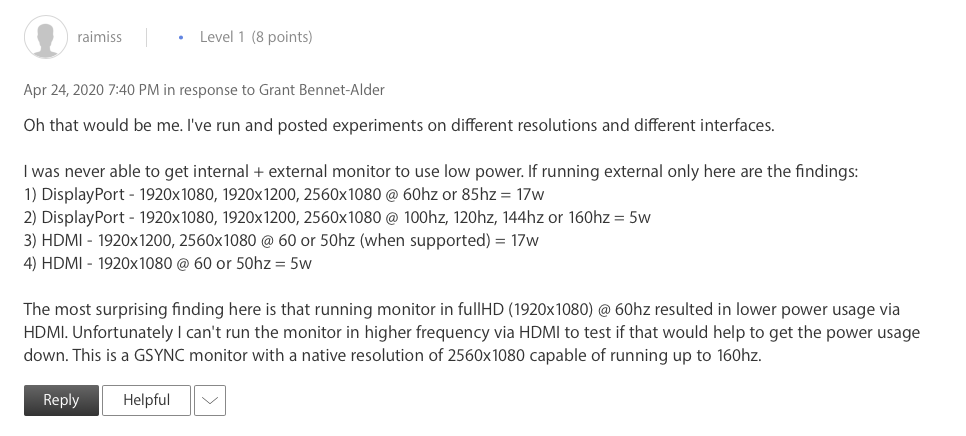
Thanks to raimiss’s comment in this thread I was able to set up a temporary safe solution while still being able to use the monitor, until there is a fix from Apple. His findings are: 1) In clamshell mode, refresh speeds 100hz, 120hz, 144hz, 160Hz at full HD or QHD via DisplayPort, and 60hz at 1920x1080 via HDMI draws 5W, while ironically 60Hz or 85hz at any resolution on DisplayPort draws 17W power. 2) The 17W power draw also applies to any refresh rate/resolution combo in non clamshell mode.

These findings alone show that it is not the AMD being more power hungry, etc., or “the TGP for the GPU is 50w, so even if it's drawing 20w that's less than half of what it could draw when working its hardest”. Simply put for you William and DPJ who are commenting with no helpful information, to the point where you are commenting on people’s purchase/return decisions with quotation marks and bold fonts: In clamshell mode via DisplayPort, the computer draws 5W during 100Hz and above refresh rates @FullHD, QHD, and 17W during less than 100Hz refresh rate. Don’t start commenting things like it is completely normal that 60Hz or 85Hz is drawing more than 3 times the wattage than what the 100,120,144Hz is drawing.

My MBP 16" 64GB RAM, 1TB, i9 2.3GHz with 5500M 8GB now runs quietly and the CPU is running 16C cooler when idle, just by switching the monitor to a higher refresh rate to minimum 100Hz and using it in clamshell mode. My laptop sits at a height for proper air flow, and my monitor is a Samsung 27" WQHD 144Hz Curved VA Monitor (LC27JG52QQNXZA).

My lid is closed to the point where it turns on clamshell, so heat can escape from the keyboard as well. When I check the Touch Bar area, the heat doesn't bother me anymore. Haven't done any SMC/NVRAM reset, didn't re-install Catalina, still running 10.15.3. Turned off dynamic wallpaper and TrueTone (lid is almost closed anyways). I still can’t use my monitor in those cool temperatures while in non-clamshell mode, but I am now at least comfortable using my monitor while my MBP is in clamshell mode.

The only area that I agree with William is that we should all contact Apple Support so that they know it. We should inform them about this inconsistency, so that they can fix it and we can have a similar watt usage when we are not using it in clamshell mode, or using it in clamshell mode at 60hz refresh rate (the word similar was for William and DPJ, in case they start writing clamshell and non clamshell can't draw the same power etc.).

For anyone who is lost in those endless pages of comments, read raimiss’s comment that I have screen shot below, try adjusting refresh rate accordingly, notice if there is a significant temperature/wattage increase when using refresh speeds lower than 100Hz or during non clamshell mode, then contact Apple Support to inform them about this inconsistency. I have tried all combos of raimiss’s ( except for 160Hz and 85Hz ones because of my monitor capabilities), and all of his findings apply to mine. 2560x1440 gives the same result as 2560x1080 as well. Not sure about 4K monitors since I don’t own one.

Thank you to everyone who thought that this extra heat and wattage output was not normal and tried coming up with countless solutions (that worked or didn’t work). In the meantime, although not ideal of course, I just hope that many of you have a monitor that can do 2.5K/1080p @ 100Hz and above via DisplayPort, or you have an HDMI port that can do 60Hz at 1080p, so that you can still use your monitor in clamshell mode in cooler temperatures until Apple releases a fix.

Thank you for putting in the time and reading this long comment, I hope that you will all put in the time to inform Apple Support about this finding as soon as possible. Contact them again with your case # if you have already contacted them before; the additional finding that raimiss stated will definitely help them understand the situation better.

Let's all spread the word and get this going! All the best to all of you!


[Edited by Moderator]


Apr 26, 2020 5:05 PM in response to DPJ

DPJ wrote:

That's your opinion. That's not factual in terms of the MacBook Pro.

The MacBook Pro conforms to real world physics just like any other notebook - the CPU, GPU and battery can be adversely effected by excess heat, there is nothing magical in the MBP to prevent that and that is a fact! If that last statement is not a fact please disprove it.


My MBP 16'' is running hotter than all previous models I've had over the last 10 years. It's not just spikes in heat when doing video decoding or something, it's constantly hot when connected to an external display.


To make it very clear for you, just because you haven't experienced the same problem doesn't mean that the problem doesn't exist.

Apr 26, 2020 5:13 PM in response to TailsDog

"To make it very clear for you, just because you haven't experienced the same problem doesn't mean that the problem doesn't exist."


This has nothing to do with what "I" experienced. I'm speaking of facts. There have been no known reports of hardware failure on the MacBook Pro due to excessive heat. If you can prove otherwise then that would be great, otherwise you're stating an opinion out of speculation. At this point please ignore my posts. I'm certain the one or two posts I put up here amongst the many that are posted daily have very little affect on you. But once again please put forth attention to posts of your interest and one's that agree with you.

Apr 27, 2020 6:43 AM in response to DPJ

DPJ wrote:

"Apple can help by reducing the Radeon dependency, NI Software is not GFX heavy so there should be no need for it."

Well there are couple of flaws here in your thinking.

#1 the iGPU is not the same higher-grade iGPU that is in the 13" MBP's and the AIR. The iGPU's in those models are better than what you get in the 16" MBP. It's always been that way. I've been Mac exclusive for the past 25 years and when Apple went with Intel the chipset for the 15" MacBook Pro's included a basic iGPU and the dGPU. For all intents and purposes the dGPU is the main GPU that is supposed to do all the tasks. Scrolling is better and it's designed for demanding tasks.

But because the MacBook Pro is a portable the basic iGPU is included to handle "basic" tasks in order to maintain good battery life, so it's not about helping to reduce Radeon dependancy. This is on every laptop that has both an iGPU and dGPU. Dell XPS, Lenovo X1 Extreme, etc are the same.

Personally I think Apple does a very good job at it. Look at Chrome vs. Safari. Chrome uses the dGPU and Safari uses the iGPU. Same with Spotify. It uses the dGPU but iTunes and Apple Music run nicely on the iGPU. It's ridiculous that a browser (Chrome) and a music streaming service (Spotify) needs a dGPU to run them. THOSE companies need to do better than that.


You request that people post scientific proof when they mention that high heat will degrade performance over time, specifically battery performance but also other component performace.


So I would like to request that you post scientific proof that the Intel gpu in the 16" machine is a lower grade than AIR's or 13" MBP.


I ask this kindly because all of the quantifiable data I have seen shows that the 16" iGPU is indeed as good if not better.


I got a kernel panic I will post about later.

This thread has been closed by the system or the community team. You may vote for any posts you find helpful, or search the Community for additional answers.

MacBook 16-inch Fan Noise

Welcome to Apple Support Community
A forum where Apple customers help each other with their products. Get started with your Apple Account.



