apple music queue

When you put a song in play next, it will be at the top of the queue, but if you want a certain song after that, there is not really a quick way to do so. If you put the new song on play next the other one will be played afterwards. And if you put it on play later, is doesn't come up for a time. Hope you understand my explanation. So the question is: how to put songs after each other in queue in a quick easy way?

Posted on Nov 22, 2019 1:05 PM

Reply
Question marked as Top-ranking reply

Posted on Nov 25, 2019 2:17 PM

Hello and welcome to Apple Support Communities, silke056!


I understand you want to know how to order the songs in your Apple Music queue. I'd be happy to provide information to help you accomplish this.


Try the steps in the following article: Add music to your queue to play next

"Add music to the Up Next queue

Follow the steps below for your device.
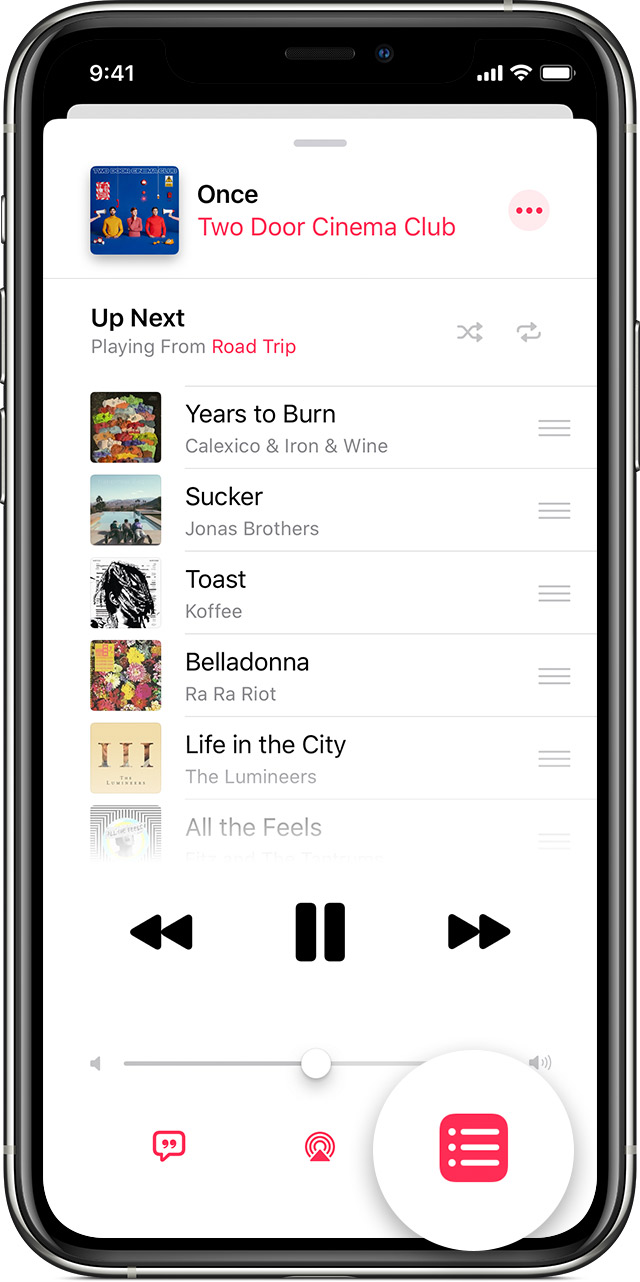
On your iPhone, iPad, iPod touch, or Android device

  1. Open the Apple Music app and play a song, album, or playlist.
    • Find music that you want to add to the Up Next queue.To add an album or playlist, open it. On your iPhone, iPad, or iPod touch, tap More . On your Android device, tap More .
    • To add a song, press and hold it.
  1. Tap Play Next  or Play Later .

Manage your Up Next queue

Tap the song that's playing at the bottom of your screen to open Now Playing, then tap Up Next  . From here, you can:

  • Reorder your queue: Press  next to a song, then drag it up or down. 
  • Remove a song: Swipe left over it, then tap Remove.
  • See your listening history: Scroll up to History to see music that you've listened to.

If you play a new album or playlist, you'll see the option to keep or clear your Up Next queue."


I hope this helps.

Have a great day!

1 reply
Question marked as Top-ranking reply

Nov 25, 2019 2:17 PM in response to silke056

Hello and welcome to Apple Support Communities, silke056!


I understand you want to know how to order the songs in your Apple Music queue. I'd be happy to provide information to help you accomplish this.


Try the steps in the following article: Add music to your queue to play next

"Add music to the Up Next queue

Follow the steps below for your device.

On your iPhone, iPad, iPod touch, or Android device

  1. Open the Apple Music app and play a song, album, or playlist.
    • Find music that you want to add to the Up Next queue.To add an album or playlist, open it. On your iPhone, iPad, or iPod touch, tap More . On your Android device, tap More .
    • To add a song, press and hold it.
  1. Tap Play Next  or Play Later .

Manage your Up Next queue

Tap the song that's playing at the bottom of your screen to open Now Playing, then tap Up Next  . From here, you can:

  • Reorder your queue: Press  next to a song, then drag it up or down. 
  • Remove a song: Swipe left over it, then tap Remove.
  • See your listening history: Scroll up to History to see music that you've listened to.

If you play a new album or playlist, you'll see the option to keep or clear your Up Next queue."


I hope this helps.

Have a great day!

This thread has been closed by the system or the community team. You may vote for any posts you find helpful, or search the Community for additional answers.

apple music queue

Welcome to Apple Support Community
A forum where Apple customers help each other with their products. Get started with your Apple Account.