
Disable reader view??

Please, please can someone tell me how to permanently disable Reader View on my iPhone?? I HATE this feature and having to disable it every time I go to a new page is making me crazy. I can’t believe there isn’t a way to opt out of it - but I can’t seem to find directions for that.


Help?

iPhone X

Posted on Nov 24, 2019 6:10 AM

Reply
1 reply

Nov 24, 2019 7:47 AM in response to cjfrommaplewood

Hide ads and distractions in Safari on iPhone

In the Safari app , use Reader view to hide ads, navigation menus, or other distracting items.
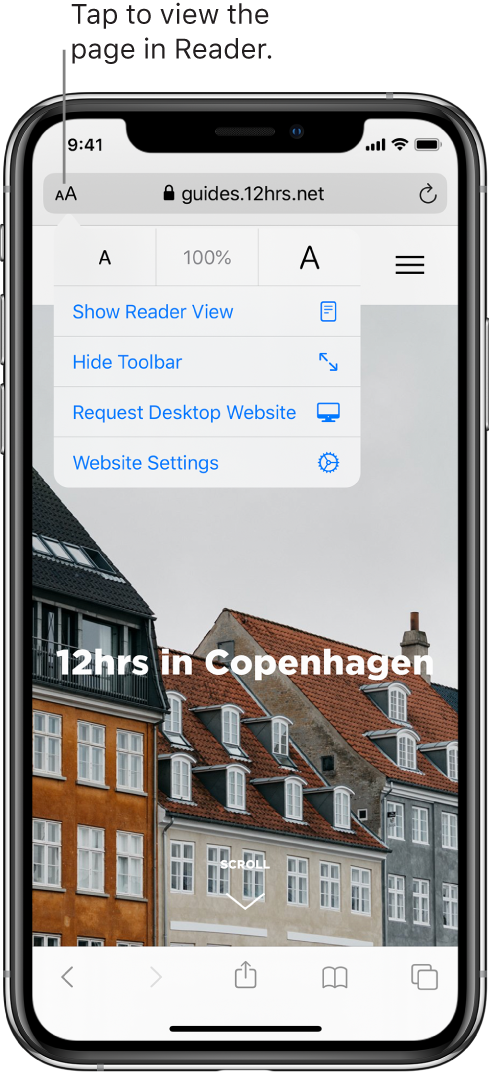
Show Reader view

Reader view formats a webpage to show just the relevant text and images.

Tap  at the left end of the address field, then tap Show Reader View.

To return to the full page, tap , then tap Hide Reader View.

Note: If Show Reader View is dimmed in the  window, Reader view isn’t available for that page.

Automatically use Reader view for a website

  1. On a supported website, tap , then tap Website Settings.
  2. Turn on Use Reader Automatically.


This thread has been closed by the system or the community team. You may vote for any posts you find helpful, or search the Community for additional answers.

Disable reader view??

Welcome to Apple Support Community
A forum where Apple customers help each other with their products. Get started with your Apple Account.