I have Mojave 10.4.1 on my 2010 Mac Pro.

Hi,


I have Mojave 10.4.1 on my 2010 Mac Pro (2010, 5,1). Do I need a metal graphics card to get it to 10.4.5? Also, my boot had on the Mac Pro is formatted in Mac OS Extended - Journaled. I have a hdd in the Mac Pro formatted in AFPS. There seems to be a few "catch-22s" with this process and I feel like I've been going in circles.


Need more information to answer my question? If you do, leave a reply here and I'll get the information for you.


Thank you.


Posted on Nov 26, 2019 6:16 PM

Reply
Question marked as Top-ranking reply

Posted on Nov 26, 2019 6:23 PM

You need a metal-capable card to run 10.14.0, unless you used an unsupported method to get 10.14 installed on that Mac.


If you wish to do anything beyond reading email and a little web-surfing, get a Metal-capable card, such as one listed in this article:


Install macOS 10.14 Mojave on Mac Pro (Mid 2010) and Mac Pro (Mid 2012) - Apple Support


.

Similar questions

11 replies
Question marked as Top-ranking reply

Nov 26, 2019 6:23 PM in response to Patrick Murphy

You need a metal-capable card to run 10.14.0, unless you used an unsupported method to get 10.14 installed on that Mac.


If you wish to do anything beyond reading email and a little web-surfing, get a Metal-capable card, such as one listed in this article:


Install macOS 10.14 Mojave on Mac Pro (Mid 2010) and Mac Pro (Mid 2012) - Apple Support


.

Nov 27, 2019 5:45 PM in response to Patrick Murphy

One way to get Mojave Installed is to use a different computer that IS Mojave compatible, and copy MacOS once installed.


--------

Do you have an Application in your /Applications or /Applications/Utilities folder named


MacOS Mojave Patcher ??


Mojave patcher bypasses some system checks that preclude installation, but it can't do Video editing (or any serious graphics activity) without an updated graphic card.

Nov 27, 2019 7:40 AM in response to Patrick Murphy

The catch-22 of this install is the part you leapfrogged over and do not have to face, because you git the software in and working without putting the card in first. Readers here are dying to know how you got Mojave Installed without the Metal card already in place. Did you use a different Mac to help?


Also, what is your experience running it withOUT the metal-capable card? Are you using Light Mode or Dark mode? Are you seeing any wonky stuff on the screen, slowness or crashes?


Nov 27, 2019 12:21 PM in response to Grant Bennet-Alder

Hello there,


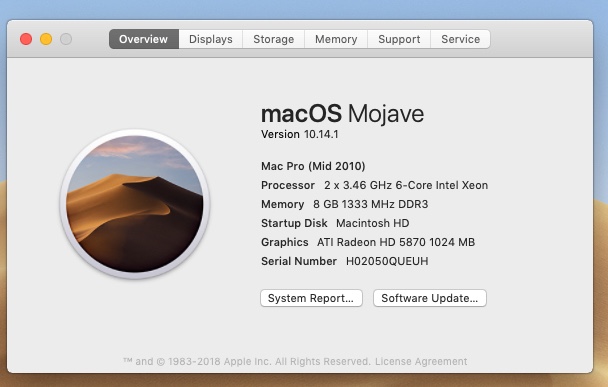
I bought the Mac Pro on eBay about two weeks ago. It came with10.14.1 installed on it. It is a 2010 5,1.


I already have a few Macs, and am happy with all of them.


I do a lot of video processing using FCPX on an older iMac and a 2016 Mac Powerbook. I'm not an expert at video; it's just a hobby for me, and I like it a lot.


I came across a video on YouTube about the 2010 Mac Pro and how to upgrade them and use them for video editing. I had a Mac years ago … a PowerMac G5 tower, that I liked a lot, but unfortunately it died a few years back. It looked very much like the PowerMac 2010 that I bought.


So this is just a project for me. I'm having fun with it and learning a lot.


This particular PowerMac is pretty much toast now. That's all my doing. So I am hoping it will continue working for me until I understand how to upgrade the operating system to 10.14.5. Maybe upgrading to 10.14.5 is not even possible??? I think it is though. One of the very few good traits I have is that I am pretty persistent, so if it is possible I think I'll get there eventually. If any of you can help me out I'd be very grateful. :-)


If I can get this up to 10.14.5 with the card I just purchased, that would be wonderful. If I can, then I am going to buy another 2010 5,1 Mac Pro and upgrade it with the benefit of having learned a lot along the way with this one.


Here's a screen shot of "About this Mac" from the Mac Pro.


Nov 28, 2019 3:29 AM in response to Grant Bennet-Alder

I was about to do a search for the "Patcher" application. However, I have just re-read this posting, and now I have a question because I think I may have misunderstood the post when I read it the first time.


My question is this: Since I have ordered an updated graphics card, should I be able to update the Mojave that is on the Mac Pro without needing "MacOS Mojave Patcher" after I install the card???


I guess I am thinking that there's always the possibility of some unexpected problem coming up, but that my chances of getting to 10.14.5 without the Patcher application are pretty good, with "pretty good" meaning the chances of success are better than 50%.


Would you agree with that, or should I start searching for the Patcher application? I am hoping you agree. If you do agree and it turns out that the installation without Patcher fails, that is OK. I am just interested in your opinion.


:-)


Dec 1, 2019 5:20 AM in response to Grant Bennet-Alder

Greetings,


I have received and installed the Sapphire Radeon HD 7950 Mac Edition, which is one of the graphics cards on the approved list for upgrading a 2010 Mac Pro. It is running well.


I have Mojave 10.14.1 installed on the Mac Pro, and have downloaded the update for Mojave 10.14.5.


The update will now install, however, because the HD on which the 10.14.1 is on is formatted in Extended Journaled. I cannot see a way to reformat the boot disk to AFSP.


How can I do that?


Dec 1, 2019 9:12 PM in response to Patrick Murphy

Greetings! …


Well, I got it. :-)


Upgraded to 10.14.6 Mojave.


Replaced the transitional Graphics card with a Radeon VII.


It's already very fast and very quiet.


I still have some upgrading to do. I have a new tray on the way; should be here by the end of the week.


I'm going to put in some fast SSD drives, and a lot of ram.


Whoever it was who gave me the hint about the Mojave Patch, thank you!!


Best Regards,


Patrick


This thread has been closed by the system or the community team. You may vote for any posts you find helpful, or search the Community for additional answers.

I have Mojave 10.4.1 on my 2010 Mac Pro.

Welcome to Apple Support Community
A forum where Apple customers help each other with their products. Get started with your Apple Account.
