Macbook pro 16 2019 freezes randomly and restarts

I just bought a new macbook pro 16 inch 2019 that came with Catalina, I set it up as a new mac and installed some apps (Chrome) and started using it.

The problem is it always freezes at some points and I have to manually restart it by pressing the power button for a few seconds until it shuts down.


This might be just me, but I think this shouldn't happen on a laptop thats costs 2699€.

I updated it to the last version of Catalina and this didn't fix the problem.

I wanted to go back to Mojave, not an option I guess.


What is going on Apple?

MacBook

Posted on Dec 1, 2019 8:27 AM

Reply
Question marked as Top-ranking reply

Posted on Feb 13, 2020 3:56 PM

I finally called Apple Support about this problem, having suffered the freezing and other GPU problems since the first day. After putting me on hold and checking with her supervisor, she did confirm this is a known problem with the MacBook Pro 16 Inch models. She did remote into my MacBook to verify the model and hardware configuration (specifically looking at the AMD Radeon Pro 5500M 8 GB GPU). She created an appointment at my local Apple Store and I will be given a new computer (not refurb). I did ask if Apple has identified the specific problem, and she told they have and all new models have the issue resolved.


It seems this was/is a hardware problem (not software) and replacing the computer is the only solution.


I will be replacing my Space Gray MacBook Pro 16 Inch tomorrow at the Apple Store. I hope this will resolve the problem.


I suggest others contact Apple Support and get their computer replaced.


Good Luck…


My model config is…


Space Gray


MacBook Pro (16-inch, 2019)


2.4 GHz 8-Core Intel Core i9


32 GB 2667 MHz DDR4


1TB Macintosh HD


AMD Radeon Pro 5500M 8 GB


Intel UHD Graphics 630 1536 MB

672 replies

Apr 9, 2020 8:56 AM in response to bartosz91

Have you tried the 10.15.4 supplemental update? The one after 10.15.4 still called 10.15.4. It fixes things but not the $3000 - $9000 mbp pro 2019 freezing & restarting 5 months after sale date.


  • Fixes an issue where Mac computers running macOS Catalina 10.15.4 could not participate in FaceTime calls with devices running iOS 9.3.6 and earlier or OS X El Capitan 10.11.6 and earlier
  • Resolves an issue where you may repeatedly receive a password prompt for an Office 365 account
  • Fixes an issue where MacBook Air (Retina, 13-inch, 2020) may hang during Set-up Assistant or when disconnecting and reconnecting a 4K or 5K external display
  • Resolves an issue where a USB-C port in your Mac may become unresponsive


😂🤣

Feb 8, 2020 3:17 PM in response to ksk6794

iStats menu is pretty useful as well for spotting issues. You can't see it during a freeze, but turning on it's logging will then give you corresponding hardware status reports with your range of macOS crash reports.


I've also found a freeze that doesn't force restart can sometimes be recovered from by closing the lid then opening it again. If I open the macbook and it's frozen, then I reclose and reopen again.


Jun 25, 2020 7:11 PM in response to fregsfdvbfeg

I've been involved in this thread since the beginning. I purchased the top spec macbook pro 2019 16" and it was faulty out the box, restarting every 10-20 minutes and also restarting as soon as I opened any apps.


It took 4 months and multiple logicboard repairs (also faulty) before apple issued a full replacement, which has been ok but restarts maybe once per week.


The restarts seem GPU related...and what do you know, apple have gone and silently refreshed the macbook pro 2019 16" with a AMD 5600M with HBM2 memory.


So I called apple about upgrading my GPU, considering I have AppleCare+ which usually allows you to upgrade to the next model for cheap if you exchange it.


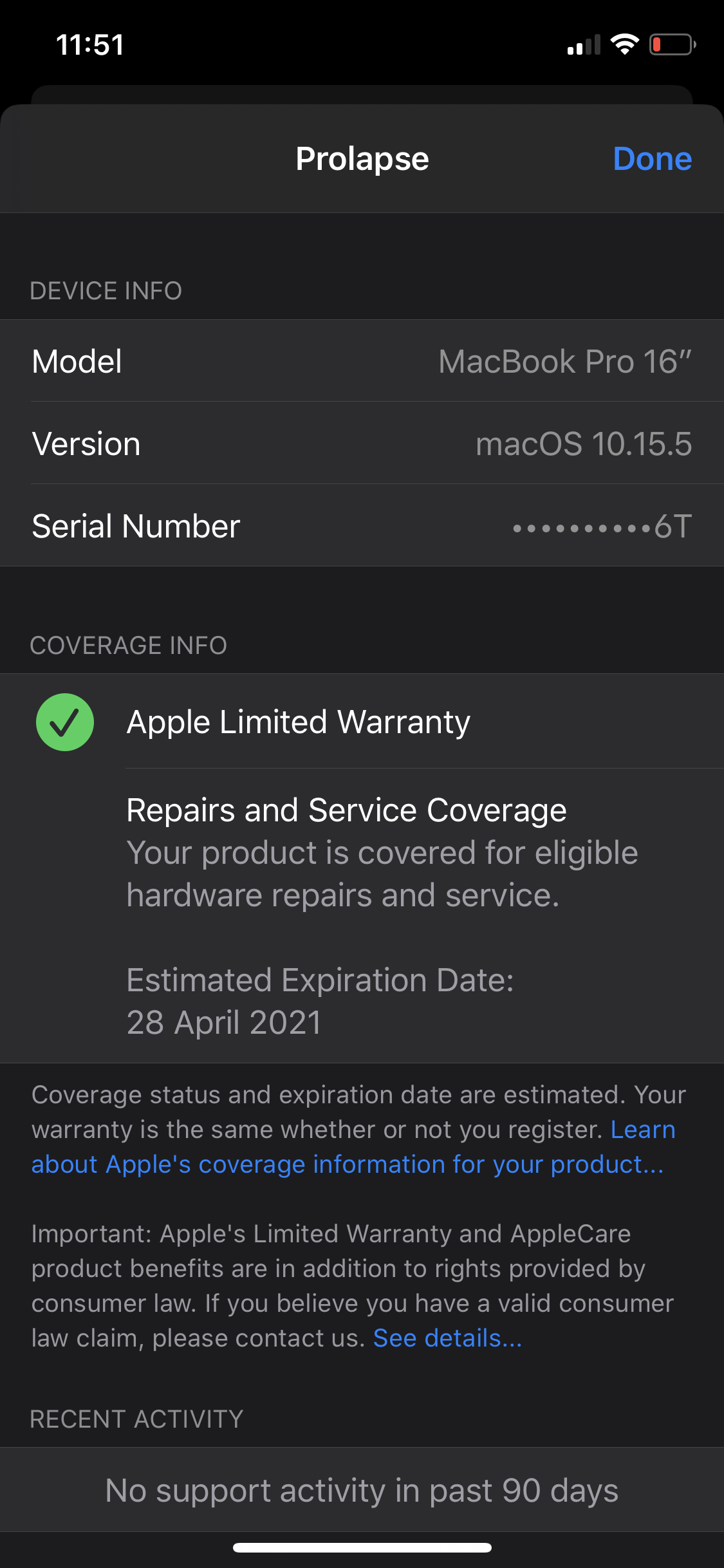
Here's the funny part...the $500 I paid for AppleCare+ has been lost by Apple! They forgot to move it from one of my faulty macbook pro 16" 2019's to my replacement, and now according to them I don't have AppleCare+!!!


So apple have essentually stolen $500 from me and don't seem to care much about rectifying the situation! I've attached a screenshot of my device in the apple support app, you can see it says I only have the limited 1yr warranty with it.


How pathetic! 4 months of run-around from apple with multiple replacements, and now this!


Apple!! Can you sort yourselves out please because this is a massive joke! Either apply my applecare to my replacement machine, or refund me $500!!! I'll be sending a drip-fed email campaign to all 100k emails attached to the apple.com domain in the meantime until someone takes notice.



Jul 14, 2020 4:25 PM in response to jbw072

Apple aren't fixing it. You have a faulty macbook. How are apple going to release a software fix for a faulty macbook?


Check out my settings after multiple replacements, no restarts:


Get a replacement, stop waiting for a 'fix'. There is no 'fix', you've convinced yourself of this and are now heading down a path of having a permanent dud for the life of the machine.

Dec 10, 2019 11:04 PM in response to ruil

Yep calling up Apple today to have this macbook returned. I will try one more, if that is the same, I'm getting a full refund.


My macbook 16" 2019 is now also screen glitching whenever it changes from the intel gpu to amd gpu. It looks like everything on the screen "jumps" to the right about a centimetre, then it goes back to normal. This is usually followed by the freezing I mentioned above.


Thinking about all the freezing related issues I've been having, it seems related to the amd gpu and reminds me why I avoid amd hardware like the plaugue in custom windows builds. Apple execs and nvidia execs really should sort themselves out, as amd does not belong in a $7000 machine. Execs are fighting over a desoldering issue that happened to 2008 macbooks, when there's been heaps of amd desoldering issues in macs since, even moreso. Looking above maybe it could be determined it's actually Apple's manufacturing process and the argument and suffering of their users is uncalled for. Intel & Nvidia is a great combo, AMD & AMD yep, Intel & AMD not so much.


AMD!!!! 🤣

This thread has been closed by the system or the community team. You may vote for any posts you find helpful, or search the Community for additional answers.

Macbook pro 16 2019 freezes randomly and restarts

Welcome to Apple Support Community
A forum where Apple customers help each other with their products. Get started with your Apple Account.