
Which charging cable for 16" MBPro?
I want to buy a second charging cable for my 16" MBPro. I don't find a cable that is listed as compatible with the 16" MBP. Which one should I buy?
I want to buy a second charging cable for my 16" MBPro. I don't find a cable that is listed as compatible with the 16" MBP. Which one should I buy?
BobTheFisherman wrote:
This is what the link says:
https://support.apple.com/library/content/dam/edam/applecare/images/en_US/macbookpro/87w-usb-c-power-adapter-usb-c-charge-cable.png•
Apple 96W USB-C Power Adapter and USB-C Charge Cable
16-inch MacBook Pro models introduced in 2019
Make sure you're using the correct USB-C charge cable
For the best charging experience, you should use the
USB-C charge cable that comes with your Mac notebook. If you use a
higher wattage USB-C cable, your Mac will charge normally but you won't
see an increase in charging speed. USB-C cables rated for 29W or 30W
will work with any USB-C power adapter, but won't provide enough power
when connected to a power adapter that is more than 30W, such as the 61W
USB-C Power Adapter.
You can verify that you're using the correct version of the Apple
USB-C Charge Cable with your Mac notebook and its USB-C AC Adapter. The
cable's serial number is printed on its external housing, next to the
words "Designed by Apple in California. Assembled in China."
https://support.apple.com/library/content/dam/edam/applecare/images/en_US/macbookpro/usb-c-charge-cable-serial-number-callout.png•
If the first three characters of the serial number are C4M or FL4, the cable is for use with the Apple 29W or 30W USB-C Power Adapter.
• If the first three characters of the serial number are DLC, CTC, FTL, or G0J, the cable is for use with a USB-C Power Adapter of any wattage.
If the cable says "Designed by Apple in California. Assembled in China" but has no serial number, you might be eligible for a replacement USB-C charge cable• .
I was just getting that the only individually sold Apple USB-C "charging" cables on the Apple website come with copy that only "recommends" them for use with those exact three power adapters. Not sure why. But I looked again and the compatibility list for the 2m USB-C charge cable actually includes the 16" MBP.
Mac Models
MacBook (Retina, 12-inch, Early 2015 - 2017)
MacBook Air (Retina, 13-inch, 2018 and later)
MacBook Pro (13-inch, 2016 and later)
MacBook Pro (15-inch, 2016 - 2019)
MacBook Pro (16-inch, 2019)
As for the cables themselves, the cable that came with my wife's 2019 MBA (with the 30W power adapter) has a serial number starting with FTL. Go fig.
I guess the other option is the Apple Thunderbolt 3 cable. It's pricey though and short.
BobTheFisherman wrote:
This is what the link says:
https://support.apple.com/library/content/dam/edam/applecare/images/en_US/macbookpro/87w-usb-c-power-adapter-usb-c-charge-cable.png•
Apple 96W USB-C Power Adapter and USB-C Charge Cable
16-inch MacBook Pro models introduced in 2019
Make sure you're using the correct USB-C charge cable
For the best charging experience, you should use the
USB-C charge cable that comes with your Mac notebook. If you use a
higher wattage USB-C cable, your Mac will charge normally but you won't
see an increase in charging speed. USB-C cables rated for 29W or 30W
will work with any USB-C power adapter, but won't provide enough power
when connected to a power adapter that is more than 30W, such as the 61W
USB-C Power Adapter.
You can verify that you're using the correct version of the Apple
USB-C Charge Cable with your Mac notebook and its USB-C AC Adapter. The
cable's serial number is printed on its external housing, next to the
words "Designed by Apple in California. Assembled in China."
https://support.apple.com/library/content/dam/edam/applecare/images/en_US/macbookpro/usb-c-charge-cable-serial-number-callout.png•
If the first three characters of the serial number are C4M or FL4, the cable is for use with the Apple 29W or 30W USB-C Power Adapter.
• If the first three characters of the serial number are DLC, CTC, FTL, or G0J, the cable is for use with a USB-C Power Adapter of any wattage.
If the cable says "Designed by Apple in California. Assembled in China" but has no serial number, you might be eligible for a replacement USB-C charge cable• .
I was just getting that the only individually sold Apple USB-C "charging" cables on the Apple website come with copy that only "recommends" them for use with those exact three power adapters. Not sure why. But I looked again and the compatibility list for the 2m USB-C charge cable actually includes the 16" MBP.
Mac Models
MacBook (Retina, 12-inch, Early 2015 - 2017)
MacBook Air (Retina, 13-inch, 2018 and later)
MacBook Pro (13-inch, 2016 and later)
MacBook Pro (15-inch, 2016 - 2019)
MacBook Pro (16-inch, 2019)
As for the cables themselves, the cable that came with my wife's 2019 MBA (with the 30W power adapter) has a serial number starting with FTL. Go fig.
I guess the other option is the Apple Thunderbolt 3 cable. It's pricey though and short.
BobTheFisherman wrote:
Find the right power adapter and cable for your Mac notebook - Apple Support
I believe this is the confusion. They don't have a specific recommendation for the 16" MBP yet. However, it's the same cable that comes in the box.
USB-C Charge Cable (2 m) - Apple
Apple recommends the following pairings:
12-inch MacBook with USB-C port with the 30W USB-C Power Adapter
13-inch MacBook Pro with Thunderbolt 3 (USB-C) ports with the 61W USB-C Power Adapter
15-inch MacBook Pro with Thunderbolt 3 (USB-C) ports with the 87W USB-C Power Adapter
This is what the link says:
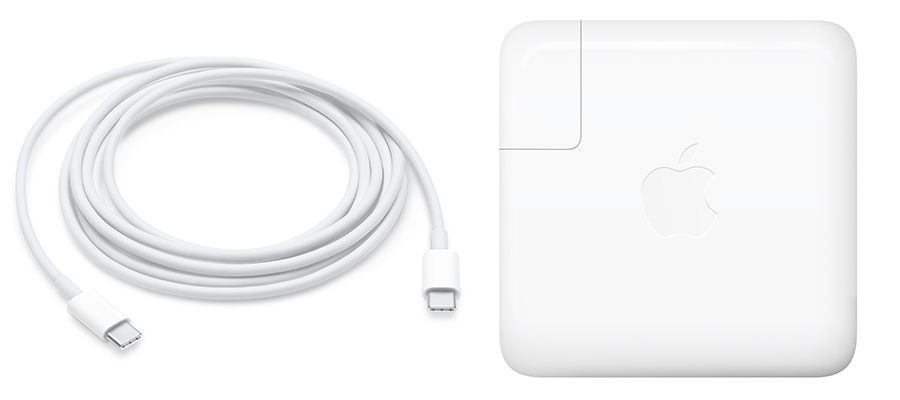
Apple 96W USB-C Power Adapter and USB-C Charge Cable
Make sure you're using the correct USB-C charge cable
For the best charging experience, you should use the
USB-C charge cable that comes with your Mac notebook. If you use a
higher wattage USB-C cable, your Mac will charge normally but you won't
see an increase in charging speed. USB-C cables rated for 29W or 30W
will work with any USB-C power adapter, but won't provide enough power
when connected to a power adapter that is more than 30W, such as the 61W
USB-C Power Adapter.
You can verify that you're using the correct version of the Apple
USB-C Charge Cable with your Mac notebook and its USB-C AC Adapter. The
cable's serial number is printed on its external housing, next to the
words "Designed by Apple in California. Assembled in China."

The Apple 2 meter USB-C cable comes with it. Don’t know why they don’t have a specific “recommendation” to use it with the 16” MBP.
Which charging cable for 16" MBPro?

