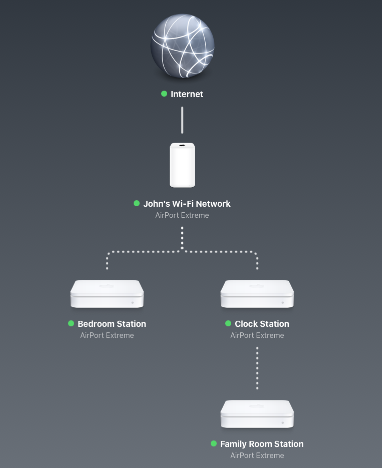
Family Room Station is not extending the network at all. You can prove this yourself by locating a WiFi device or two very close to Family Room Station.
Open AirPort Utilty
Click on Family Room Station
In the smaller window that appears, look for Wireless Clients. You will not see any because the devices are connecting to another AirPort. They cannot connect to Family Room Station.
So, at the present time, Family Room Station is doing nothing except using using up electricity
If you want Family Room Station to extend the network, it will need to be located closer to John's WiFi Network than it is to any other AirPort.
You will know when Family Room Station is extending the network when you see all three AirPorts .....Bedroom Station, Clock Station, and Family Room Station lined up horizontally side by side so that each one of them is connecting directly to John's WiFi Network.
Another way to say the same thing......and this is confusing for some users......is that Apple only allows the network to be extended one time.....not two. Each Extender must connect directly to the main AirPort router, not to another AirPort that is already extending the network.
You can have more than one AirPort extending a network, but each one of them must connect to the main AirPort.....not to another AirPort that is already extending the network.
Unfortunately, there is a huge downside in trying to extend a network using wireless connections. That is that you will lose half of the potential speed on the network. And.....you are trying to do this with 3 devices.
Ideally, you would want AirPorts to connect to other AirPorts using a wired Ethernet cable connection......because there is no signal loss through the Ethernet cable up to 300+ feet. So, you avoid the significant loss that occurs when you try to extend a network using wireless.


