No nighttime notifications for messages or emails

Do Not Disturb is turned off on my iphone 6s, but I still don't get any notification sounds at night. I used to get them, but now I don't, and I'm missing messages that I need to get. How do I get the nighttime notification sounds back?

iPhone 6s, iOS 13

Posted on Dec 29, 2019 10:51 PM

Reply
1 reply

Dec 29, 2019 11:01 PM in response to okbunyip

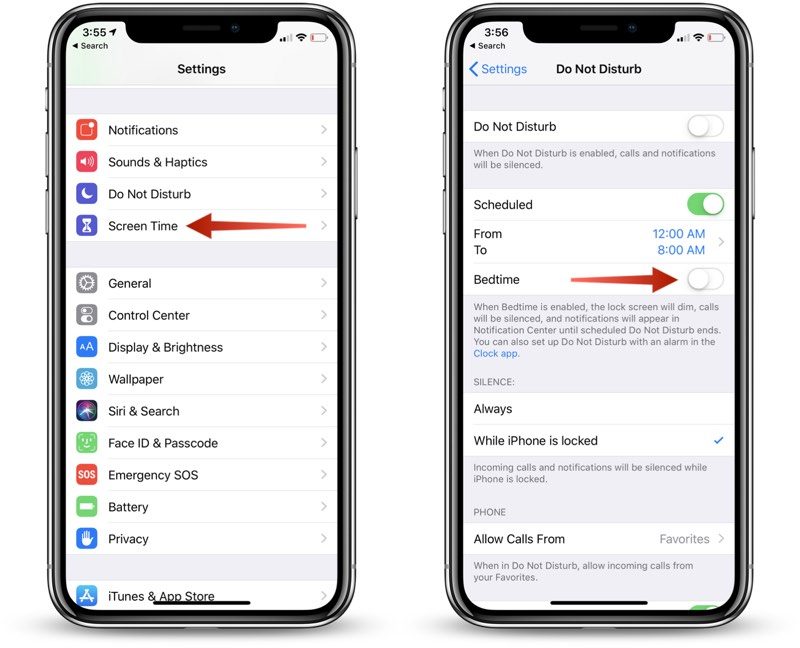
You may still have Scheduled Do Not Disturb ON from a certain time at night until a certain time in the morning (Bedtime Mode).

Here is how to turn it OFF if that is the case-


  1. Open up the Settings app.
  2. Scroll to the "Do Not Disturb" section and tap on it.
  3. In the Do Not Disturb section, tap on "Scheduled" to toggle it OFF.
  4. Tap on Bedtime Mode to toggle it OFF.


Axel F.

This thread has been closed by the system or the community team. You may vote for any posts you find helpful, or search the Community for additional answers.

No nighttime notifications for messages or emails

Welcome to Apple Support Community
A forum where Apple customers help each other with their products. Get started with your Apple Account.