face id setup not working

i recently bought an iphone 11 and i haver tried to set up face id but it just says lift phone lower or higher or what ever and it doesnt go past trying to find my face

iPhone 11

Posted on Jan 4, 2020 1:49 AM

Reply
Question marked as Top-ranking reply

Posted on Jan 4, 2020 1:50 AM

Set up Face ID

Before you set up Face ID, make sure that there isn't anything covering the TrueDepth camera or your face. Face ID is designed to work with glasses and contacts. Face ID works best when your iPhone or iPad is approximately an arm’s length or closer (10-20 inches) from your face.

Learn which iPhone and iPad models support Face ID.
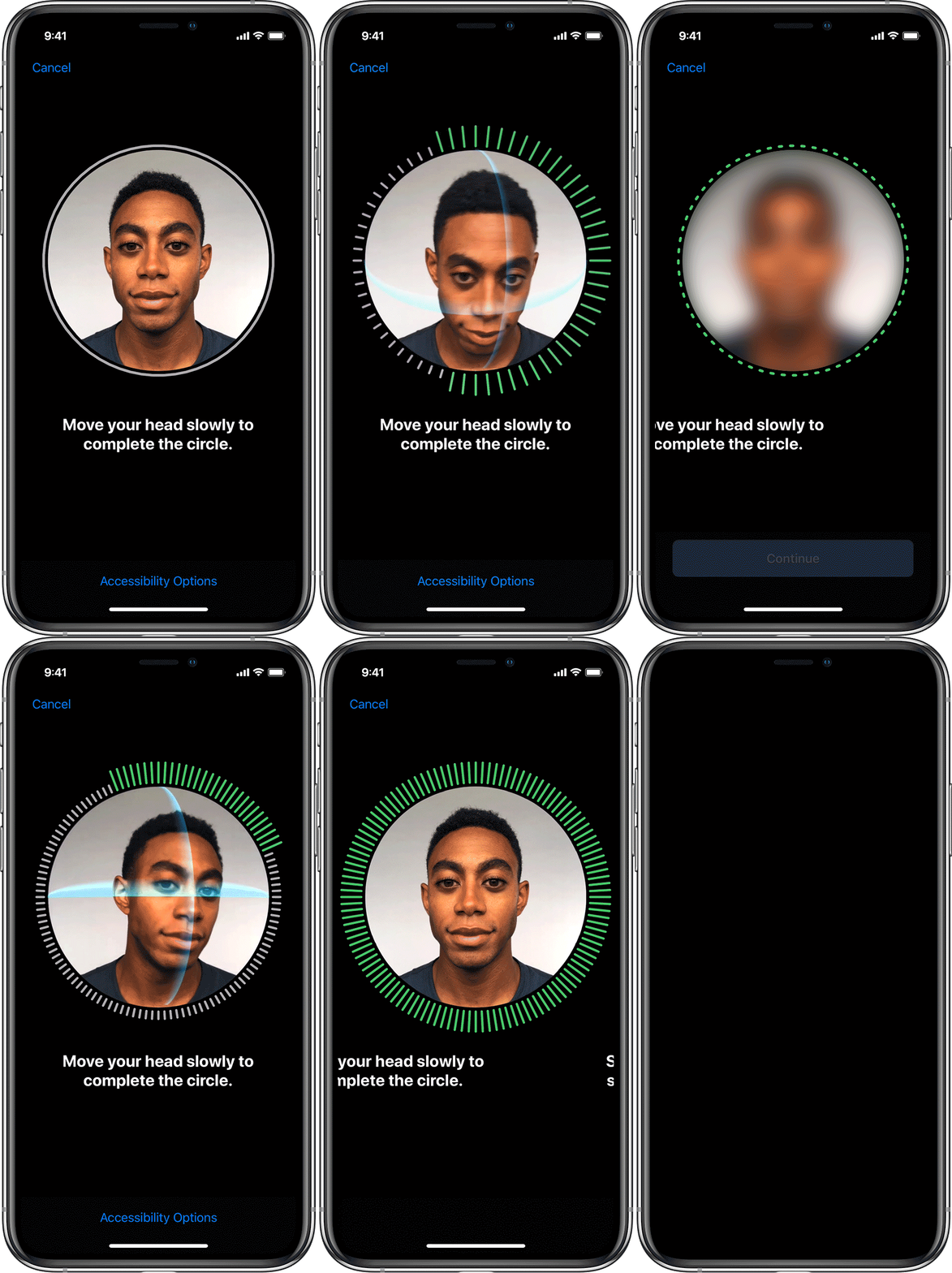
To set up Face ID:

  1. Go to Settings > Face ID & Passcode. If asked, enter your passcode.
  2. Tap Set Up Face ID. 
  3. Make sure that you're holding your device in portrait orientation, position your face in front of your device, and tap Get Started.
  4. Position your face inside the frame and gently move your head to complete the circle. If you're unable to move your head, tap Accessibility Options.
  5. When you finish the first Face ID scan, tap Continue.
  6. Gently move your head to complete the circle for a second time.
  7. Tap Done.

If you didn’t set a passcode, you’ll be asked to create one to use as an alternate way to verify your identity.

To choose features that you want to use Face ID with or reset Face ID, go to Settings > Face ID & Passcode.

Need help with Face ID?


2 replies
Question marked as Top-ranking reply

Jan 4, 2020 1:50 AM in response to LiamJones121

Set up Face ID

Before you set up Face ID, make sure that there isn't anything covering the TrueDepth camera or your face. Face ID is designed to work with glasses and contacts. Face ID works best when your iPhone or iPad is approximately an arm’s length or closer (10-20 inches) from your face.

Learn which iPhone and iPad models support Face ID.

To set up Face ID:

  1. Go to Settings > Face ID & Passcode. If asked, enter your passcode.
  2. Tap Set Up Face ID. 
  3. Make sure that you're holding your device in portrait orientation, position your face in front of your device, and tap Get Started.
  4. Position your face inside the frame and gently move your head to complete the circle. If you're unable to move your head, tap Accessibility Options.
  5. When you finish the first Face ID scan, tap Continue.
  6. Gently move your head to complete the circle for a second time.
  7. Tap Done.

If you didn’t set a passcode, you’ll be asked to create one to use as an alternate way to verify your identity.

To choose features that you want to use Face ID with or reset Face ID, go to Settings > Face ID & Passcode.

Need help with Face ID?


This thread has been closed by the system or the community team. You may vote for any posts you find helpful, or search the Community for additional answers.

face id setup not working

Welcome to Apple Support Community
A forum where Apple customers help each other with their products. Get started with your Apple Account.
