
Can’t slide the power off button.
I bought my husband an Apple Watch for Christmas and he can’t slide the power off button. It doesn’t work.
[Re-Titled by Moderator]
I bought my husband an Apple Watch for Christmas and he can’t slide the power off button. It doesn’t work.
[Re-Titled by Moderator]
Hello Katydid67,
Thank you for using Apple Support Communities! I understand that you need help with your husband's Apple Watch which isn't displaying a slide to power off icon. Do you get any icons when you follow the steps below? Also please note that if the watch is being charged, then the Power Off slider will not appear.
"
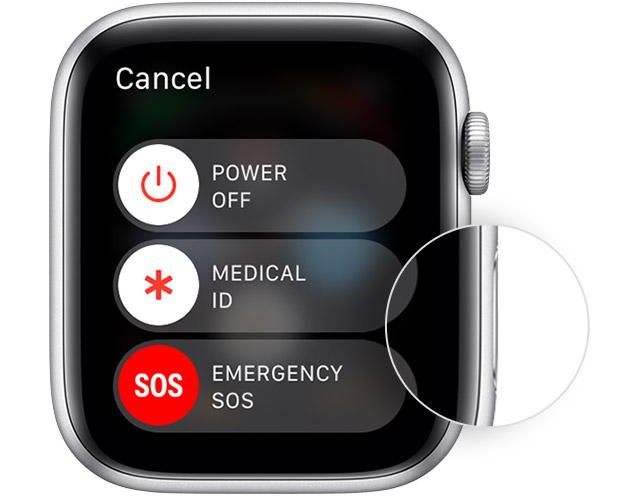
Restart your Apple Watch
If your Apple Watch is charging, take it off the charger first. When your watch is charging, you can't restart it."
If nothing is appearing at all, and the Apple Watch is completely unresponsive, then try forcing the Apple Watch to restart:
"Force restart your Apple Watch
Don’t force restart your Apple Watch if you're updating watchOS. After you see the Apple logo and progress wheel on your Apple Watch, leave your Apple Watch alone until the update finishes.
You should force restart your device as a last resort and only if it's not responding. To force restart your Apple Watch, press and hold both the side button and Digital Crown for at least 10 seconds, then release both buttons when you see the Apple logo."
How to restart your Apple Watch
Cheers!
Hello Katydid67,
Thank you for using Apple Support Communities! I understand that you need help with your husband's Apple Watch which isn't displaying a slide to power off icon. Do you get any icons when you follow the steps below? Also please note that if the watch is being charged, then the Power Off slider will not appear.
"
Restart your Apple Watch
If your Apple Watch is charging, take it off the charger first. When your watch is charging, you can't restart it."
If nothing is appearing at all, and the Apple Watch is completely unresponsive, then try forcing the Apple Watch to restart:
"Force restart your Apple Watch
Don’t force restart your Apple Watch if you're updating watchOS. After you see the Apple logo and progress wheel on your Apple Watch, leave your Apple Watch alone until the update finishes.
You should force restart your device as a last resort and only if it's not responding. To force restart your Apple Watch, press and hold both the side button and Digital Crown for at least 10 seconds, then release both buttons when you see the Apple logo."
How to restart your Apple Watch
Cheers!
We went to the Apple Store and found out the voice assist was turned on accidentally.
Hello Katydid67,
Thanks for reaching out and letting us know. I am happy to hear it was resolved. I hope you have a great day today!
Cheers!
Can’t slide the power off button.

