Verizon Fios, Gen 2? (flat version) Time Capsule and 6.3 Airport Utility

Hello all,


I've read ad nauseam for the past few days on connecting a Time Capsule to Verizon Fios. I've tried LaPastenague's method of connecting to the Verizon Router and putting the TC in "bridge mode" and I've read all of Mr. Bob Timmons insightful suggestions. For whatever reason, I can't seem to even get the TC to show in my Airport Utility and I'm at a loss. I get the green light but nothing in the utility. I'd like to extend my network with the TC (though I'm not sure if it would help or not, its older and might actually decrease speed?) but my main objective is to have a wireless backup solution - for as long as this drive will last ;)


Thank you all in advance for your assistance!


Posted on Jan 8, 2020 7:24 PM

Reply
Question marked as Top-ranking reply

Posted on Jan 19, 2020 8:17 AM

I've read that people have hardwired to Fios router and its "plug and play"


People are pulling your leg. "Plug and play" was terminology introduced by Microsoft for PC products. Apple is not Microsoft and the Time Capsule is not a PC product. Nothing about a Time Capsule is plug and play......it must be reset back to factory default settings and then set up to work correctly with another router, like Fios or any other brand.


We asked for the model number of the Time Capsule.....and gave you instructions on how to find it.....but still don't have that information, so we are forced to proceed with limited information. Please understand that even with a correct setup, there are no guarantees that things will work if you are planning to use the Fios wireless network to back up your Mac(s) to the Time Capsule.


Check to make sure that an Ethernet cable connects from one of the four LAN <--> Ethernet ports on the Fios router........(there are likely 4 of them, choose any one that you want) to the WAN "O" Ethernet port on the Time Capsule (TC). This cable must be connected permanently at all times.


Power up the TC, if it is not already on, and let it run a few minutes.


Hold in the reset button on the back panel of the TC for 7-8 seconds, then release

Allow a full minute for the TC to restart to a slow, blinking amber light status. This will confirm that the TC has been reset correctly, so it can now be programmed with the correct settings that it needs to connect to the Fios router


Next, click on the WiFi menu at the top of your Mac's screen

Look for a listing of New AirPort Base Station

Click directly on AirPort Time Capsule just below that listing. Your screen may simply read Time Capsule, since you have an old model


When you click on Time Capsule, that will start up the AirPort Utility setup "wizard" automatically. The wizard will take a few seconds to analyze the network settings and then display a window that looks like the example below, except that you will see a Time Capsule pictured.
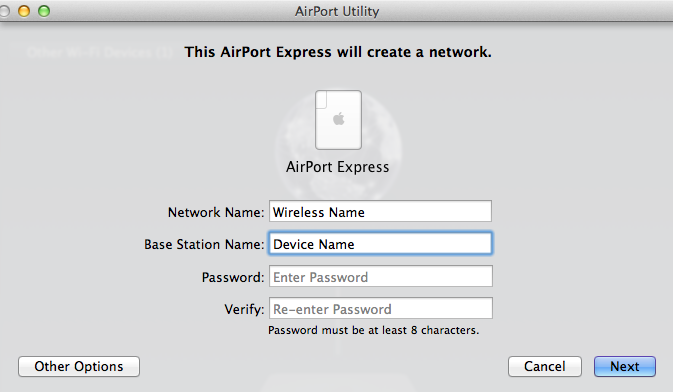


Network Name.......Type in a short simple name for the TC WiFi network. Later, we will turn off the wireless on the TC, unless you want to have another WiFi network.

Base Station Name.......Type in a short simple name that you want to call the TC as a device

Password.......Type in a password that will be used for the Time Capsule

Verify......Type in the same password again to confirm


Click the Next button at the lower right of the window


The "wizard" will now set up the TC with the correct settings that it needs to connect to the Fios router. When you see the message of Setup Complete, click Done.


At this point, the TC should be visible in AirPort Utility.


Post back on your progress and we will continue.


Similar questions

7 replies
Question marked as Top-ranking reply

Jan 19, 2020 8:17 AM in response to apliguori

I've read that people have hardwired to Fios router and its "plug and play"


People are pulling your leg. "Plug and play" was terminology introduced by Microsoft for PC products. Apple is not Microsoft and the Time Capsule is not a PC product. Nothing about a Time Capsule is plug and play......it must be reset back to factory default settings and then set up to work correctly with another router, like Fios or any other brand.


We asked for the model number of the Time Capsule.....and gave you instructions on how to find it.....but still don't have that information, so we are forced to proceed with limited information. Please understand that even with a correct setup, there are no guarantees that things will work if you are planning to use the Fios wireless network to back up your Mac(s) to the Time Capsule.


Check to make sure that an Ethernet cable connects from one of the four LAN <--> Ethernet ports on the Fios router........(there are likely 4 of them, choose any one that you want) to the WAN "O" Ethernet port on the Time Capsule (TC). This cable must be connected permanently at all times.


Power up the TC, if it is not already on, and let it run a few minutes.


Hold in the reset button on the back panel of the TC for 7-8 seconds, then release

Allow a full minute for the TC to restart to a slow, blinking amber light status. This will confirm that the TC has been reset correctly, so it can now be programmed with the correct settings that it needs to connect to the Fios router


Next, click on the WiFi menu at the top of your Mac's screen

Look for a listing of New AirPort Base Station

Click directly on AirPort Time Capsule just below that listing. Your screen may simply read Time Capsule, since you have an old model


When you click on Time Capsule, that will start up the AirPort Utility setup "wizard" automatically. The wizard will take a few seconds to analyze the network settings and then display a window that looks like the example below, except that you will see a Time Capsule pictured.


Network Name.......Type in a short simple name for the TC WiFi network. Later, we will turn off the wireless on the TC, unless you want to have another WiFi network.

Base Station Name.......Type in a short simple name that you want to call the TC as a device

Password.......Type in a password that will be used for the Time Capsule

Verify......Type in the same password again to confirm


Click the Next button at the lower right of the window


The "wizard" will now set up the TC with the correct settings that it needs to connect to the Fios router. When you see the message of Setup Complete, click Done.


At this point, the TC should be visible in AirPort Utility.


Post back on your progress and we will continue.



Jan 8, 2020 8:15 PM in response to apliguori

For whatever reason, I can't seem to even get the TC to show in my Airport Utility


Assuming that you have performed a Hard Reset or Factory Default Reset, the TC will not "show" in AirPort Utility. You must first reconfigure the TC and get it working correctly. Then.....it will "show" in AirPort Utility.


I'd like to extend my network with the TC


The TC will not be able to extend the Fios network if you are thinking of only a wireless connection to connect the TC to the Fios network.


Whether or not you decide to extend the network or not, the TC will need to connect to the Fios router using a permanent, wired Ethernet cable connection.


my main objective is to have a wireless backup solution


Are you thinking about using the Fios wireless network to back up your Mac(s), or are you thinking about using the TC wireless network to back up your Mac(s)?


Apple does not officially support backups over a 3rd party wireless network (Fios). They expect you to use the TC wireless to back up. That being said, it might be possible to back up over the Fios wireless, but there are no guarantees that this will work reliably.


If you want to try to continue to set up the TC, we really do need to know what model that you have. Turn the TC upside down and look for the model number which is usually embedded in the foam pad base. The model number starts with an "A" followed by 4 numbers. Examples......A1302, A1355, A1409.


Do you understand that the TC will need to connect to the Fios router using a permanent wired Ethernet cable connection?


Bottom line......we can provide step by step instructions to set up the TC with your Fios router, but we cannot guarantee that things will work if you want to use the Fios wireless network to back up.


Finally.....depending on the age of the TC, it may not be advisable to continue to use the product to back up.....unless....you can afford to lose the data on the TC.


Jan 8, 2020 8:13 PM in response to apliguori

I would not expect it to last too much longer.. and the wireless is pretty pathetic.


So from your Mac are you trying to connect to the TC wireless? If it is more than a room or two away it won't work. Get the computer or TC into the same room.


The TC must have its WAN port plugged into any LAN port of the Verizon router.

If the TC has green it must have been setup correctly at some point.


No luck try using an iphone or ipad if you have one.. the airport utility works better than Mac version.


You might need to reset it and start over but still might not help much.

Jan 19, 2020 9:47 AM in response to apliguori

Thanks for the info. The A1409 version of the Time Capsule was introduced by Apple in June 2011 and discontinued in June 2013, so depending on when you placed the Time Capsule into service, the product is at least 6+ years old and as much as 9+. The average useful life of a Time Capsule is about 4-5 years.


Another way to say the same thing.......you would not want to store any data on the hard drive inside the Time Capsule that you cannot afford to lose......since the Time Capsule electronics and hard drive are overdue to fail at 6+ years old.


The reset of the Time Capsule will not affect any of the data that is already stored on the Time Capsule hard drive. However, if you have "upgraded" your Mac to the newer Catalina operating system, there are numerous reports of older Time Machine backups on Time Capsules not being visible, so you may......or may not.....be able to "see" the old backups on the Time Capsule using Time Machine.


Personally, I would not place a 6+ year old Time Capsule that is now overdue to fail into service, but it is your call as to whether you want to proceed with the setup that I have posted for you.


Jan 19, 2020 7:27 AM in response to LaPastenague

Thank you to both of you. I currently have the TC plugged into the LAN of the Fios router and there is a green light on the TC. I can't seem to access it from Airport utility on either Mac or iPhone. At this point, if I can somehow just use the TC as a Time Machine backup device, I would be okay with that. I understand that Apple doesn't support backup on another wireless network but I'm willing to take the chance. I've read that people have hardwired to Fios router and its "plug and play" - unfortunately, that has not been my experience so far!

This thread has been closed by the system or the community team. You may vote for any posts you find helpful, or search the Community for additional answers.

Verizon Fios, Gen 2? (flat version) Time Capsule and 6.3 Airport Utility

Welcome to Apple Support Community
A forum where Apple customers help each other with their products. Get started with your Apple Account.
