How to convert purchased itunes songs to MP3

I recently purchased an MP3 swimming device. It requires the songs in my library to be converting to MP3 but doesn't. The drop down menu offers this option but returns a MPEG file. The device cost me $200.00 and is useless without a playlist - the whole purpose of the device is to deliver music to swim to.

Really will appreciate any feedback.

Posted on Feb 1, 2020 11:32 AM

Reply
Question marked as Top-ranking reply

Posted on Feb 4, 2020 1:44 PM

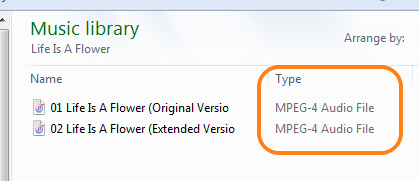
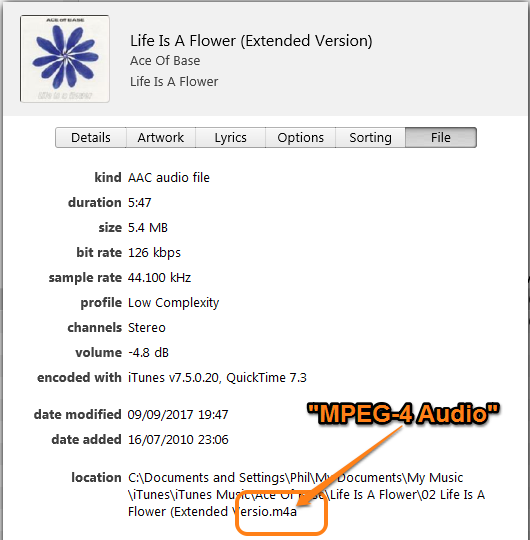
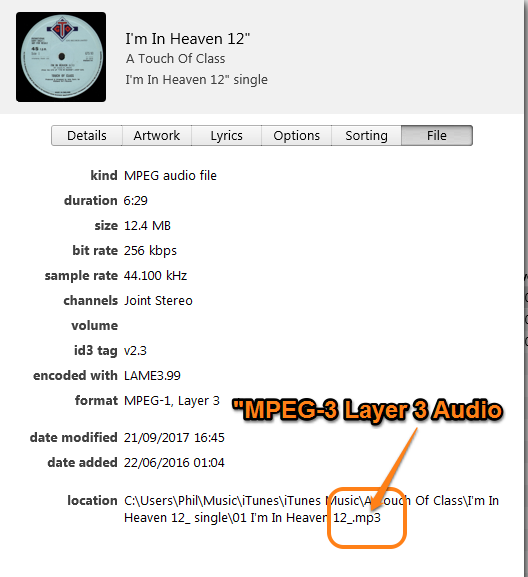
In addition to the points made by Starr.C, in particular the fact that converting an audio file creates a duplicate song in your iTunes Library, note that MPEG is a general term that applies to both Apple's m4a and an MP3 file, so perhaps you haven't spotted that the MP3 file is there after all.


Look at the screenshots below, the first two are one song, while screenshots three and four are a separate song. Note the difference between MPEG-4 and MPEG-3:


While the MP3 is:


Another thing to note is that in order to convert to an MP3, the original file has to be DRM-free (in other words, not a protected song). For a while, the iTunes store sold songs in a protected form, meaning that they cannot be converted. (Don't blame Apple for that, I suspect the music industry was repsonsible for it.) It should be obvious if any of your iTunes purchases are still DRM files.


The final point to note (which you may already be aware of) is that in order for iTunes to convert the file to MP3, you need to set the CD Import Setting to MP3. I know - it's not very intuitive, but that is what has to happen. I assume that your iTunes is already set to import CDs as MP3s because if it wasn't, you would not see Create MP3 version on the File/Convert menu.


2 replies
Question marked as Top-ranking reply

Feb 4, 2020 1:44 PM in response to Convertmusic

In addition to the points made by Starr.C, in particular the fact that converting an audio file creates a duplicate song in your iTunes Library, note that MPEG is a general term that applies to both Apple's m4a and an MP3 file, so perhaps you haven't spotted that the MP3 file is there after all.


Look at the screenshots below, the first two are one song, while screenshots three and four are a separate song. Note the difference between MPEG-4 and MPEG-3:


While the MP3 is:


Another thing to note is that in order to convert to an MP3, the original file has to be DRM-free (in other words, not a protected song). For a while, the iTunes store sold songs in a protected form, meaning that they cannot be converted. (Don't blame Apple for that, I suspect the music industry was repsonsible for it.) It should be obvious if any of your iTunes purchases are still DRM files.


The final point to note (which you may already be aware of) is that in order for iTunes to convert the file to MP3, you need to set the CD Import Setting to MP3. I know - it's not very intuitive, but that is what has to happen. I assume that your iTunes is already set to import CDs as MP3s because if it wasn't, you would not see Create MP3 version on the File/Convert menu.


Feb 4, 2020 11:52 AM in response to Convertmusic

Hello, Convertmusic.


Welcome to Apple Support Communities.


From what I've read is that you need to convert your purchased songs to MP3. I'd like to help. What happens after you convert, do you get any error messages? This article can help with converting your songs: Convert a song to a different file format with the Apple Music app or iTunes for Windows


"On your PC

  1. Open iTunes for Windows.
  2. In the menu bar, choose Edit > Preferences.
  3. Click the General tab, then click Import Settings.
  4. Click the menu next to Import Using, then choose the encoding format that you want to convert the song to.
  5. Click OK.
  6. Select the songs in your library that you want to convert.
  7. Choose File > Convert, then Create [format] Version.

New song files appear in your library next to the original files".


Does this happen with all songs or just purchased ones? If possible, do you have another computer with iTunes or Finder that you can try?


Keep me updated.


Cheers!

This thread has been closed by the system or the community team. You may vote for any posts you find helpful, or search the Community for additional answers.

How to convert purchased itunes songs to MP3

Welcome to Apple Support Community
A forum where Apple customers help each other with their products. Get started with your Apple Account.