Excel formula in numbers

I have a spreadsheet I created in Excel (new to numbers..)

Most formulae convert ok, but I have one that sums the top 8 values in a range which gives an error triangle and message 'the formula contains a number outside the valid range'

In Excel the formula is..

SUM(LARGE(C2:T2,{1,2,3,4,5,6,7,8}))


How can I get the same result in numbers?

MacBook Pro

Posted on Feb 16, 2020 7:37 AM

Reply
Question marked as Top-ranking reply

Posted on Feb 16, 2020 11:07 PM

Numbers does not support most Excel array formulas (identifiable by the presence of 'curly brackets' ( {} ).


LARGE, in Number accepts only a single number for its second argument, so you'll need an iteration of the LARGE function for each of the values you want to include in the sum:
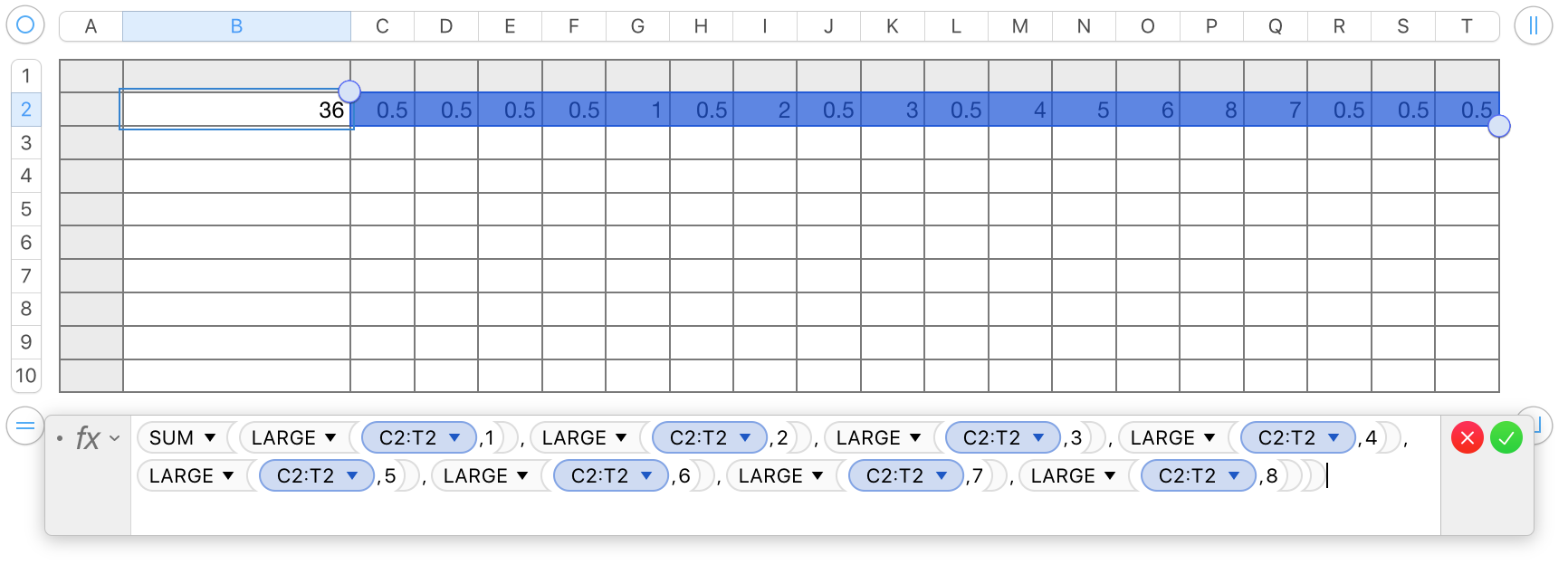

SUM(LARGE(C2:T2,1),LARGE(C2:T2,2),LARGE(C2:T2,3),LARGE(C2:T2,4),LARGE(C2:T2,5),LARGE(C2:T2,6),LARGE(C2:T2,7),LARGE(C2:T2,8))


You can also choose to build a list of the numbers to be included in a single column array in a separate column, or row on the same or a different table, Then SUM that one dinension array with a second formula on the original table.
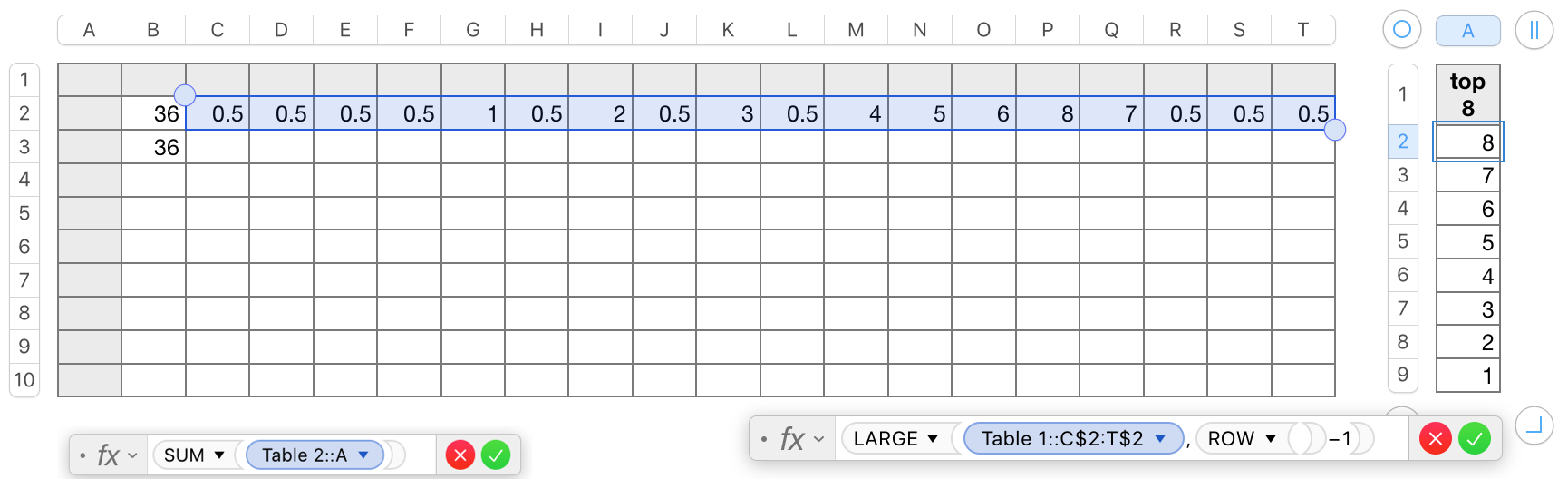

The formula on the right is entered in A2 of the single column table on the right, Table 2, and is filled down to row 9.

The basic SUM formula on the left is in cell B3 of the original table.


Regards,

Barry


7 replies
Question marked as Top-ranking reply

Feb 16, 2020 11:07 PM in response to Kimyeo

Numbers does not support most Excel array formulas (identifiable by the presence of 'curly brackets' ( {} ).


LARGE, in Number accepts only a single number for its second argument, so you'll need an iteration of the LARGE function for each of the values you want to include in the sum:


SUM(LARGE(C2:T2,1),LARGE(C2:T2,2),LARGE(C2:T2,3),LARGE(C2:T2,4),LARGE(C2:T2,5),LARGE(C2:T2,6),LARGE(C2:T2,7),LARGE(C2:T2,8))


You can also choose to build a list of the numbers to be included in a single column array in a separate column, or row on the same or a different table, Then SUM that one dinension array with a second formula on the original table.


The formula on the right is entered in A2 of the single column table on the right, Table 2, and is filled down to row 9.

The basic SUM formula on the left is in cell B3 of the original table.


Regards,

Barry


Feb 18, 2020 3:14 PM in response to SGIII

The logic is straightforward. The formula simply uses the SUMIFS function to sum up only the values in C2:T2 that are greater than or equal to the eighth largest value in that range.


It’s a good approach unless, of course, you enjoy typing long formulas.😀 As you can see, in this case you do not need an iteration of the LARGE function for each of the values you want to include in your sum.


You can read more about SUMIFS and SUMIF and see examples of how they are used at Help > Formulas and Functions Help in your menu. They are commonly used and very useful functions well worth adding to your toolbox.


SG


This thread has been closed by the system or the community team. You may vote for any posts you find helpful, or search the Community for additional answers.

Excel formula in numbers

Welcome to Apple Support Community
A forum where Apple customers help each other with their products. Get started with your Apple Account.