ZOOM IN

Whole display screen is zoomed in! How do I zoom out?

My whole computer screen including Chrome etc is zoomed in how do I fix this? I have no idea how I did this. It happened when my Mac was restarting.

I have a MacBook Pro.

MacBook Pro 13", macOS 10.15

Posted on Feb 23, 2020 1:32 AM

Reply
2 replies

Feb 23, 2020 6:11 AM in response to radhika247

radhika247 wrote:

Whole display screen is zoomed in! How do I zoom out?
My whole computer screen including Chrome etc is zoomed in how do I fix this? I have no idea how I did this. It happened when my Mac was restarting.
I have a MacBook Pro.


To add,—if not system wide as suggested above by dominic23


Zoom keyboard shortcut commands for individual browser windows, etc:


Command - smaller

Command 0 default resolution

Command = (+) larger


no other key, just Command and the 3 keys in a row..
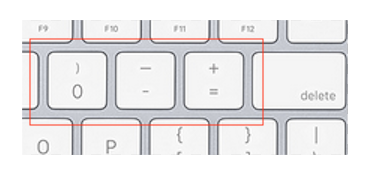

Mac keyboard shortcuts - Apple Support


.

.

This thread has been closed by the system or the community team. You may vote for any posts you find helpful, or search the Community for additional answers.

ZOOM IN

Welcome to Apple Support Community
A forum where Apple customers help each other with their products. Get started with your Apple Account.

