Select / Select All / Paste in place of the Predictive Text menu

So I've been sending feedback to apple for a decade now about this.


I want Select / Select All / Paste as part of the keyboard in place of the predictive text. I have never used predictive text and never will. Predictive text is an accessibility feature and shouldn't be an default on feature. I can tap out the word faster than selecting the predicted word 99% of the time, excepting the harder to spell words. ...which I just use the replace feature to replace.


That select / select all / paste popup doesn't always popup in every situation. And trying to get it to work is maddening. In certain contexts, it doesn't work on websites or in textareas. SO WHY make it default? It's not ready for primetime, why enable it?


Not only that all those new "improvements" apple made in the last major updates are full on fantastic garbage. Tap and the cursor appears at the end of the word? This so called smart cursor position is beyond stupid!!! ARE YOU !@#$ing serious? Not only that I can't turn that "accessibility feature" off. Why is apple building all these "improvements" and turning them on by default and not giving us the ability to turn them off.


No I don't use triple tap to select the line or the paragraph. That also only works in certain contexts and not on websites or textareas.


I'm trying not to be angry. Really trying. But if things don't improve text-editing wise this 7 plus, I've avoided upgrading, will be the VERY LAST iphone I ever own.


SELECT / SELECT ALL / PASTE in place of predictive text bar or Im done with apple forever. I just can't stand not being able to do text-editing efficiently on an iphone. And after a decade of asking for a function over form keyboard, I've reached the very last straw.

Posted on Mar 9, 2020 9:18 AM

Reply

Similar questions

4 replies

Mar 9, 2020 9:33 AM in response to Capsaicin1

First of all your statements "VERY LAST iphone I ever own." and "reached the very last straw." has only reached user community.


Apple Support Community Forum


This is Apple Support Community forum, for user to user interaction for information & idea sharing between users, if need be, extend support on technical knowhow in handling Apple products from more experienced fellow user, Apple Inc is neither here nor they are listening. 


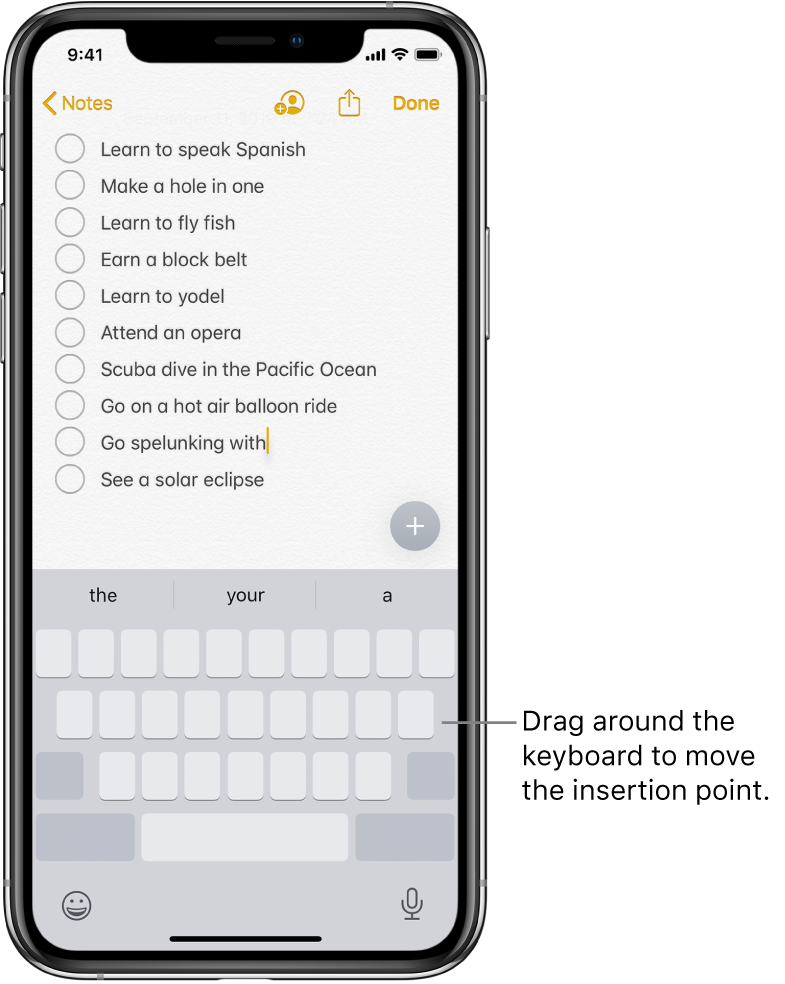
Reading you story I gather that you are not aware of many features on an iPhone such as trackpad. Watch the GIF below.


Turn your keyboard into a trackpad

  1. Touch and hold the Space bar with one finger until the keyboard turns light gray.
  2. Move the insertion point by dragging around the keyboard.


You also wrote: "That also only works in certain contexts and not on websites or text areas."

  • On Safari while browsing websites, keyboard is not activated
  • Many websites prevent copy paste and select or select all feature is irrelevant.


Select and revise text

To insert, revise, or replace text, do any of the following:

  • Navigate a long document: Touch and hold the right edge of the document, then drag the scroller to locate the text you want to revise.
  • Insert text: Tap to place the insertion point where you want to insert text. You can also move the insertion point precisely by dragging it. Then start typing.
  • Select a word: Double-tap the word with one finger.
  • Select a sentence: Triple-tap the sentence with one finger.
  • Select a paragraph: Quadruple-tap with one finger.
  • Select a block of text: Touch and hold the first word in the block, then drag to the last word.
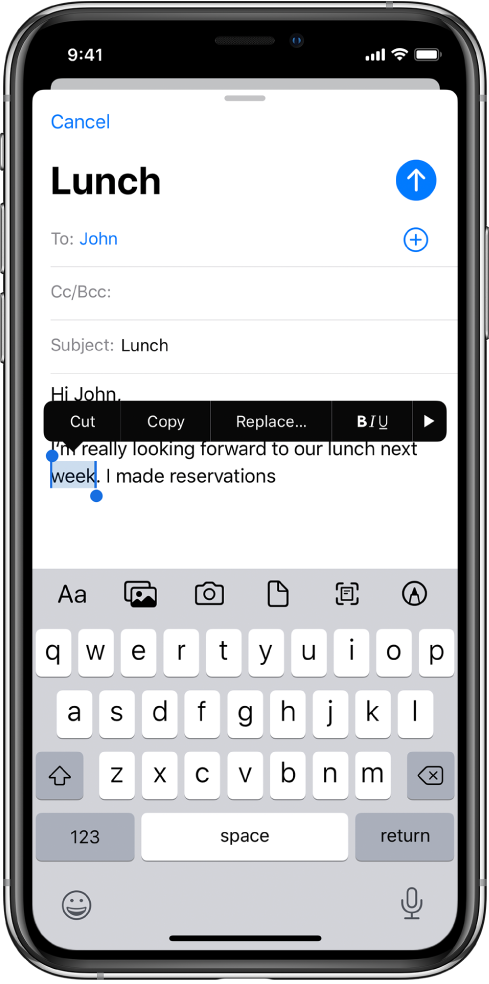
  • After selecting the text you want to revise, you can type, or tap the selection to see options.
    • Cut: Tap Cut or pinch closed with three fingers two times.
    • Copy: Tap Copy or pinch closed with three fingers.
    • Paste: Tap Paste or pinch open with three fingers.
    • Replace: View suggested replacement text, or have Siri suggest alternative text.
    • B/I/U: Format the selected text.
    • : View more options.

With Universal Clipboard, you can cut or copy something on one Apple device and paste it to another. You can also use drag and drop to move selected text within an app.


Have you tried using Siri in stead of Keyboard, it is fascinating Please do try.

Mar 9, 2020 9:52 AM in response to SravanKrA

That hold spacebar select feature is stupid. Beyond stupid. If it's going to be anywhere, it should be in the middle of the keyboard in it's own context menu. Being at the bottom it doesn't let you drag down very far before reaching the end of the keyboard...unless you move your finger up and then the cursor just just jumps around like "House of Pain". Oh and the unintentional spaces while trying to move the cursor around. Stupid.


The rest of your massive tutorial, I already know and doesn't help. Those individual "accessibility enhancements" that are default on, and no way to turn them off, are not enhancements at all. Apple needs give us a way to turn off cursor drag and drop as it interferes with the select process. Again 99% of these feature improvements should be under accessibility enhancements, or at least be a part of general > keyboard menu where I can turn the feature off if I want to.

Mar 9, 2020 10:12 AM in response to SravanKrA

Just to be clear I do programming editing js/php/css/html. I can't really use siri to do this. Speech to text isn't quick or accurate. Sometimes I edit in an FTP app, sometimes the editing is done in inputs and text areas via Safari. Sometimes I'm trying to select text/code in stackexchange.com or other programming related website, sometimes I'm trying write comments in forums.


I just give up on the iphone and stop trying. It's a !@#$ing nightmare doing any precision selecting/copying/pasting etc via the iphone. More especially so since the last update added all those "enhancements" that interfere:


double tap doesn't select.

but then double tap does selects.

double tap triggers cursor drag and drop instead of selecting

double tap actually puts the cursor on the word instead of selecting the word

double tap selects the whole paragraph instead of the line or the word

double tap selects the line.

double tap selects the word.

Tap and hold on spacebar, the cursor goes hog wild selecting or jumping around.

Tap and hold selects the word.

Tap and hold triggers cursor move instead of selecting the word or the line.


You get what i'm saying here. Nothing works predictably. It's a roll the dice and 1 out of 5 tries what you expect to happen, happens.


ALL OF IT. A NIGHTMARE.


No, I don't have parkinson's. No I'm not retarded. No I don't have big fingers. Yes I'm a coherent full functioning technically inclined person who can and does understand interfaces. I build them.

This thread has been closed by the system or the community team. You may vote for any posts you find helpful, or search the Community for additional answers.

Select / Select All / Paste in place of the Predictive Text menu

Welcome to Apple Support Community
A forum where Apple customers help each other with their products. Get started with your Apple Account.