
Network offline
Both ipads state network to be offline since feb 28, 2020, although my wifi shows to be connected. No connection to the web nor my emailserver gmail can be made however. What to do???
iPad Pro, iOS 13
Both ipads state network to be offline since feb 28, 2020, although my wifi shows to be connected. No connection to the web nor my emailserver gmail can be made however. What to do???
iPad Pro, iOS 13
Your network may be blocking outbound connections - or no default gateway/route has been defined.
Assuming that you’re working at home, I suggest that you restart your home router. To restart, disconnect power from the router, wait 30 seconds then restart. After the router reboots (this may take many minutes), force-restart your iPad(s):
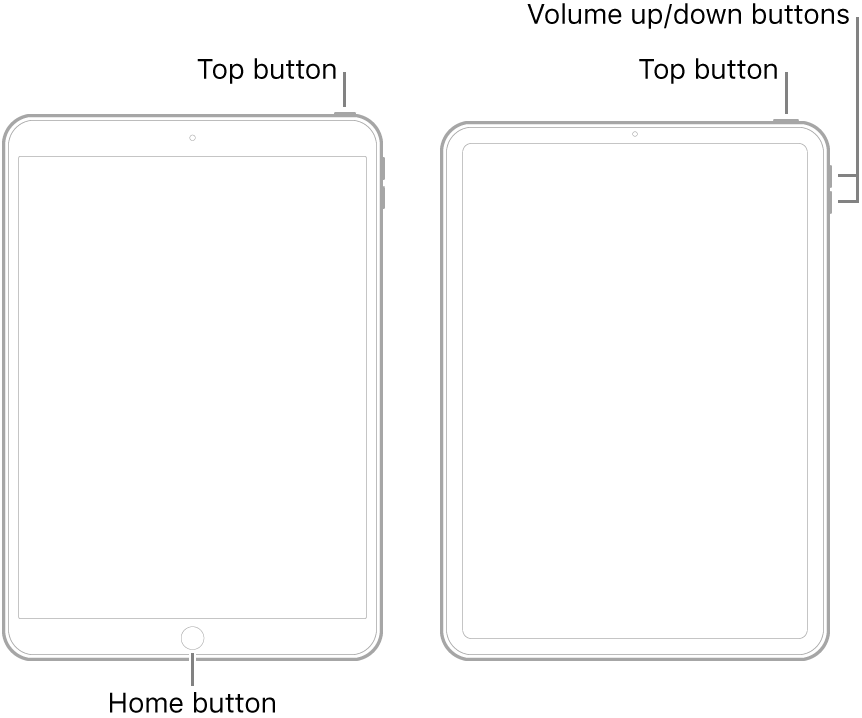
Your network may be blocking outbound connections - or no default gateway/route has been defined.
Assuming that you’re working at home, I suggest that you restart your home router. To restart, disconnect power from the router, wait 30 seconds then restart. After the router reboots (this may take many minutes), force-restart your iPad(s):
Did you restart the router as suggested, or did you just restart your iPad?
As I have previously stated, your DHCP-derived IP Addresses, assigned to your devices by your router, appear to be consistent. As such, the probability of your two iPads having the same fault, whist your two iPhones are okay, is vanishingly small - unless you have manually introduced a consistent network configuration error.
If the recommend restart of the router did not correct the problem, then without the ability to examine router logs and/or run protocol analysis on your network, it is going to be very difficult to offer you constructive advice. Although all domestic routers ultimately perform the same job, their individual setup vary considerably between manufacturers and models.
If not already tried, there is one more simple reset that you could try - and should perhaps have tried earlier - this being a reset of network settings on affected devices:
Settings > General > Reset > Reset Network Settings
As your have an identical issue with multiple devices, logic suggests that the problem is not your devices - but something in common with them. It follows therefore that the item “in common” is your home network and/or your internet connection.
We’re clearly going to have difficulties diagnosing issues with your network - as there are many variables - but my feeling is that your router is blocking connections.
Things to check - using your iPhones as the reference (you have said that these are still working using WiFi) - are that your iPads are getting unique IP Addresses, but addresses on the same subnet. If the IP Address starts with “169”, we can look at the cause.
Similarly, check that your iPads have the same subnet mask and router address as your iPhones.
This information reinforces my belief that your router Firewall must be selectively blocking access from your iPad(s) to the internet - as otherwise, your DHCP-derived look to be usable.
I did both , meanwhile I discussed with my neighbor who claimed he had similar problems when he had VPN activated. I stopped it and yes!!!, it all worked again!!!! Thanks for your excelkent advise and willingness to react.... 👍😜💥
Iphone 1: IP 10.0.0.5, Subnet 255.255.255.0, router 10.0.0.1
Iphone 2: IP 10.0.0.6, Subnet 255.255.255.0, router 10.0.0.1
Ipad 1: IP 10.0.0.3, Subnet 255.255.255.0, router 10.0.0.1
Ipad 2: IO 10.0.0.4, Subnet 255.255.255.0, router 10.0.0.1
Rgds Benno1234
I’m delighted that the source of the issue has been identified and the problem solved. Had you divulged that you were attempting use of a VPN client, we may have been somewhat quicker in reaching resolution.
Thanks, gorgot to mention that both iphones do have propee connection thru same network.
Did as you suggested, to no avail😩 any other suggestions? As stated last both iphones have no problem at all... i have all updates to my knowledge..
Any suggestions how to correct that!
Network offline
