What can I do with my 2TB Time Capsule?

Hi all, I dug out an old 2TB Time Capsule and managed to add it to my current Google Wi-Fi mesh system. I've always loved this thing and wondering how I can get the most out of it now. Previously it was my primary router that I also backed up to using Time Capsule. Now, it's empty and just looks pretty. A couple of questions:


  1. Will having the Time Capsule connected to my current Google WiFi network cause traffic or bandwidth conflict somehow? When I added it to my current network, it seems the only way to access it is through a Finder window. Why doesn't it just show up as an additional wifi point, versus a separate network?
  2. Is there a way to make it a dedicated music server? If so, what do I need to do? I have tons of music I'd love to be able to access that's just sitting in storage (have been online streaming Spotify for years now).


Thanks for your help and guidance!

Posted on Apr 5, 2020 10:13 AM

Reply
Question marked as Top-ranking reply

Posted on Apr 5, 2020 12:43 PM

What is the model number of the TC?


For the last tower model just say tower.. for the other ones look on the paper label or moulded rubber foot end of first line.

eg A1409 is Gen4. A1355 is Gen3. 2TB is most common on the Gen4 and Gen5.


I've always loved this thing and wondering how I can get the most out of it now.


Love for old technology .. no matter how pretty the white shiny plastic .. has a habit of biting you on rear end.

The Time Capsule was the weak link.. the Extreme and Express seem to last a lot longer. The extra heat and load of the hard disk kills them off. Any of the older TC are min of 6 years old now. The hard disk has been through its lifetime x2 so could die on start up. Same with power supply not run for a while etc etc.


Will having the Time Capsule connected to my current Google WiFi network cause traffic or bandwidth conflict somehow? When I added it to my current network, it seems the only way to access it is through a Finder window. Why doesn't it just show up as an additional wifi point, versus a separate network?


If you didn't reset the TC to factory and start over you must. Do it now. Hold in reset before power on.. power on and keep holding in reset for up to 10sec. Front LED will flash rapidly.

Run through the setup on your Mac with the WAN port connected to the closest google wifi puck to location of your Mac assuming it is using wireless. Do not use Apple recommended names.. all names I strongly recommend <8 characters, no spaces and pure alphanumerics. Password same rules but 8-20 characters.


Run through the setup in the airport utility. The TC MUST be in bridge mode.. once you complete the setup click the icon of the TC in utility and go to the Network Tab. It should show bridge.
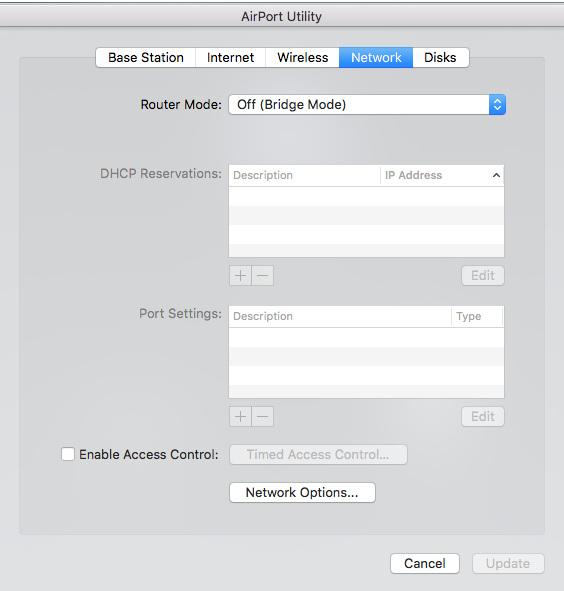


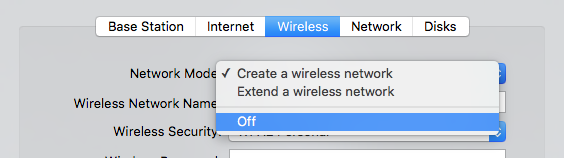
If you setup wireless on the TC you cannot use wireless on the google.. so it could be slower.. maybe very slow. It should be part of the network but remember it is never part of the mesh. It is a side branch.. like a railway shunting for parking trains, and will not increase speed. It might not be detrimental .. you will need to test that. IMHO you will do better with the wifi turned off. Your access to the TC is best done over the google wifi. So turn off wireless.


There is more that is required because google wifi is not particularly bonjour's favourite router. So come back to us if you have issues.. some people get away with it.


Backups will saturate the wifi and possibly slow your internet.. but once complete the short incremental is not a problem for most.


Is there a way to make it a dedicated music server? If so, what do I need to do? I have tons of music I'd love to be able to access that's just sitting in storage (have been online streaming Spotify for years now).


Basically NO. The TC is a dumb as a board hard disk in a router. It was designed by Apple for one task. Time Machine backup of laptop computers on your network.

It is not a NAS. It has no media extensions. In fact it is now difficult for windows or anything else that has SMB1 turned off for security reasons to even find it. This is old tech remember that has big teeth to bite you with.

There are tricks of course.. you could load a copy of the iTunes library onto the TC and use that with Sonos. Or you could load anything you wanted in raw file form and use another SMART media player to read it.

What you need is a real NAS i.e. Synology. TC is not now nor ever will be a substitute.. Apple ensured home serving of files died so you MUST use iCloud.


Similar questions

1 reply
Question marked as Top-ranking reply

Apr 5, 2020 12:43 PM in response to Michaelography

What is the model number of the TC?


For the last tower model just say tower.. for the other ones look on the paper label or moulded rubber foot end of first line.

eg A1409 is Gen4. A1355 is Gen3. 2TB is most common on the Gen4 and Gen5.


I've always loved this thing and wondering how I can get the most out of it now.


Love for old technology .. no matter how pretty the white shiny plastic .. has a habit of biting you on rear end.

The Time Capsule was the weak link.. the Extreme and Express seem to last a lot longer. The extra heat and load of the hard disk kills them off. Any of the older TC are min of 6 years old now. The hard disk has been through its lifetime x2 so could die on start up. Same with power supply not run for a while etc etc.


Will having the Time Capsule connected to my current Google WiFi network cause traffic or bandwidth conflict somehow? When I added it to my current network, it seems the only way to access it is through a Finder window. Why doesn't it just show up as an additional wifi point, versus a separate network?


If you didn't reset the TC to factory and start over you must. Do it now. Hold in reset before power on.. power on and keep holding in reset for up to 10sec. Front LED will flash rapidly.

Run through the setup on your Mac with the WAN port connected to the closest google wifi puck to location of your Mac assuming it is using wireless. Do not use Apple recommended names.. all names I strongly recommend <8 characters, no spaces and pure alphanumerics. Password same rules but 8-20 characters.


Run through the setup in the airport utility. The TC MUST be in bridge mode.. once you complete the setup click the icon of the TC in utility and go to the Network Tab. It should show bridge.


If you setup wireless on the TC you cannot use wireless on the google.. so it could be slower.. maybe very slow. It should be part of the network but remember it is never part of the mesh. It is a side branch.. like a railway shunting for parking trains, and will not increase speed. It might not be detrimental .. you will need to test that. IMHO you will do better with the wifi turned off. Your access to the TC is best done over the google wifi. So turn off wireless.


There is more that is required because google wifi is not particularly bonjour's favourite router. So come back to us if you have issues.. some people get away with it.


Backups will saturate the wifi and possibly slow your internet.. but once complete the short incremental is not a problem for most.


Is there a way to make it a dedicated music server? If so, what do I need to do? I have tons of music I'd love to be able to access that's just sitting in storage (have been online streaming Spotify for years now).


Basically NO. The TC is a dumb as a board hard disk in a router. It was designed by Apple for one task. Time Machine backup of laptop computers on your network.

It is not a NAS. It has no media extensions. In fact it is now difficult for windows or anything else that has SMB1 turned off for security reasons to even find it. This is old tech remember that has big teeth to bite you with.

There are tricks of course.. you could load a copy of the iTunes library onto the TC and use that with Sonos. Or you could load anything you wanted in raw file form and use another SMART media player to read it.

What you need is a real NAS i.e. Synology. TC is not now nor ever will be a substitute.. Apple ensured home serving of files died so you MUST use iCloud.


This thread has been closed by the system or the community team. You may vote for any posts you find helpful, or search the Community for additional answers.

What can I do with my 2TB Time Capsule?

Welcome to Apple Support Community
A forum where Apple customers help each other with their products. Get started with your Apple Account.