
iPad won’t stop beeping
My iPad will randomly beep continuously and will not stop for hours and when I check the lock screen, there are no notifications, what should I do?
My iPad will randomly beep continuously and will not stop for hours and when I check the lock screen, there are no notifications, what should I do?
First, before anything else, force-restart your iPad - as this often resolves isolated issues:
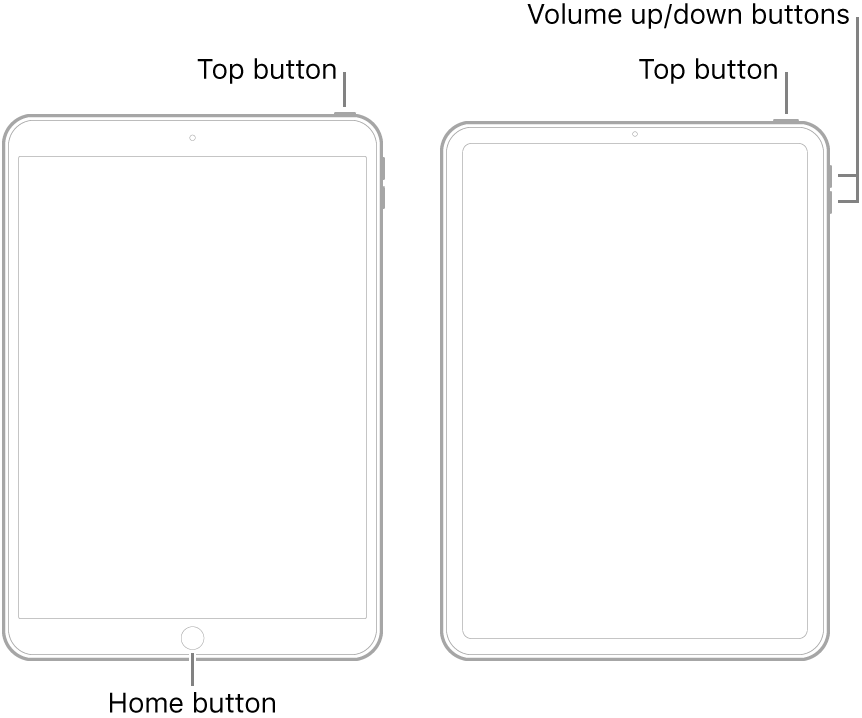
If the restart doesn’t help, the next step will be to ensure that you have an iCloud or iTunes backup, then start will progressively more invasive reset procedures:
1) Reset All Settings (Settings > General > Reset > Reset All Settings)
2) Erase All Content & Settings (Settings > General > Reset > Erase All Content & Settings)
3) Restore iPad to Factory Settings
https://support.apple.com/en-us/HT204184
Steps (2) and (3) allow you to restore your data from backup at the end of the process - however, you may ultimately find that the backup incorporates the very problem that you’re trying to resolve.
I hope your find this information to helpful in getting you on track to resolution.
First, before anything else, force-restart your iPad - as this often resolves isolated issues:
If the restart doesn’t help, the next step will be to ensure that you have an iCloud or iTunes backup, then start will progressively more invasive reset procedures:
1) Reset All Settings (Settings > General > Reset > Reset All Settings)
2) Erase All Content & Settings (Settings > General > Reset > Erase All Content & Settings)
3) Restore iPad to Factory Settings
https://support.apple.com/en-us/HT204184
Steps (2) and (3) allow you to restore your data from backup at the end of the process - however, you may ultimately find that the backup incorporates the very problem that you’re trying to resolve.
I hope your find this information to helpful in getting you on track to resolution.
Let me be more specific. Yes, I can intervene and stop it.
What I'd like to know is how to prevent it from doing this. I can find no indication of why it is beeping, so I don't know what's causing it and thus don't know how to stop it from happening.
iPad won’t stop beeping
