cannnot sign into iMessage

I cannot sign into iMessage on my ipad. I enter my id & password and it just rolls - - forever. I've tried the troubleshooting steps to no avail. I can't go to settings > messages > turn of imessages because it just rolls - - it wont let me in!! How do I fix this frustrating glitch??? I've been using iMessages for YEARS and all of a suddent it wont work.... what gives??


iPad, iOS 10

Posted on Apr 20, 2020 9:49 AM

Reply
Question marked as Top-ranking reply

Posted on Apr 20, 2020 10:23 AM

First, sign-out of iCloud on the affected device - then force-restart your iPad:


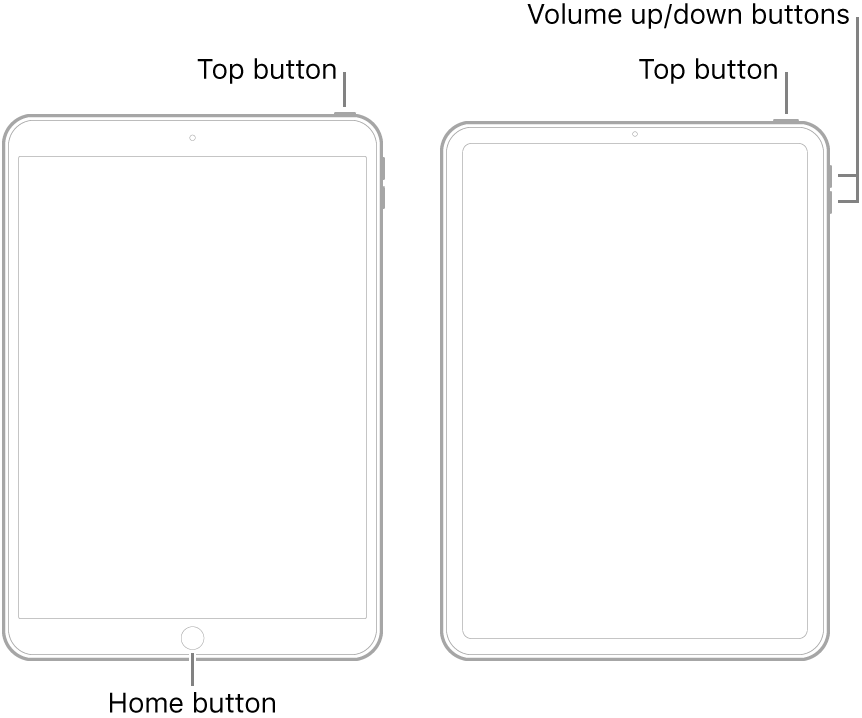
  • On an iPad with a Home button: Press and hold the top button and the Home button at the same time. When the Apple logo appears, release both buttons.
  • On an iPad with Face ID: Press and quickly release the volume up button, press and quickly release the volume down button, then press and hold the top button. When the Apple logo appears, release the button.


After restarting, log-in to iCloud - then attempt to log-in to iMessage.


7 replies
Question marked as Top-ranking reply

Apr 20, 2020 10:23 AM in response to Bears-Pats

First, sign-out of iCloud on the affected device - then force-restart your iPad:


  • On an iPad with a Home button: Press and hold the top button and the Home button at the same time. When the Apple logo appears, release both buttons.
  • On an iPad with Face ID: Press and quickly release the volume up button, press and quickly release the volume down button, then press and hold the top button. When the Apple logo appears, release the button.


After restarting, log-in to iCloud - then attempt to log-in to iMessage.


Apr 20, 2020 10:02 AM in response to Bears-Pats

Still not activated after a day?

It might take up to 24 hours to activate iMessage and FaceTime. If the issue continues after 24 hours, follow these steps:

  1. Make sure that your device has the latest version of iOS or iPadOS.
  2. If you're using an iPhone, contact your carrier to make sure that you can send and receive SMS messages.
  3. If your iPhone is used with a carrier not found in the wireless carrier articles make sure you can send and receive international SMS.
  4. Contact Apple Support.


What did Apple support say when you contacted them about your issue?

This thread has been closed by the system or the community team. You may vote for any posts you find helpful, or search the Community for additional answers.

cannnot sign into iMessage

Welcome to Apple Support Community
A forum where Apple customers help each other with their products. Get started with your Apple Account.