Soundcheck and Airplay 2

Does the Soundcheck feature on iPhone and iTunes work when playing over Airplay 2 to multi room wireless speakers? I listen exclusively to my mp3s thru iTunes and my iPhone and I am currently introducing wireless multi room speakers to my home. The apps that come with the speakers do not seem to have any soundcheck volume equalization and all my mp3s can have wildly different volumes. I assume the speaker apps are using their own mp3 players and just play from the files on my phone itself? If I use the iTunes on my iPhone will Apple's Soundcheck feature work over Airplay 2 and solve this problem?

iPhone XR

Posted on Apr 20, 2020 8:30 PM

Reply

Similar questions

2 replies

Apr 21, 2020 12:57 AM in response to MGray

 use Siri on your iOS device to play a movie or TV show in the room where you want to watch it.1 It's never been easier to control what's playing in every part of your home. 


AirPlay audio from your iPhone, iPad, or iPod touch

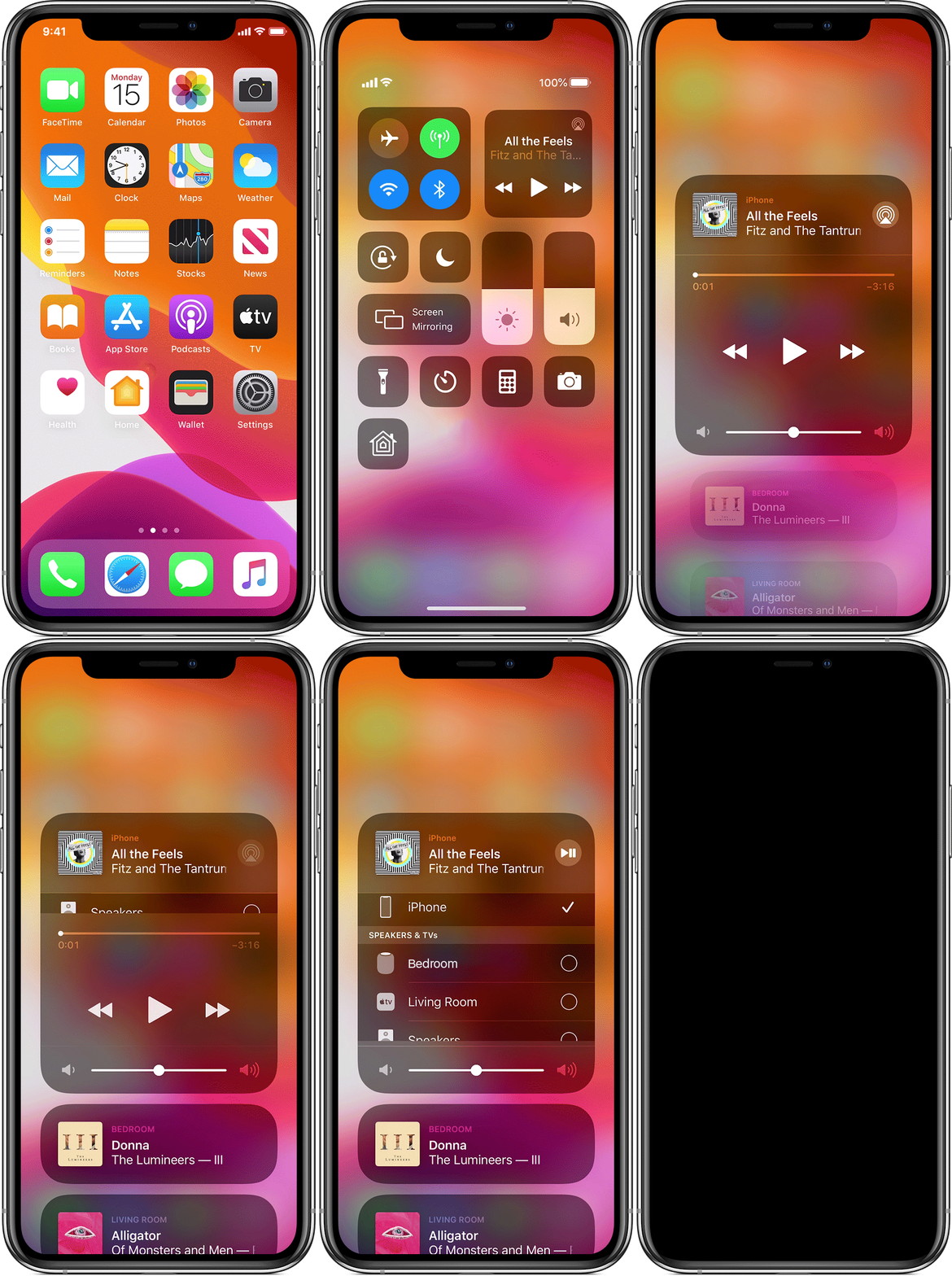
Play music on your iPhone, iPad, or iPod touch, then control where it's playing from Control Center:

  1. Open Control Center:
    • On iPhone X or later or iPad with iOS 12 or later: Swipe down from the upper-right corner of the screen.
    • On iPhone 8 or earlier or iOS 11 or earlier: Swipe up from the bottom edge of any screen.
  1. Press and hold the audio card in the upper-right corner, then tap Airplay .
  2. Tap each speaker or TV that you want to play the current audio to. 

You can also AirPlay audio from an app you're using on your iOS device. Just open the app, tap Airplay , then tap a speaker or tap multiple speakers.

Learn more about the requirements for using AirPlay and which speakers are supported.

This thread has been closed by the system or the community team. You may vote for any posts you find helpful, or search the Community for additional answers.

Soundcheck and Airplay 2

Welcome to Apple Support Community
A forum where Apple customers help each other with their products. Get started with your Apple Account.