share screen with zoom

Hi all,


I used to share my presentation in zoom, then I will use an app called explain everything to present and record my presentation. Everything fine when I used my ipad air 2. When I switch to the latest ipad pro, the system don't allow me to record the audio part of my presentation in explain everything. Anyone know how to tackle this problem?


Thx

iPad Pro 11-inch Wi-Fi

Posted on Apr 23, 2020 3:37 AM

Reply
3 replies

Apr 23, 2020 4:25 AM in response to foolkiukiu

I recommend that you seek assistance from Zoom, however, a force-restart of your iPad might help resolve an isolated issue.


Similarly, deleting the Zoom App, a forced-restart, followed by reinstallation of the App may be beneficial.


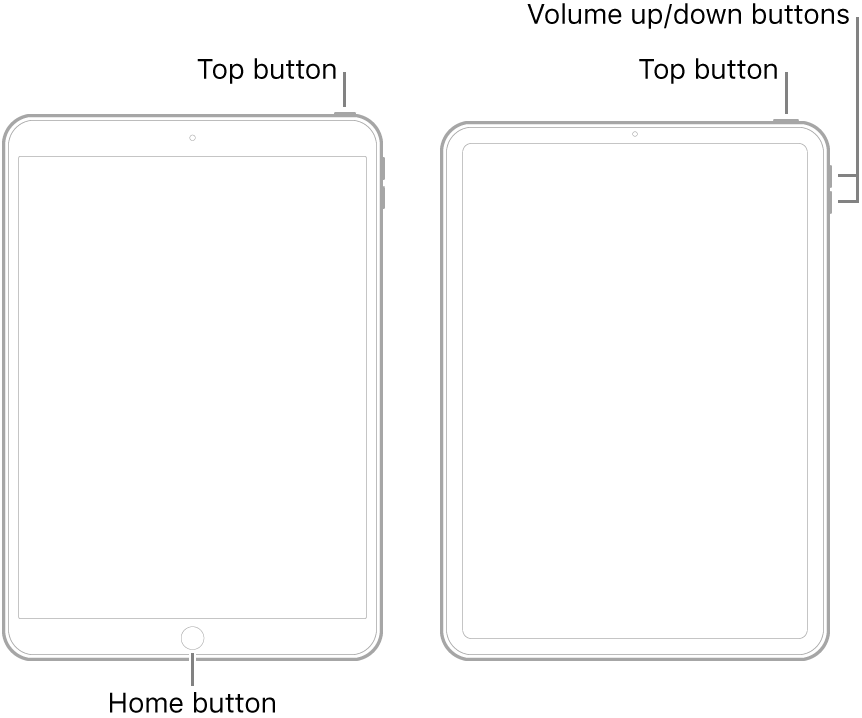
To force restart:

  • On an iPad with a Home button: Press and hold the top button and the Home button at the same time. When the Apple logo appears, release both buttons.
  • On an iPad with Face ID: Press and quickly release the volume up button, press and quickly release the volume down button, then press and hold the top button. When the Apple logo appears, release the button.


For now, I’ll presume you know how to delete and install Apps.

This thread has been closed by the system or the community team. You may vote for any posts you find helpful, or search the Community for additional answers.

share screen with zoom

Welcome to Apple Support Community
A forum where Apple customers help each other with their products. Get started with your Apple Account.