
Red microphone icon on Ipad
whenever i enter an app an red microphone icon appears on my screen. I have disabled all apps to have access to my microphone but the icon is still appearing. How do i turn it off?
whenever i enter an app an red microphone icon appears on my screen. I have disabled all apps to have access to my microphone but the icon is still appearing. How do i turn it off?
Begin with a force-restart of your iPad:
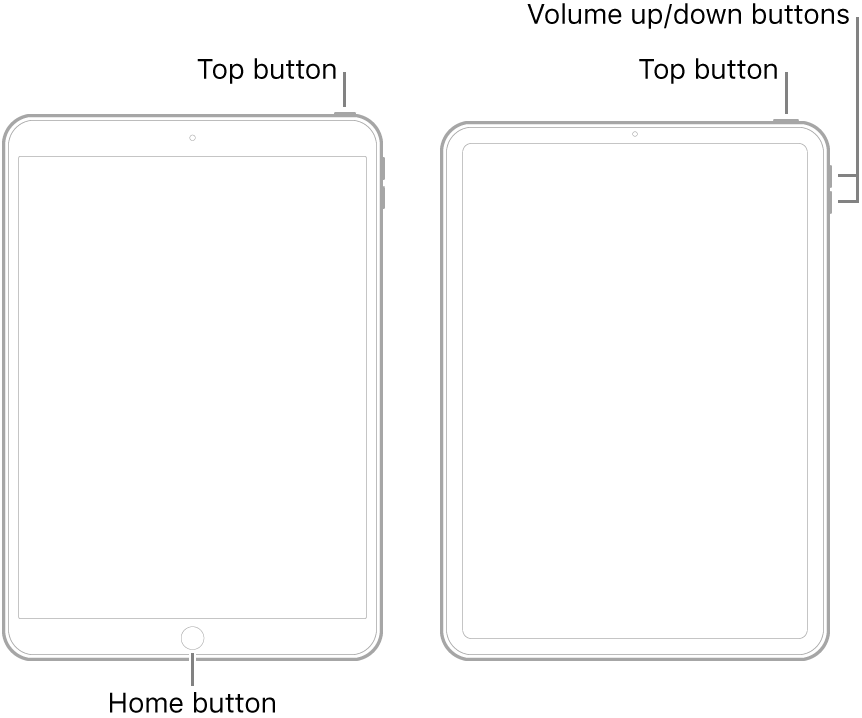
If this doesn’t resolve the problem, please post a screenshot (redacting any personal/sensitive information before posting). With the benefit of seeing what you can see, we may be able to offer definitive advice.
Begin with a force-restart of your iPad:
If this doesn’t resolve the problem, please post a screenshot (redacting any personal/sensitive information before posting). With the benefit of seeing what you can see, we may be able to offer definitive advice.
I noticed that the red mic icon appeared after using the "screen share" option on the Zoom meeting app. A force-restart cleared the issue for me.
check out the red mic icon at the top. Creeps me out. Is someone
listening?
Microphone Icon and mic are constantly on . How to turn it off? I have tried both of the listed fixes. No dice. It is a red, blinking mic icon, in the top of the home screen page and all other pages.When you touch the icon I am taken to Garage band that I use a lot. I’ve been through Settings and privacy and also reset the iPad. I want to turn the mic off, please help.
Your issue may be different to that of the Original Post.
In your case, perhaps you should confirm that the trigger is GarageBand. To do so, as a diagnostic tool, force-close the GarageBand App from the Task Switcher - then avoid using the App for 24hrs.
Red microphone icon on Ipad

