iPhone X screen stuck on black with apple logo

Hey Apple friends : )


my nearly brand new iPhone X is stuck on the black screen with the apple logo and refuses to do anything else. I did the volume up, volume down power instructions and now I see the screen has an image of the power cable pointing to the iTunes logo. However, my also brand new MacBook Air is not recognizing my phone. If any of you can offer any help I would truly appreciate it. Thank you !

iPhone X, iOS 12

Posted on May 2, 2020 10:37 AM

Reply
Question marked as Top-ranking reply

Posted on May 2, 2020 10:56 AM

Force restart iPhone - Apple Support ⬅︎ try this again and if still the same put it in Recovery Mode ...

⬇︎⬇︎⬇︎

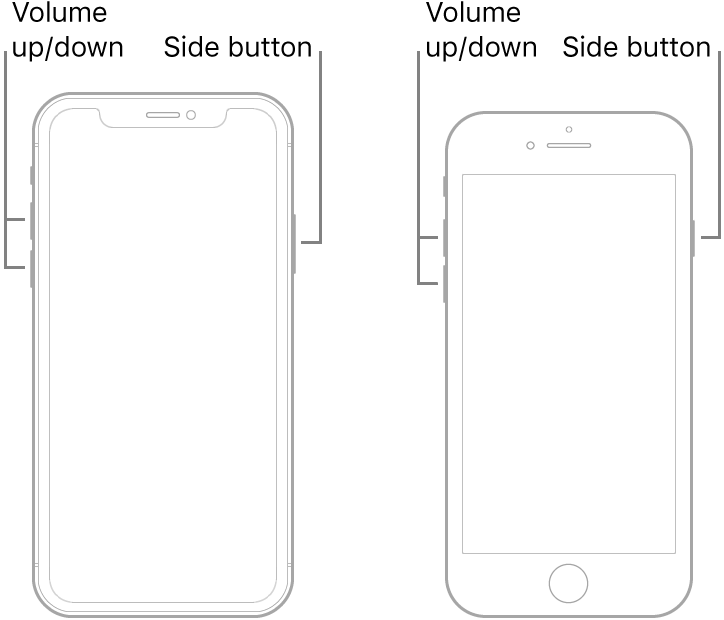
  1. Press and quickly release the volume up button.
  2. Press and quickly release the volume down button.
  3. Press and hold the side button.
  4. When the Apple logo appears, release the button.


If your iPhone, iPad, or iPod touch won't turn on or is frozen - Apple Support


Try Recovery Mode...⬇︎⬇︎⬇︎Full instructions in link...⬆︎⬆︎⬆︎


Connect your device to a computer. On a Mac with macOS Catalina 10.15, open Finder. On a Mac with macOS Mojave 10.14 or earlier, or on a PC, open iTunes.


 Press and quickly release the Volume Up button. Press and quickly release the Volume Down button. Then, press and hold the Side button until you see the recovery mode screen.


It may take a few tries to get into Recovery Mode but when you do then the phone will be recognized...


1 reply
Question marked as Top-ranking reply

May 2, 2020 10:56 AM in response to ceecee111

Force restart iPhone - Apple Support ⬅︎ try this again and if still the same put it in Recovery Mode ...

⬇︎⬇︎⬇︎

  1. Press and quickly release the volume up button.
  2. Press and quickly release the volume down button.
  3. Press and hold the side button.
  4. When the Apple logo appears, release the button.


If your iPhone, iPad, or iPod touch won't turn on or is frozen - Apple Support


Try Recovery Mode...⬇︎⬇︎⬇︎Full instructions in link...⬆︎⬆︎⬆︎


Connect your device to a computer. On a Mac with macOS Catalina 10.15, open Finder. On a Mac with macOS Mojave 10.14 or earlier, or on a PC, open iTunes.


 Press and quickly release the Volume Up button. Press and quickly release the Volume Down button. Then, press and hold the Side button until you see the recovery mode screen.


It may take a few tries to get into Recovery Mode but when you do then the phone will be recognized...


This thread has been closed by the system or the community team. You may vote for any posts you find helpful, or search the Community for additional answers.

iPhone X screen stuck on black with apple logo

Welcome to Apple Support Community
A forum where Apple customers help each other with their products. Get started with your Apple Account.