My iphone xr is stuck on the Apple logo, displays a solid color, and isn't recognized in iTunes. Its been like this overnight, but nothing has changed. What do i do during this crisis too?

last night i tried to charge my phone and back up my photos to icloud. So to do that it says to plug phone with power cord, lock phone and on wifi and that's exactly what I had done. couple hours later, I came to check and the screen turned black. I tried to turn it back on, but it wouldn't so i left thinking that it will restart by itself since it wasn't the first time that happens. Couple more hours later i checked again and it was still off. So my husband force restart my phone and then the apple logo popped out. However, last night until now its still stuck with the apple logo. Nothing I did or do was/is helping. I tried plugging it to my laptop but it did not respond as well. I don't know what to do. Any suggestions?

iPhone XR, iOS 13

Posted on May 2, 2020 11:04 AM

Reply
Question marked as Top-ranking reply

Posted on May 2, 2020 11:41 AM

Force restart iPhone - Apple Support ⬅︎ try this one more time and if still the same put it in Recovery Mode...

⬇︎⬇︎⬇︎

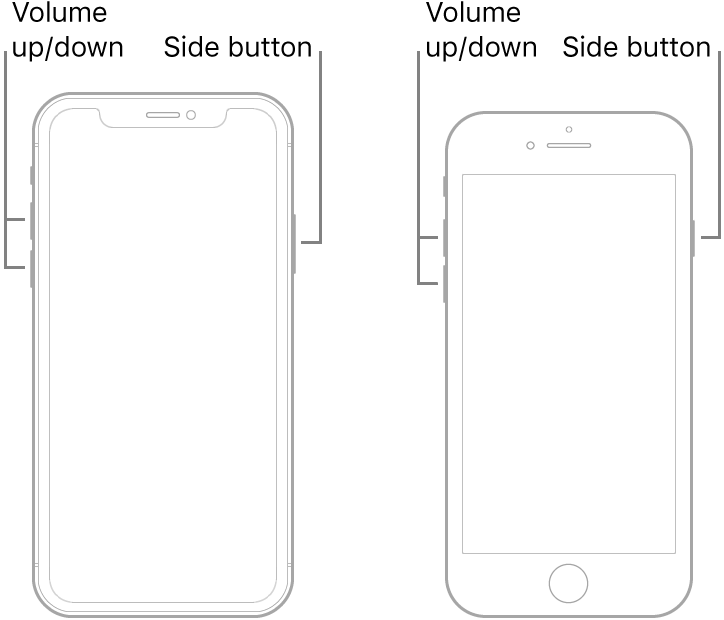
  1. Press and quickly release the volume up button.
  2. Press and quickly release the volume down button.
  3. Press and hold the side button.
  4. When the Apple logo appears, release the button.


If your iPhone, iPad, or iPod touch won't turn on or is frozen - Apple Support


Try Recovery Mode...⬇︎⬇︎⬇︎Full instructions in link...⬆︎⬆︎⬆︎


Connect your device to a computer. On a Mac with macOS Catalina 10.15, open Finder. On a Mac with macOS Mojave 10.14 or earlier, or on a PC, open iTunes.


 Press and quickly release the Volume Up button. Press and quickly release the Volume Down button. Then, press and hold the Side button until you see the recovery mode screen.


It may take a few tries to get into Recovery Mode but when you do then the phone will be recognized...


Similar questions

1 reply
Question marked as Top-ranking reply

May 2, 2020 11:41 AM in response to silent93

Force restart iPhone - Apple Support ⬅︎ try this one more time and if still the same put it in Recovery Mode...

⬇︎⬇︎⬇︎

  1. Press and quickly release the volume up button.
  2. Press and quickly release the volume down button.
  3. Press and hold the side button.
  4. When the Apple logo appears, release the button.


If your iPhone, iPad, or iPod touch won't turn on or is frozen - Apple Support


Try Recovery Mode...⬇︎⬇︎⬇︎Full instructions in link...⬆︎⬆︎⬆︎


Connect your device to a computer. On a Mac with macOS Catalina 10.15, open Finder. On a Mac with macOS Mojave 10.14 or earlier, or on a PC, open iTunes.


 Press and quickly release the Volume Up button. Press and quickly release the Volume Down button. Then, press and hold the Side button until you see the recovery mode screen.


It may take a few tries to get into Recovery Mode but when you do then the phone will be recognized...


This thread has been closed by the system or the community team. You may vote for any posts you find helpful, or search the Community for additional answers.

My iphone xr is stuck on the Apple logo, displays a solid color, and isn't recognized in iTunes. Its been like this overnight, but nothing has changed. What do i do during this crisis too?

Welcome to Apple Support Community
A forum where Apple customers help each other with their products. Get started with your Apple Account.