ios 13.4.1 storage

Upgraded to 13.4.1 last night. Now it appears there is a runaway process taking up all storage. Have cleaned the device and removed lots of data using the iphone tools -- removed 3GB of data and 30 minutes later, with no activity on phone, phone was full again. Anyone else?

iPhone 8

Posted on May 2, 2020 6:26 PM

Reply
1 reply

May 2, 2020 7:21 PM in response to wpollack

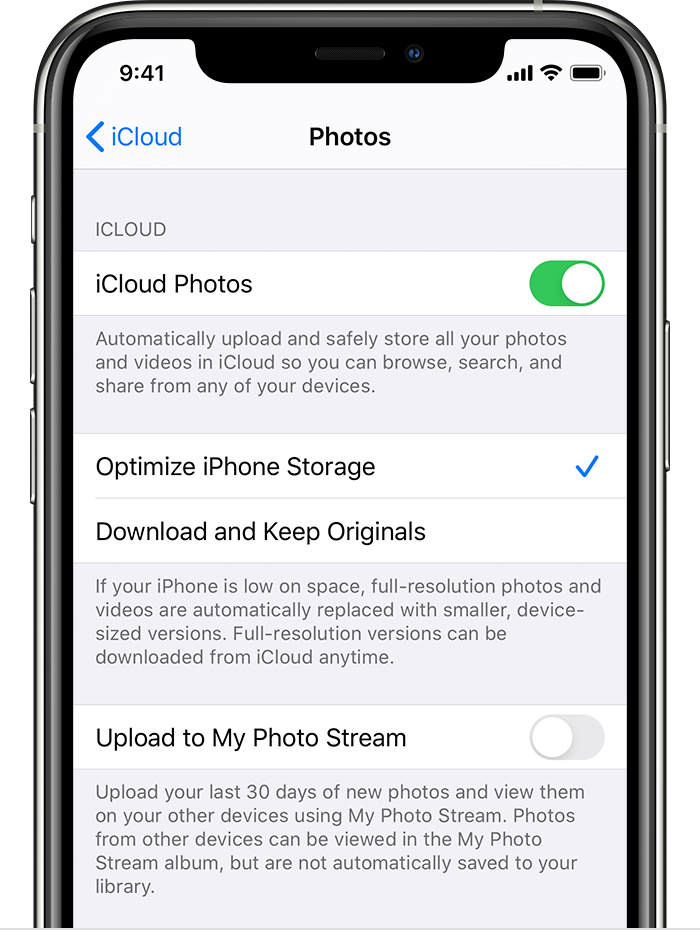
Have you unselected Optimised Storage and selected Download and store original?


Get started with iCloud Photos:

  1. Tap Settings > [your name] > iCloud > Photos.
  2. Turn on iCloud Photos.
  3. Select Optimize iPhone Storage to save space on your device.

With Optimize Storage, smaller, space-saving photos and videos are kept on your device while all of your original, full-resolution versions are stored in iCloud. And as long as you have enough space in iCloud, you can store as many photos and videos as you want.

This thread has been closed by the system or the community team. You may vote for any posts you find helpful, or search the Community for additional answers.

ios 13.4.1 storage

Welcome to Apple Support Community
A forum where Apple customers help each other with their products. Get started with your Apple Account.