Force restart iPhone - Apple Support ⬇︎⬇︎TRY THIS AND RECOVERY MODE ALSO if force restart does not work...
Press and hold both the volume down button and the Sleep/Wake button.
When the Apple logo appears, release both buttons.
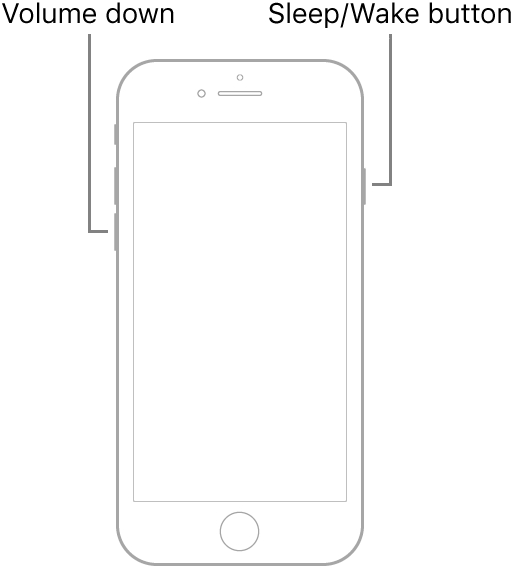
Note: If iPhone still doesn’t turn on, or if it gets stuck during start up, see the Apple Support article If your iPhone, iPad, or iPod touch won’t turn on or is frozen.
If that does not work try to put your phone in Recovery Mode...⬇︎⬇︎ full instructions in the link above...⬆︎⬆︎
Short instructions...⬇︎⬇︎
Connect your device to a computer. On a Mac with macOS Catalina 10.15, open Finder. On a Mac with macOS Mojave 10.14 or earlier, or on a PC, open iTunes.
Press and hold the Top (or Side) and Volume Down buttons at the same time. Keep holding them until you see the recovery mode screen.
It may take a few tries to get into Recovery Mode but when you do then the phone will be recognized...

