Fragmented albums!

i have synced music from my Windows laptop to my apple phone using ITunes. This has caused songs to fragment from their original albums so that one album is now split into several songs or more. I do not want to sign up to an Apple Music Subscription. It has also lost art work on the way.

iPhone SE, iOS 13

Posted on May 16, 2020 9:06 PM

Reply
Question marked as Top-ranking reply

Posted on May 17, 2020 2:37 AM

The usual cause of albums being split up is either that some tracks have guest artists listed in the artist field or the album is a compilation album (that is, a "various artists" album) that has not been correctly tagged.


Look at the album in your iTunes Library:

  • for a single artist album, that has a guest artists on one or more tracks, add the primary artist's name into the Album Artist field. In the example below, this album by Nelly Furtado has guest artists on several tracks. So on an iPod, the album would be split up in some menus. By adding her name to the Album Artist field, the album will be kept together. In the iTunes view shown below, you can see the guest artists listed in the artist column:


  • Selecting all the tracks and using Edit/Get Info, brings up the dialogue panel shown below:


  • Notice that the Artist field has Mixed in the box, because there is a mixture of artists
  • Add the prime artist name to the Album Artist field
  • Make sure that the Compilation field is not ticked, even if this the album is a collection (compilation) of songs from various periods of one artist's work (ie. <artist's name> Greatest Hits album)
  • Click OK
  • You will need to Sync your iPod with iTunes to make these changes effective on the iPod


  • for a compilation album (that is, each song is by a different artist), the Album Artist field needs to have Various Artists in the Album Artist field and the Compilation field needs to be ticked:


Again, you will need to Sync the iPod with iTunes for the changes to be added to the iPod.


Similar questions

4 replies
Question marked as Top-ranking reply

May 17, 2020 2:37 AM in response to Apple-frustration

The usual cause of albums being split up is either that some tracks have guest artists listed in the artist field or the album is a compilation album (that is, a "various artists" album) that has not been correctly tagged.


Look at the album in your iTunes Library:

  • for a single artist album, that has a guest artists on one or more tracks, add the primary artist's name into the Album Artist field. In the example below, this album by Nelly Furtado has guest artists on several tracks. So on an iPod, the album would be split up in some menus. By adding her name to the Album Artist field, the album will be kept together. In the iTunes view shown below, you can see the guest artists listed in the artist column:


  • Selecting all the tracks and using Edit/Get Info, brings up the dialogue panel shown below:


  • Notice that the Artist field has Mixed in the box, because there is a mixture of artists
  • Add the prime artist name to the Album Artist field
  • Make sure that the Compilation field is not ticked, even if this the album is a collection (compilation) of songs from various periods of one artist's work (ie. <artist's name> Greatest Hits album)
  • Click OK
  • You will need to Sync your iPod with iTunes to make these changes effective on the iPod


  • for a compilation album (that is, each song is by a different artist), the Album Artist field needs to have Various Artists in the Album Artist field and the Compilation field needs to be ticked:


Again, you will need to Sync the iPod with iTunes for the changes to be added to the iPod.


May 17, 2020 6:46 AM in response to the fiend

This has not helped. iTunes on the phone does not seem to recognise the albums. Under most albums it has "Unknown Album".

This is despite in the song info dialogue boxes it has album name, artist and album artist filled in correctly. This is for all albums including those that are not compilations. For example an AC/DC album all songs have the same info except the name of the song and track number, yet they are still split/fragmented.

May 19, 2020 2:16 PM in response to Apple-frustration

I asked from help from the fiend and it didn’t help. I tried replying but still no help. I have transferred music from my windows laptop iTunes Account to my iPhone however it has fragmented my albums. It does not seem to recognise the albums. Under most albums it has "Unknown Album".

This is despite in the song info dialogue boxes it has album name, artist and album artist filled in correctly. This is for all albums including those that are not compilations. For example an AC/DC album all songs have the same info except the name of the song and track number, yet they are still split/fragmented. So that some albums are split into all the different songs. On my iTunes on the windows laptop all albums are fine. It’s really frustrating!

Please help

May 20, 2020 7:22 AM in response to Apple-frustration

Okay, then now it's time to be more specific about the symptoms, in part because a song listed as "unknown album" has a different cause to albums that are split up.


  • So are you saying that you are experiencing both:
    • split albums - songs that appear as one album in your iTunes Library appear on your phone with some songs listed separately to other songs on the same album, but all songs have the same album title and artist details?
    • unknown album - songs appearing on your phone in the Album menu, but under the album title of "unknown album"?


Assuming the answer is yes, let's deal with them as separate issues with separate causes.


Let's start with the Split Albums:

Identify an album on your phone that has been split up. Now check that album in your iTunes Library, preferably using the Songs View (because it's more specific when trying to find the cause of this issue). Make sure you select all the songs and look at the Get Info box:
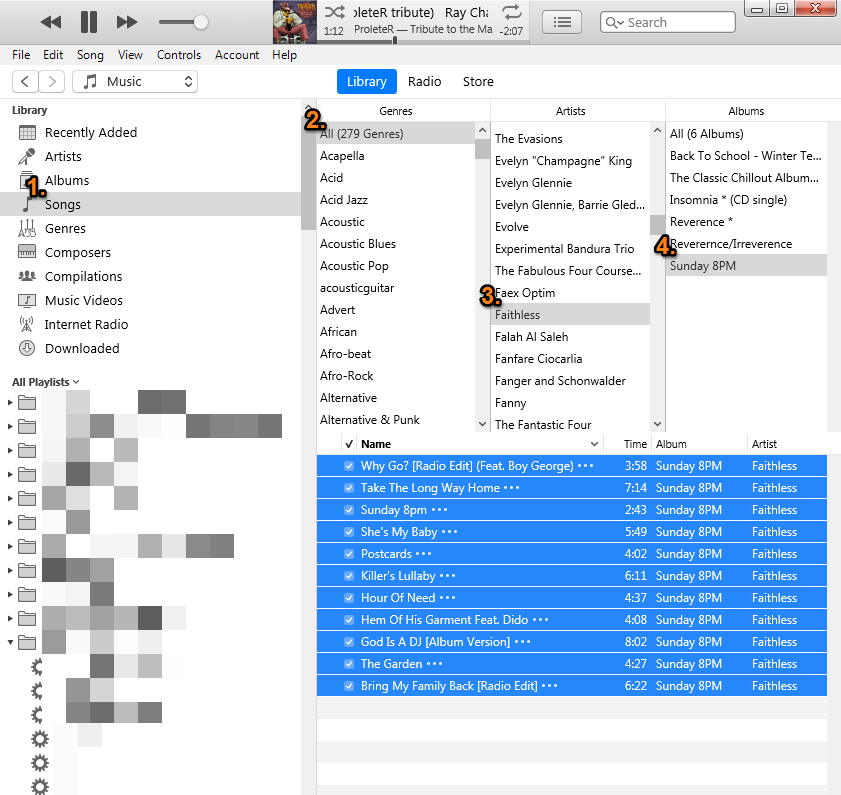

By selecting the Songs View (1.), choosing all genres (2.) then the specific artist (3.) and specific album (4.), I should have every song on that album showing here. Now select Edit/Get Info/Details and look closely at the artist field:


Notice that despite the fact that the artist name appears to be identical when looked at as a list of songs, the artist field (in Get Info) says "mixed" in greyed out text. It even states 2 artists selected to the right of the artwork. That's enough to split up the album on your phone. It means that at least one song has something different in the artist box.


I already know which song is causing this (because I've set it up to show you). You'll see in a minute how to fix it, but first of all, let's look closely at the specific song that's causing the issue:

I've highlighted the artist name by selecting from right to left and it reveals (in the upper picture) a trailing space after the band name. The lower picture demonstrates the difference. It's very easy to miss this problem, so read the next paragraph in order to fix it without knowing which particular song is causing it. It might even be more than one song.


What you need to do is copy the artist name from one specific song (that's correct of course) and paste it into every song on the album, including the song you copied from. That will make every song the same and then the artist field will show correctly once you Sync* iTunes with the phone.


    • If the artist is not the problem, check the album title using the same method as above. Repeat for each album that is listed as unknown album on your phone
    • If neither of these methods resolves the issue, start looking on the Sorting tab, for the same problem with either the artist name or the album title. More about the Sorting tab below.


Now let's look at the unknown album issue:

Identify just one song (for now) on your phone that is listed under the album menu with an album title of "unknown album". Now find that song in your iTunes Library and check the details in the Library. On the Details tab, look at the album title field and then check on the Sorting tab and make sure that both the album title and the sort as fields are completed (with the correct information):


If there is no problem with the song you chose, try another one, preferably one that you know is from a different album. What do you find?


Crucially - if you make (or have made) any changes to the version of songs in your Library, to correct issues that you find, you have to Sync (synchronise) the phone with your Library before those changes will be added to the phone.


* A note about synchronising; a Sync is just that. It involves using the Sync procedure to allow iTunes to apply changes made in iTunes, or certain changes made on the phone, to be matched up in both iTunes and on the phone. It is not "manually sync" (there's no such thing) or Manually Manage. If you use Manually Manage to add content to your phone, you will have to delete the copy on your phone and then drag on the revised version.

This thread has been closed by the system or the community team. You may vote for any posts you find helpful, or search the Community for additional answers.

Fragmented albums!

Welcome to Apple Support Community
A forum where Apple customers help each other with their products. Get started with your Apple Account.