Why I hate to update my IOS

I have delayed uodating mu phone IOS from 12.x to latest until recently as I dislike having to re-learn familar steps in the process of IOS upgrade. Often the so called upgrade is a downgrade as programers run out of ideas and simply change things without improvements in the name of progress. Worse is when this furniture moving result in a worse off experience.

My fear was not misplaced as after installing IOS 13.4 I realised the ease of editing text is now gone. Used to be able to tap and insert cursor in a word at the point for typo correction. Now the tap leads to the whole word being highlighted. It used to be that you could simply tap an insert point and slide to where you want, plus that a magnified view pops up to guide you where you finger is covering the word. This ease of editing is now gone.

Apple is going the way of Microsoft where with each new version you get a worse off experience. They take away what was working well and introduce meaningless features that has no value and made things worse in the name of progress. Simply moving the furniture without improvement is not progress and we all know how reluctant users have been in moving to a new Windows operating system. Now the same is happening at Apple and it comes when people run out of ideas but still need to bring in something new in the name of progress.

iPhone 8, iOS 13

Posted on May 22, 2020 7:44 PM

Reply
Question marked as Top-ranking reply

Posted on May 22, 2020 8:52 PM

It is contained in the link I provided, but is the absolute last suggestion there.


Here it is:


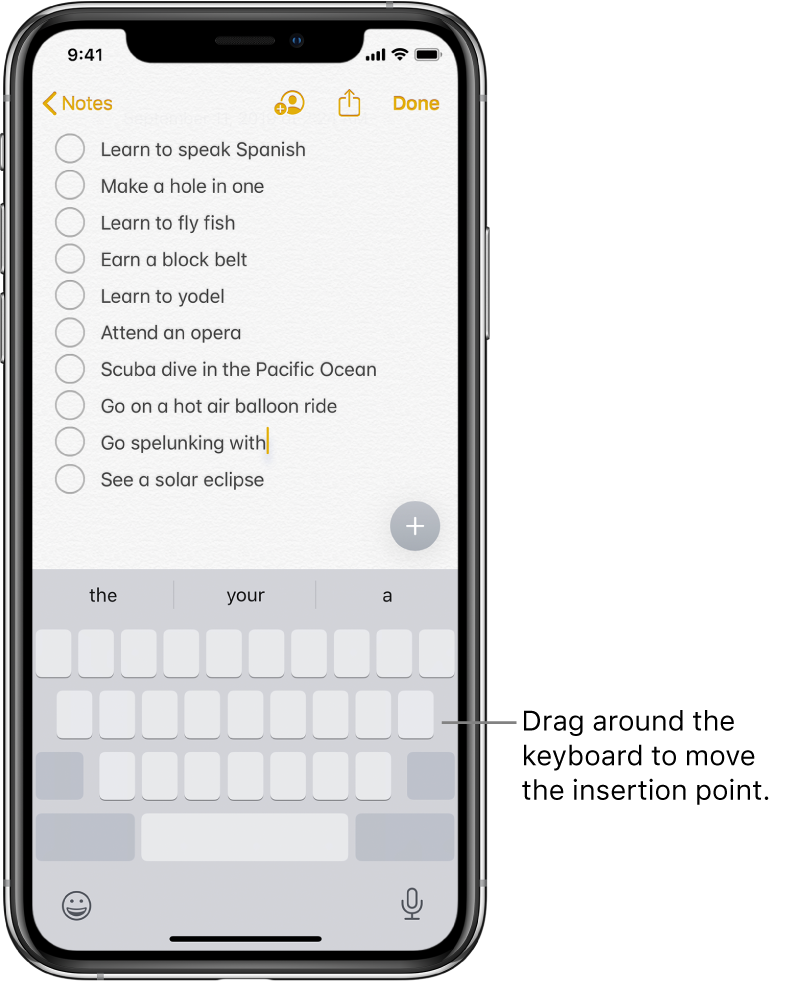
Turn your keyboard into a trackpad

  1. Touch and hold the Space bar with one finger until the keyboard turns light gray.
  2. Move the insertion point by dragging around the keyboard.


5 replies

May 22, 2020 7:56 PM in response to andrewtantk

Sorry, but change is going to be an ongoing thing with any operating system. If you don't like change, perhaps a smart phone which will constantly be updated and changed isn't the best solution for you.


Yes, Apple introduced new gestures for editing text in iOS 13, which work quite well. The simplest way is to put your finger on the space bar, hold it there until the keyboard letters disappear, then slide your finger to move the cursor where you want to move it and make whatever change you want.


This link explains the new and much better way to edit text on your iPhone --> Type and edit text on iPhone - Apple Support

This thread has been closed by the system or the community team. You may vote for any posts you find helpful, or search the Community for additional answers.

Why I hate to update my IOS

Welcome to Apple Support Community
A forum where Apple customers help each other with their products. Get started with your Apple Account.