How can I lower the temperature of my MacBook? can I increase the fan speed?

I need to lower the temperature of my MacBook, after some time its temperature rises too much and the fans do not accelerate to prevent it.


Thanks.

MacBook Pro 13″, macOS 10.15

Posted on May 27, 2020 5:20 PM

Reply
7 replies

May 27, 2020 6:44 PM in response to Kunturi

Please read See how apps affect Mac performance, battery runtime, temperature, and fan activity.


The exhaust fan speed is controlled by hardware, which is engineered to keep your Mac's internal temperatures well within specified parameters. Make no attempt to override it. If you suspect the fan has become inoperative, run Apple Diagnostics: How to use Apple Diagnostics on your Mac - Apple Support. It will exercise the fan and either confirm its proper operation or identify a failure.

May 28, 2020 9:08 AM in response to Kunturi

What year is your MBP ("sub-model" from "About this Mac.")?
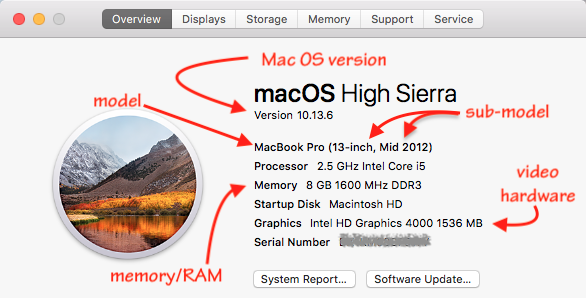


Is anything on the desk--books, external drives, tissue boxes--shoved up against the hinge area in the back? That is the primary hot air exhaust and must be clear. I try to keep anything the desk at least 3 inches (75mm) from the hinge.


My problem is not with the apps, they are working very well,


Not that simple, I'm afraid. Most processes that cause overheating are not the apps you use but among the many background apps that, by design, run all the time. The first article John Galt wisely presents is superb for ferreting out the little troublemakers that you do not even sense to be running in normal use.


Anti-virus and so-called "cleaning apps will absolutely increase temps. So will Google Chrome.



May 28, 2020 1:53 PM in response to Kunturi

Third party products that serve to circumvent the Mac's thermal management systems serve only one purpose: to mask a problem that needs to be identified and corrected. In so doing they will exacerbate those problems by needlessly drawing in additional contaminants, reducing a Mac's performance and contributing to premature hardware failure.


... after working a couple of hours, the time comes when it is too uncomfortable to use the palm rest or the keyboard.


No Mac should ever become warm to the point it becomes that uncomfortable to use. Contact Support and get it fixed.


Fix the problem. Don't hide it.

May 28, 2020 8:53 AM in response to John Galt

Thank you John,

My problem is not with the apps, they are working very well, I need to lower the temperature of the equipment because after working a couple of hours, the time comes when it is too uncomfortable to use the palm rest or the keyboard. (I work on desk). I would like to know if there is way to adjust the average fan speed to lower the temperature.


BR,

This thread has been closed by the system or the community team. You may vote for any posts you find helpful, or search the Community for additional answers.

How can I lower the temperature of my MacBook? can I increase the fan speed?

Welcome to Apple Support Community
A forum where Apple customers help each other with their products. Get started with your Apple Account.

