Anger about macOS 10.15.5

Hello. MacBook Air 2020 macOS Catalina 10.15.5. I regret that I updated from MacOS 10.15.3 to MacOS 10.15.5. Before the upgrade, the brand new MacBook Air 2020 worked fine on a single charge of the battery, and after the upgrade it barely holds a charge until the evening. The update was the day before yesterday.

What can I do? Wait for three days, re-install, or?


Posted on Jun 5, 2020 6:36 AM

Reply

Similar questions

19 replies

Jun 6, 2020 8:02 AM in response to антонfromnull

I sent in a comment a few hours ago, as my wife's MacBook Air was heating up and the fan running for a lot of the time - seemed to happen only after I'd upgraded to OS 10.15.5. I've now checked the Activity Monitor - con.apple.photos.imageconversionservice had been running long after my wife stopped working on her stored photos. Monitor showed usage close to 100%. It would not quit, so I had to force a quit. It stopped and the fan then gently switched off. From other posts, it does look as if 10.15.5 has created a number of problems. I'm also using this version of Catalina in another Air (2015), so far with no obvious problems.

Jun 7, 2020 10:46 AM in response to антонfromnull

антонfromnull wrote:

And I don't know how to interpret these indicators (screenshot attached).


Activity Monitor Help provides a detailed description.


Excerpt:


View energy consumption in Activity Monitor on Mac


Mac portable computers

    • Remaining charge: The percentage of battery charge remaining.
    • Time until full (plugged in): The amount of time your Mac must be plugged into an AC power outlet until the battery is fully charged.
    • Time on AC (plugged in): Time elapsed since your Mac was plugged into an AC power outlet.
    • Time remaining (unplugged): The estimated amount of battery time remaining.
    • Time on battery (unplugged): The amount of time that’s elapsed since your Mac was plugged into an AC outlet.
    • Battery (Last 12 hours): The battery charge level over the last 12 hours.


In your case Activity Monitor is estimating 3 hours 22 minutes remaining on battery power. Extrapolating that amount yields a full charge estimate of about ten hours predicated on current usage.


Examine the section directly above the screenshot portion you posted to sort and identify each process that contributes to your Mac's energy consumption.

Jun 6, 2020 2:15 AM in response to jfraserd

Hello. Got my new MacBook on June 1st. Literally 1 day after 10.15.5 was released, I updated it, not suspecting a trick. For all the time that I have this MacBook, I heard the fans once when I uploaded my photos and stuff to a new MacBook, the audibility of the fan was very low. But now, yes, I am observing that it is necessary to charge the MacBook more often, but the more often you charge, the faster battery dies. Either this is due to a new feature, or I must been patient to wait 3-4 days.

Jun 7, 2020 11:01 AM in response to антонfromnull

Oh that's just not right. The Activity Monitor window should resemble the one below:
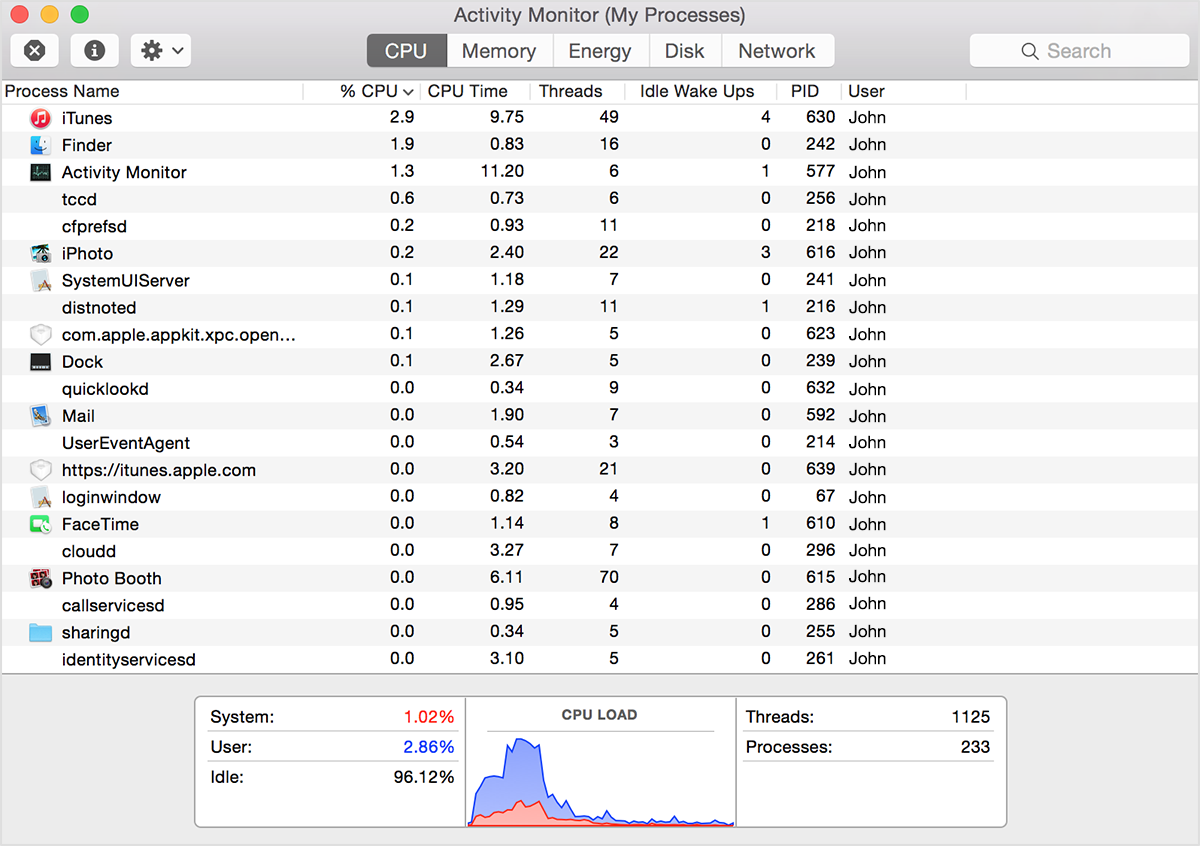


Since yours is completely blank, reinstalling macOS is justified because who knows what else isn't right.


Before you perform that time-consuming exercise though, first quit the Activity Monitor app.


Then, delete the following file:


~/Library/Preferences/com.apple.ActivityMonitor.plist


To navigate to it, select the line above (you can triple-click to select the entire line), then control-click, then select Services > Show in Finder from the contextual menu that appears. A Finder window will open. Drag the com.apple.ActivityMonitor.plist file to the Desktop, or directly to the Trash.


Then, launch the Activity Monitor app again. The default columns as shown in the above screenshot should be restored.

Jun 6, 2020 8:39 AM in response to jfraserd

Thanks for the comment. Yesterday, late in the evening, I did a reinstall without erasing the disk. And today, while my macbook was charging I did SMC. I did a reset of this parameter im meanwhile communicating with Apple technical support. I explained my situation to them, they offered me a diagnostic By rebooting the MacBook and pressing D., the system checked for problems and could not find it.

They offered me several options, including working in safe mode, or creating another user profile. I thanked them. I have done so far only SMC. I will watch.

My MacBook heats up around the trackpad (left and right) and around the speaker grids. But this happens when the MacBook is on my lap. But the most interesting thing is that the fans do not start up at the same time. On my previous MacBook Air 2017, in this situation, the fans started up, although not so noisy. And it heats up and I can warm my fingers.

Jun 7, 2020 10:30 AM in response to jfraserd

Yesterday I talked twice with Apple technical support. They offered a lot of options to solve the problem. So far I decided to try only SMC. By the way, I did diagnostics, and it did not show the presence of any issues. And it seems that (I would like to believe) the problem was solved, but I can be sure of this only on weekdays, since on weekends I work most of the time on iMac.

At the moment, 32 percent of the charge. Last charge on Saturday.

And I don't know how to interpret these indicators (screenshot attached).

Jun 7, 2020 11:50 AM in response to антонfromnull

According to your latest Activity Monitor results your Mac will last about a day on battery power—exactly what Apple advertises.


... barely holds a charge until the evening.


That's correct. At the end of the day it will be barely charged. That's how Apple designs most if not all their portable devices.


It's normal to expect a day of usage from a fully charged battery, to normally charge it overnight, and to last about a month on standby power.


You can empty the Trash manually or allow macOS to empty it automatically: Empty Trash Automatically

This thread has been closed by the system or the community team. You may vote for any posts you find helpful, or search the Community for additional answers.

Anger about macOS 10.15.5

Welcome to Apple Support Community
A forum where Apple customers help each other with their products. Get started with your Apple Account.
