Songs I didn’t download or purchase are showing up in my library

I’m an Apple Music subscriber, and I twice in the last month I have noticed that music I didn’t purchase or add to my library have shown up in my library. I have a Family Sharing account with my husband, but he didn’t purchase/add them either. I want to know how this happened and am concerned about the security of my account.

Posted on Jun 7, 2020 7:57 PM

Reply
Question marked as Top-ranking reply

Posted on Jun 9, 2020 5:51 PM

Hello Wsqwared,


I see you have questions about music you didn't purchase or add being added to your Apple Music library. I can understand wanting to find out where this unknown music is coming from. If you have Shazam installed on your device, and you use it to locate music information, it is possible this is where the music is coming from. Here's information on how to Use Shazam to identify songs and find new music.


This article goes over how songs from Shazam are automatically added to your Apple Music library: Use Shazam with Apple Music, Snapchat, and more


"Apple Music

Tap the Apple Music button near a Shazam to listen to that song in Apple Music. If you’re an Apple Music subscriber, songs that you've Shazamed are also automatically added to a playlist called My Shazam Tracks in the Music app. To add a Shazam to a different playlist, tap "Add To" next to a Shazam, then tap the playlist that you want to add the song to. If you’re not already a subscriber, learn how to join Apple Music.
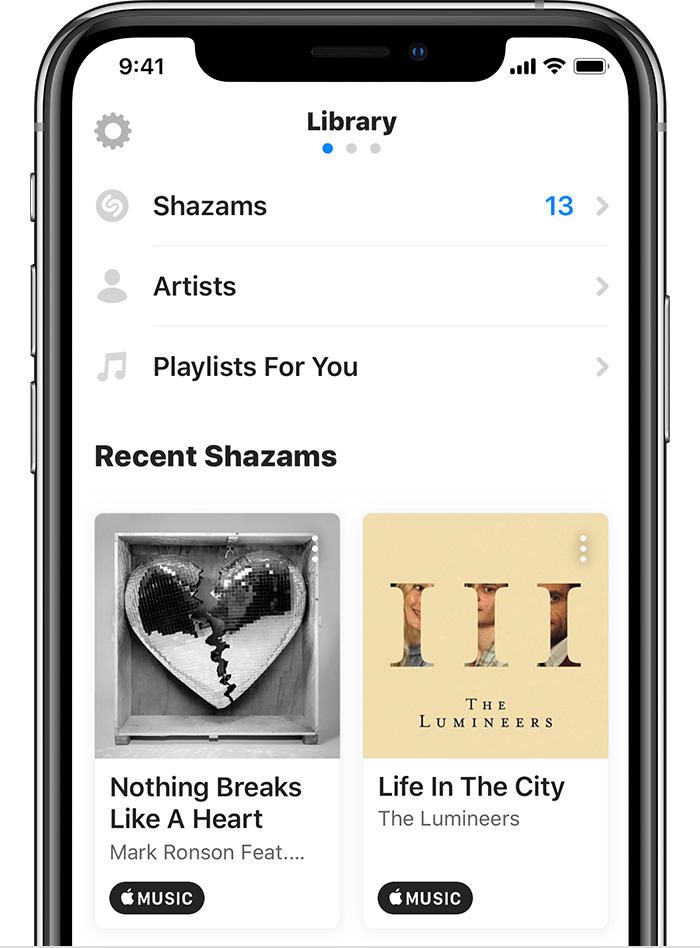
If you can’t add songs to a playlist, make sure to sync your music library with Apple Music. If you don’t want Shazam to automatically add songs to Apple Music, in Shazam on iPhone or iPad tap the library button tap the settings button then turn off "Auto-add Shazams to Apple Music."


Do you have any other Apple devices that use your same Apple ID and password? If so, it's possible that you have Sync Library enabled with Apple Music. Here's more information on that: Turn on Sync Library with Apple Music.


Best regards!

5 replies
Question marked as Top-ranking reply

Jun 9, 2020 5:51 PM in response to Wsqwared

Hello Wsqwared,


I see you have questions about music you didn't purchase or add being added to your Apple Music library. I can understand wanting to find out where this unknown music is coming from. If you have Shazam installed on your device, and you use it to locate music information, it is possible this is where the music is coming from. Here's information on how to Use Shazam to identify songs and find new music.


This article goes over how songs from Shazam are automatically added to your Apple Music library: Use Shazam with Apple Music, Snapchat, and more


"Apple Music

Tap the Apple Music button near a Shazam to listen to that song in Apple Music. If you’re an Apple Music subscriber, songs that you've Shazamed are also automatically added to a playlist called My Shazam Tracks in the Music app. To add a Shazam to a different playlist, tap "Add To" next to a Shazam, then tap the playlist that you want to add the song to. If you’re not already a subscriber, learn how to join Apple Music.

If you can’t add songs to a playlist, make sure to sync your music library with Apple Music. If you don’t want Shazam to automatically add songs to Apple Music, in Shazam on iPhone or iPad tap the library button tap the settings button then turn off "Auto-add Shazams to Apple Music."


Do you have any other Apple devices that use your same Apple ID and password? If so, it's possible that you have Sync Library enabled with Apple Music. Here's more information on that: Turn on Sync Library with Apple Music.


Best regards!

Jun 10, 2020 6:58 AM in response to Wsqwared

Wsqwared,


Thanks for checking those Apple Music/Shazam settings. I know that songs showing up out of the blue is not an expected behavior. Did you get a chance to see if any other devices use your same Apple ID and password? If you're unsure if there are other devices, you may want to check. Here's how to Check your Apple ID device list to see where you're signed in


If you find that your Apple ID is being on other devices, you may want to check to see if Sync Library is enabled with Apple Music. Here's more information on that: Turn on Sync Library with Apple Music.


Cheers!

This thread has been closed by the system or the community team. You may vote for any posts you find helpful, or search the Community for additional answers.

Songs I didn’t download or purchase are showing up in my library

Welcome to Apple Support Community
A forum where Apple customers help each other with their products. Get started with your Apple Account.
