How do I delete robokiller, there is no unsubscribe
How can I delete RoboKiller off my phone. There is no unsubscribe.
iPhone 7 Plus, iOS 13
How can I delete RoboKiller off my phone. There is no unsubscribe.
iPhone 7 Plus, iOS 13
Here are the steps to remove RoboKiller and disable its call blocking/forwarding. This consolidates all the recommendations without having to jump to multiple posts or links. Links are provided with more details for each section under Additional Information. Below outlines how to do the following:
TO CANCEL A SUBSCRIPTION
TO DISABLE ROBOKILLER’S CALL BLOCKING/FORWARDING
Step 1
Step 2 (If App Wasn’t Deleted)
Step 3 (If Step 2 Didn’t Work or App Was Deleted)
Step 4 (If Step 3 Didn’t Work)
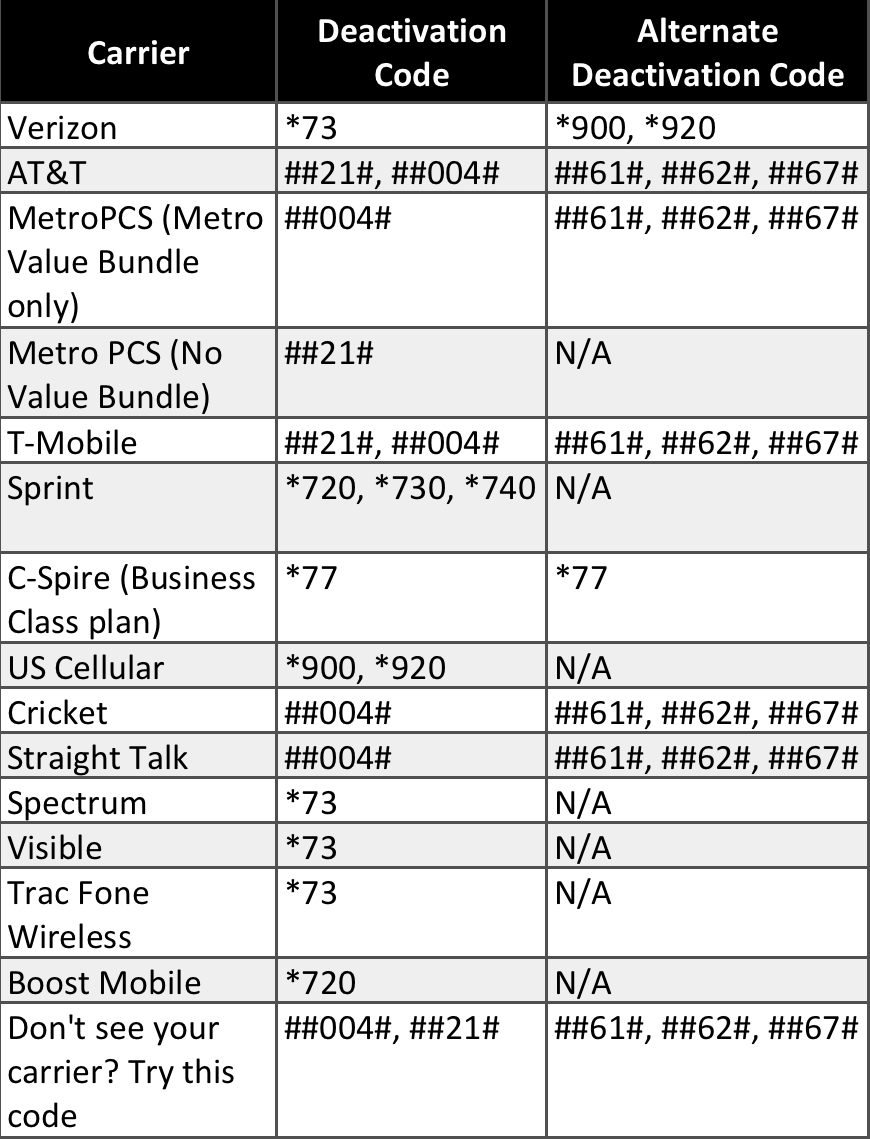
Call the deactivation code for your carrier.
Step 5 (If Step 4 Didn’t Work)
Call your carrier directly to disable.
TO DELETE AN APP
REQUEST A REFUND
Some purchases from the App Store, iTunes Store, Apple Books, or other Apple services might be eligible for a refund. Limitations apply. See the Apple Media Services Terms and Conditions for details.
It took me a while to get RoboKiller completely removed, so I hope this helps others. Good luck!
Justin
That link no longer works
I'm having the same problem, and it's screwing up my apple payment account.
it wants to take a monthly fee, but I cancelled before the free trial ended.
i just had this problem, learned that you cannot deactivate without a valid subscription. Took me like 15 try’s but I finnaly figured it out
RoboKiller should be outed for NUISANCE it actually is. Even the BEST day with Their CURE is more aggravation than the WORST day of the Robo DISEASE.
How to unsubscribe from Robokiller? Tried to delete app and still blocked incoming calls if not on my contact list LPL
Oh the app still blocks any number not in contacts. I have been trying to remove it for months. It is causing severe stress to me.
I have a Ipjhone 6. How do I deactivate RoboKiller. I don’t have a subscription
You have to disable call forwarding to the app as well. Here's a link: https://support.robokiller.com/hc/en-us/articles/360039457831-How-can-I-disable-RoboKiller-on-my-phone-iOS-12-
RoboKiller is absolutely blocking calls from my contacts. It’s an abomination. And nearly impossible to get rid of. If you don’t have it, don’t get it.
Same problem. Blocks every call, contacts or otherwise. Contacted RK Support but complete waste of time. They are unable to find my subscription and offer no assistance in eliminating this nuisance APP. Short of doing a factory reset there doesn't seem to be any way to avoid this utterly frustrating intrusion on iPhone use/enjoyment.
Following RK instructions on deactivating the BLOCKING after having removed the APP simple does NOT work. Endless aggravation. WOULD NEVER RECOMMEND ROBOKILLER as support is as useless as their product is disgusting.
If anyone learns how to deactivate the BLOCKING/SILENCING activity of ROBO KILLER after the APP has been removed, PLEASE SHARE the Step by Step of "HOW TO." Grateful!
INSTRUCTIONS FOR IoS/iPhone:
Yes, it can block all of your calls whether they’re in your contacts or not & is an absolute pain to fully remove. The first step is to delete any call blocking app from your phone’s carrier as that’s usually the conflict.
REMOVE ROBOKILLER Completely from Phone:
1) , delete the app. 2). Unsubscribe 3). In Settings go to Do Not Disturb, scroll down and change Calls to Everyone. 4). In Settings—Do Not Disturb. Under Phone change to Allow Calls from Everyone 5). In Settings—Phone: Call Blocking & ID & turn to OFF then to Call Blocking & ID: turn Silence Junk Callers OFF (while in there make sure Call Identification Apps are off & that RoboKiller isn’t listed) then SMS/Cell Reporting is set to NONE. 6). Settings—your name—Subscriptions: make sure RoboKiller plans are showing as Inactive.
Do a soft reset by powering off phone & turning on again. Have someone not in your contacts call you.
iF all of this still doesn’t work call your carrier’s technical support, allow them to see your phone & let them help you. That’s how I was *finally* able to fully remove RoboKiller. They do not make it easy in the hopes you’ll give up & keep their app 😬
Good luck!
Same issue as Gananam56. I've deleted the Robokiller app, deleted the subscription, and it still blocks my contacts when they call me.
How do I delete robokiller, there is no unsubscribe