
Hello, I am unable to update my iPhone 7 Plus, I keep getting a message that my storage is full
Hello, I’m unable to update my iPhone 7 Plus, keep getting a message storage full?
Hello, I’m unable to update my iPhone 7 Plus, keep getting a message storage full?
Good afternoon contrena,
Welcome to the Apple Support Communities!
It sounds like like you have run out of storage space on your iPhone 7 Plus. The resources below will help you free up space so that you can update the iOS:
If your iPhone, iPad or iPod touch won’t update
If you need more space for an update
Manage your photo and video storage
" Store your photos and videos in iCloud
Your photos and videos are stored on your device in their original, high-resolution version. This means that they use a lot of space on your iPhone, iPad, and iPod touch. With iCloud Photos, you can make more space available on your device and have your entire collection, everywhere you go.
Get started with iCloud Photos:
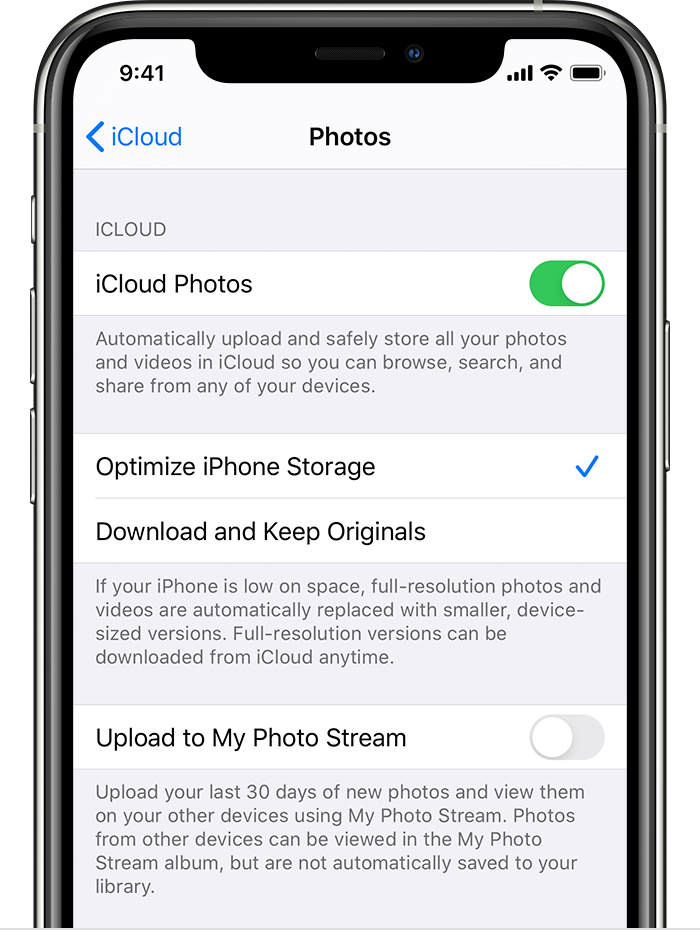
With Optimize Storage, smaller, space-saving photos and videos are kept on your device while all of your original, full-resolution versions are stored in iCloud. And as long as you have enough space in iCloud, you can store as many photos and videos as you want."
Take care.
Good afternoon contrena,
Welcome to the Apple Support Communities!
It sounds like like you have run out of storage space on your iPhone 7 Plus. The resources below will help you free up space so that you can update the iOS:
If your iPhone, iPad or iPod touch won’t update
If you need more space for an update
Manage your photo and video storage
" Store your photos and videos in iCloud
Your photos and videos are stored on your device in their original, high-resolution version. This means that they use a lot of space on your iPhone, iPad, and iPod touch. With iCloud Photos, you can make more space available on your device and have your entire collection, everywhere you go.
Get started with iCloud Photos:
With Optimize Storage, smaller, space-saving photos and videos are kept on your device while all of your original, full-resolution versions are stored in iCloud. And as long as you have enough space in iCloud, you can store as many photos and videos as you want."
Take care.
Hello, I am unable to update my iPhone 7 Plus, I keep getting a message that my storage is full

