Numbers Substraction - From a value of a cell I want to gradually substract values from other cells until = 0

Cell A=10, B=4, C=7, D=3


Cell A=10 (which is an expense) can be covered by the value of the 3 other cells in any particular order I decide


e.g.

cover expense A=10 by first substracting cell C=7 (because A=3 I need to continue substracting)

continue to substract from B=4


we now have

A=0 B=1, C=0, D=3


But if A=14, then formula would have continued to substract from D


Is this formula possible.


Anticipated thanks


we now have

Posted on Aug 1, 2020 11:40 AM

Reply
6 replies

Aug 2, 2020 7:54 PM in response to vdorofte

Here is another take on it:


The first row of each set of numbers is the start condition. The second row is the end condition. I suppose if you decide to pull from the other pockets in an order other than B then C then D you would have to rearrange them in the table.


Formulas

A3 =A2−SUM(B2:D2)+SUM(B3:D3)

B3 =MAX(0,B2−A2)

C3 =MAX(0,C2−(A2−B2+B3))

D3 =MAX(0,D2−(A2−B2+B3−C2+C3))


To make the other sets of rows, select rows 2 and 3, Copy, Paste to new row.


Aug 2, 2020 1:11 AM in response to vdorofte

Here are four copies of the same table.


The upper pair shows your first scenario, with payments made from C, then B on the left and with payments made from B, then D then C on the right.
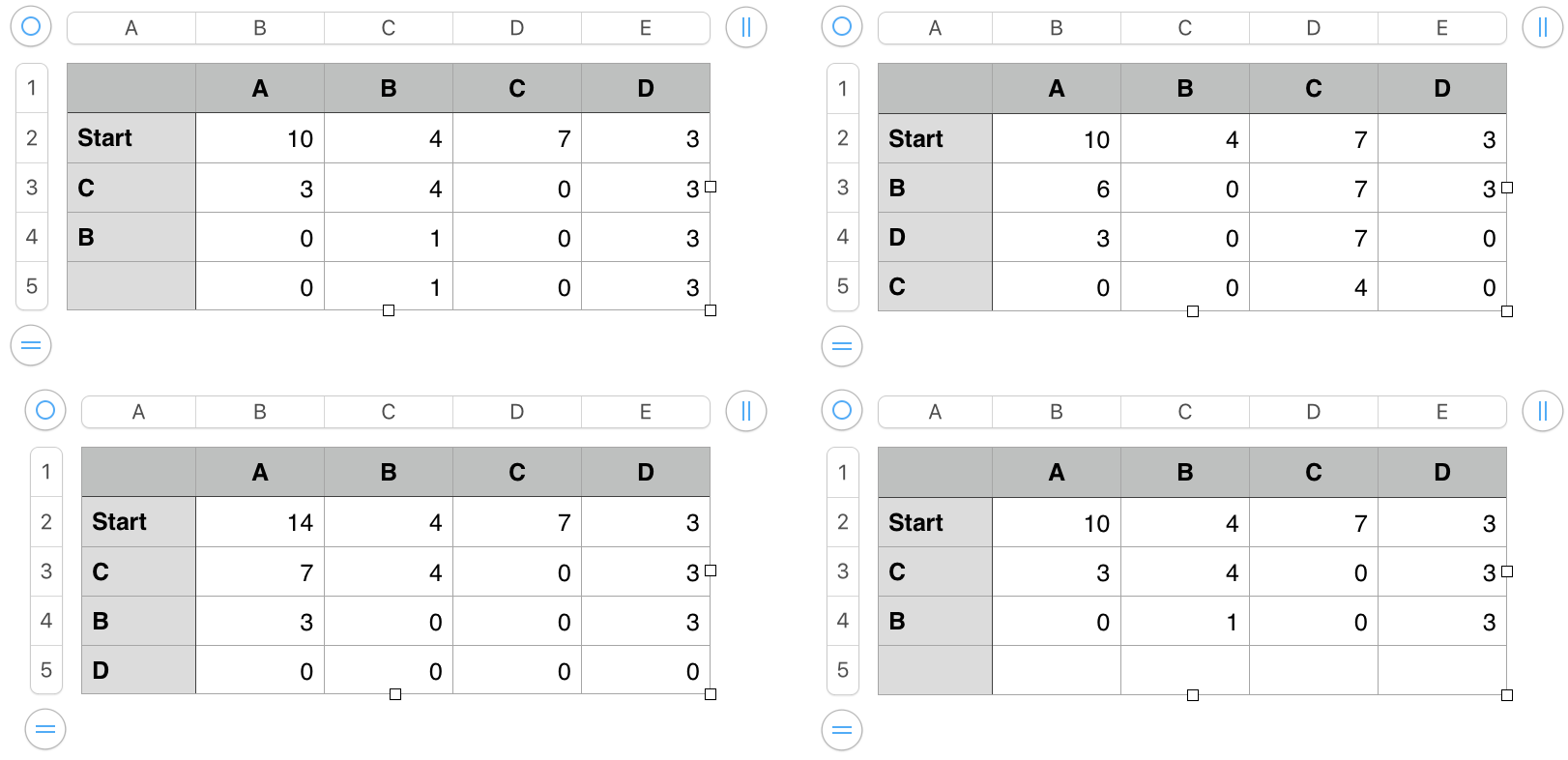
In the bottom pair, the table on the left shows the results if A is 14, and payments are made in the same order as in the top left table.

The table at bottom right has the second set of formulas shown(amd described) below. The changes produce the 'empty' final row, where no entry has been made in column A.


Formulas:


The first three tables contain these formulas:


B3, and filled down: B2−(SUM(C2:E2)−SUM(C3:E3))


The two SUM functions calculate the sum of the B, C and D values in the row above and in 'this row', and subtract the second sum from the first. The difference is the amount taken out of the pocket named in 'this row' of column A. The amount is subtracted from the cell above the formula (B2) to get the amount remaining in A.


C3, and filled right to E3 and down to row 5: IF(C$1=$A3,C2−MIN($B2,C2),C2)


IF the value in 'this row' of Column A is the same as the value in row 1 of 'this column', the formula gets the value in row 2 of 'this column' and subtracts the smaller of the value in B2 and the value in row of 'this column'. Otherwise, the formula copies the value from the cell above this cell into this cell.


The fourth table (lower right) has the same two formulas, each wrapped in a 'switch' that prevents calculation until there is an entry made in that row of column A.


B3, and filled down:                        IF(LEN($A3)<1,"",B2−(SUM(C2:E2)−SUM(C3:E3)))


C3, and filled right and down:       IF(LEN($A3)<1,"",IF(C$1=$A3,C2−MIN($B2,C2),C2))


Regards,

Barry


Aug 1, 2020 7:37 PM in response to vdorofte

Hi vdorofte.


I think I may have been distracted by your strange spelling of subtraction (which I was surprised to find listed in the Merriam-Webster online dictionary with the definition "embezzlement").


What is the end goal here?


I'm also unsure of which values are to be subtracted and which are to be subtracted from. Could you clarify that by writing out the subtraction expression for each action in your example.


Regards,

Barry

Aug 1, 2020 11:56 PM in response to Barry

On re-reading…


A is the amount owing.

B, C and D are the 'pockets' from which money may be drawn to pay the amount in A.


You state: The expense in A "can be covered by the value of the 3 other cells in any particular order I decide."


Questions:

How do you decide which pocket is to provide the initial payment?

How do you decide which is to provide the second payment?


Regards,

Barry


This thread has been closed by the system or the community team. You may vote for any posts you find helpful, or search the Community for additional answers.

Numbers Substraction - From a value of a cell I want to gradually substract values from other cells until = 0

Welcome to Apple Support Community
A forum where Apple customers help each other with their products. Get started with your Apple Account.
