I phone storage management

I am getting often messages that there is enough storage in my iPhone

Also the same message about ICloud storage

I deleted several videos and photos from my iPhone

it is reflected in the storage bar

I wish some one will help me to use my phone peacefully

iPhone 7, iOS 13

Posted on Aug 19, 2020 1:04 AM

Reply
Question marked as Top-ranking reply

Posted on Aug 19, 2020 1:09 AM

You can manage your storage --> How to check the storage on your iPhone, iPad, and iPod touch

Manage your Storage --> Manage your photo and video storage - Apple Support


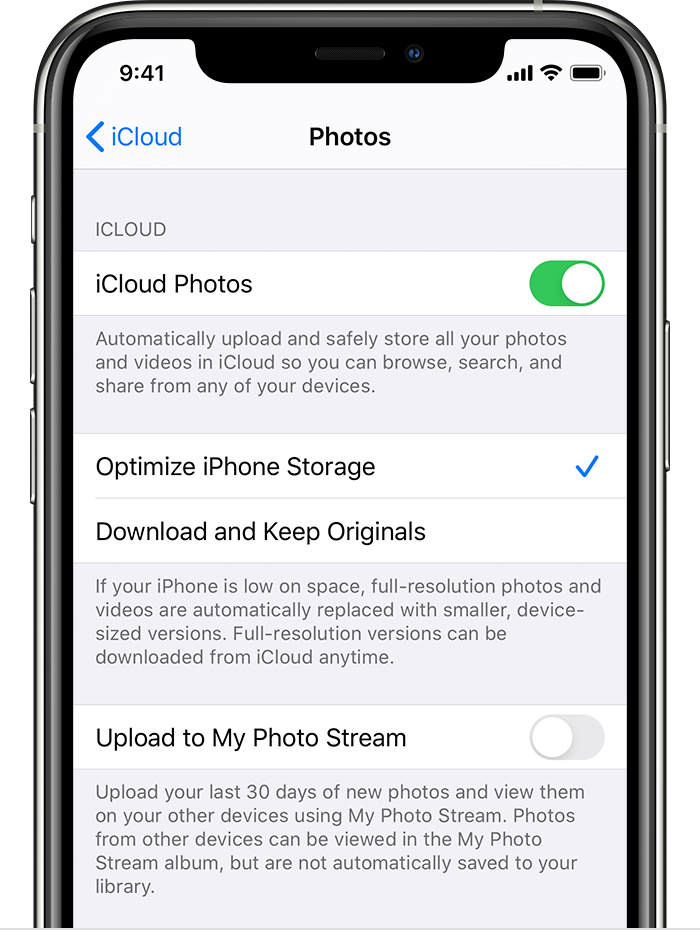
Your photos are always available on both iPhone and iCloud. You delete it on iPhone it is gone from iCloud and vice-versa. To save space on your iPhone use Optimised iPhone storage. Remember, if you delete in one it is deleted everywhere.


Get started with iCloud Photos:

  1. Tap Settings > [your name] > iCloud > Photos.
  2. Turn on iCloud Photos.
  3. Select Optimize iPhone Storage to save space on your device.

With Optimize Storage, smaller, space-saving photos and videos are kept on your device while all of your original, full-resolution versions are stored in iCloud. And as long as you have enough space in iCloud, you can store as many photos and videos as you want.


How to check the storage on your iPhone, iPad, and iPod touch


2 replies
Question marked as Top-ranking reply

Aug 19, 2020 1:09 AM in response to trichy98

You can manage your storage --> How to check the storage on your iPhone, iPad, and iPod touch

Manage your Storage --> Manage your photo and video storage - Apple Support


Your photos are always available on both iPhone and iCloud. You delete it on iPhone it is gone from iCloud and vice-versa. To save space on your iPhone use Optimised iPhone storage. Remember, if you delete in one it is deleted everywhere.


Get started with iCloud Photos:

  1. Tap Settings > [your name] > iCloud > Photos.
  2. Turn on iCloud Photos.
  3. Select Optimize iPhone Storage to save space on your device.

With Optimize Storage, smaller, space-saving photos and videos are kept on your device while all of your original, full-resolution versions are stored in iCloud. And as long as you have enough space in iCloud, you can store as many photos and videos as you want.


How to check the storage on your iPhone, iPad, and iPod touch


Aug 19, 2020 1:10 AM in response to trichy98

Update your device to iOS 13.6.1, then read this support article: Clear Other storage on your iPhone or iPad - Apple Support

Keeping in mind that the “other” storage category is mostly filled with cache and system files created by Safari, the Mail app, other apps and iOS itself, that space is automatically managed by iOS and you can’t interact with it.

If the issue still persists, some benefits to reduce that space can be also obtained creating a full backup of your device, then restoring it to factory settings and, in the end, setting it up as new, as per these instructions: Restore your iPhone, iPad, or iPod to factory settings – Apple Support

When done, restore data from your previously made backup, then restart your device and check your device storage again.

For any further help, contact Apple Support directly, using this link: Get Support

Regards

Giulio

This thread has been closed by the system or the community team. You may vote for any posts you find helpful, or search the Community for additional answers.

I phone storage management

Welcome to Apple Support Community
A forum where Apple customers help each other with their products. Get started with your Apple Account.