
i don’t want to sync my library how do i fix it

Posted on Aug 28, 2020 2:54 AM

Reply
Question marked as Top-ranking reply

Posted on Aug 28, 2020 2:57 AM

Turn OFF Sync Library

With the latest version of iOS, iPadOS, and macOS, Sync Library is turned on by default. If you turned off Sync Library, you can turn it back on. Just follow the steps below for your device.
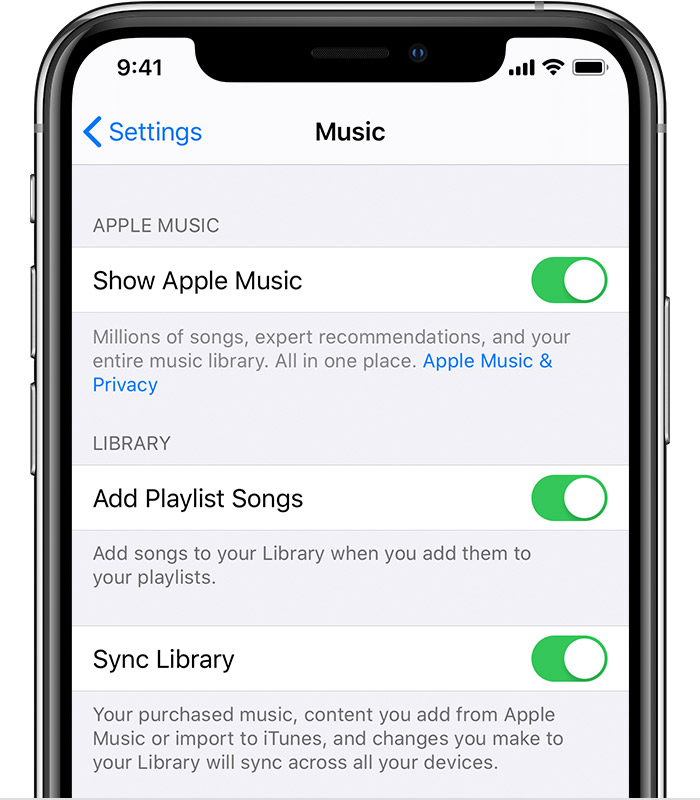

On your iPhone, iPad, or iPod touch

  1. Go to Settings > Music.
  2. Turn off Sync Library. If you don't subscribe to Apple Music or iTunes Match, you won’t see an option to turn on Sync Library.


If Sync Library is updating or turned off, you'll see a message at the top of the Library tab in the Apple Music app.

1 reply
Question marked as Top-ranking reply

Aug 28, 2020 2:57 AM in response to MJSavvo

Turn OFF Sync Library

With the latest version of iOS, iPadOS, and macOS, Sync Library is turned on by default. If you turned off Sync Library, you can turn it back on. Just follow the steps below for your device.


On your iPhone, iPad, or iPod touch

  1. Go to Settings > Music.
  2. Turn off Sync Library. If you don't subscribe to Apple Music or iTunes Match, you won’t see an option to turn on Sync Library.


If Sync Library is updating or turned off, you'll see a message at the top of the Library tab in the Apple Music app.

This thread has been closed by the system or the community team. You may vote for any posts you find helpful, or search the Community for additional answers.

i don’t want to sync my library how do i fix it

Welcome to Apple Support Community
A forum where Apple customers help each other with their products. Get started with your Apple Account.