optimizedwastaken wrote:
I hope you take this seriously instead of mocking me like I'm really dumb, it's not helping at all
I wasn't mocking you. I asked why you were concerned, and if your applications are not running properly, taking an excessive amount of time to perform tasks, etc., that's certainly cause for concern. But all you said was your RAM was being used, and my point was that RAM is there to be used. Macs do use RAM efficiently, although some always-on background applications are problematic (often ones like CleanMyMac or antivirus software).
As a comparison, looking at one of my MacBook Pros right now, I have Outlook, Excel, PowerPoint and OneNote open and together they use more than the 8 GB of RAM your system has; with the many other apps also open the system is >13 GB of the available 16 GB, but the system doesn't lag at all. Just for kicks, I opened even more apps (Photoshop, DxO PhotoLab launched at the same time) and I was briefly able to push Memory Pressure into the yellow, but then macOS pushed it back down into the green and after that the total RAM usage was actually lower than just before opening those apps.

Incidentally, both the MacBook Pros I have open now show many instances of "com.apple.iconsservices.store" when inspecting Finder, so I suspect that's normal as my Finder instances are using <0.5 GB of physical RAM. But that brings up another point...physical RAM vs. virtual RAM.
As TheLittles highlighted, you have <7 GB free storage space on a 128 GB internal drive. That is not wise – and can be crippling. It best to have 20% of your internal storage free, 10% at a minimum and you have down near 5% free. Applications need swap space for temporary files, macOS needs space for caches and virtual memory – the latter is where those swap files go, among other things, and it's essentially the macOS using SSD space as accessory RAM (which it's always done, but now with SDDs instead of HDDs the access is fast enough that it's actually useful). Below are two processes, Finder (left) and Mail that together use only 0.55 GB of physical memory but use >10 GB of virtual memory – that's more than the available space on your SSD.
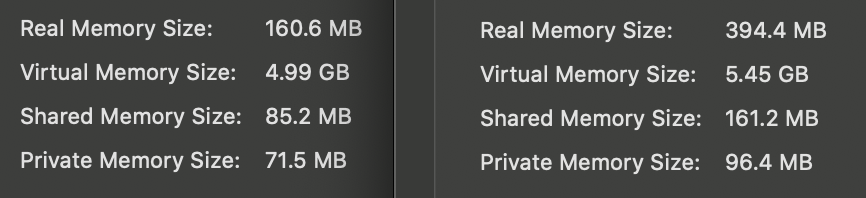
I suspect Adobe Premiere is trying to use more virtual memory than your SSD has available, and it's running into trouble.
As TheLittles recommends, clear some files off your SSD – move them to an external drive if you want to keep copies.



