Music Library Organization, Catalina

What is the definitive organization for the Music/iTunes library. I want to be sure I have a portable external drive that will be functional on my home system, as well as my MBP while traveling. Turingtest2 posted an excellent discussion of this in May of 2019, but I could not find an update for Catalina, or Music 1.0.6.10. Suggestions/advice please.

Posted on Oct 4, 2020 11:22 AM

Reply
Question marked as Top-ranking reply

Posted on Oct 5, 2020 7:12 PM

Hi,


Music in Catalina doesn't make use of the old iTunes Album Artwork cache folders, you can probably remove all of those unless you're going to be using the old iTunes library on Mojave or earlier at some point.


Assuming the library files and all media are on the external drive things will probably work out on a Mac as long as you don't change the volume name. To be properly portable you'd want to consolidate music into /Music/Media, and video content into /TV/Media, then do some housekeeping on all of the originals left outside.


Tones/Ringtones are no longer supported in iTunes or Music, but you can keep files that you have somewhere. Books, audiobooks, and podcasts go into hidden libraries in Catalina making them much harder to properly backup and migrate, or keep stored on an external drive. Again you can organize your original content somewhere sensible so it could be reimported at a later date if needed. A clean media drive might have the following first and second level folders:


/Media

/Media/Audiobooks

/Media/Books

/Media/Podcasts

/Media/Tones

/Music

/Music/Media

/TV

/TV/Media


tt2

5 replies
Question marked as Top-ranking reply

Oct 5, 2020 7:12 PM in response to dodsonmd00

Hi,


Music in Catalina doesn't make use of the old iTunes Album Artwork cache folders, you can probably remove all of those unless you're going to be using the old iTunes library on Mojave or earlier at some point.


Assuming the library files and all media are on the external drive things will probably work out on a Mac as long as you don't change the volume name. To be properly portable you'd want to consolidate music into /Music/Media, and video content into /TV/Media, then do some housekeeping on all of the originals left outside.


Tones/Ringtones are no longer supported in iTunes or Music, but you can keep files that you have somewhere. Books, audiobooks, and podcasts go into hidden libraries in Catalina making them much harder to properly backup and migrate, or keep stored on an external drive. Again you can organize your original content somewhere sensible so it could be reimported at a later date if needed. A clean media drive might have the following first and second level folders:


/Media

/Media/Audiobooks

/Media/Books

/Media/Podcasts

/Media/Tones

/Music

/Music/Media

/TV

/TV/Media


tt2

Oct 4, 2020 12:27 PM in response to dodsonmd00

I'm assuming you've seen Make a split library portable - Apple Community. With Music the library folder is normally called Music and contains the Music Library.musiclibrary file (actually a package that contains several files) and the media folder inside Music in a folder called Media. Provided all media attached to the library is inside Media, and Media is inside Music then this should be a portable library you can move from one drive or machine to another. Unlike iTunes however the artwork cache is not stored in this structure, so when you move the library to a new computer it may take time to rebuild the artwork cache.


tt2

Oct 4, 2020 4:13 PM in response to turingtest2

Thank you, that helps. I'm only moving the external drive from the home system to my laptop when I travel. It's not used on any other systems, so I presume the artwork cache has probably been built at some point on my MBP. I did see the Split Library post, and the advice was very helpful. I was just concerned that with the new OS and app structure that there would be some differences in the folder organization.


The portable drive 'iTunes Mobile' has nothing else on it except the iTunes files, music, movies, podcasts, etc.


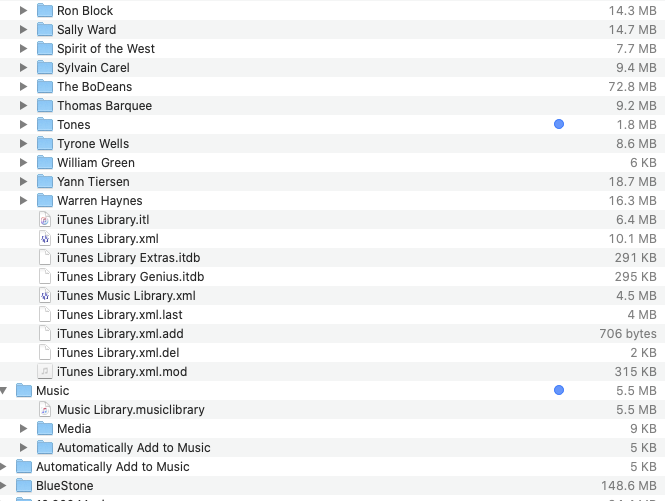
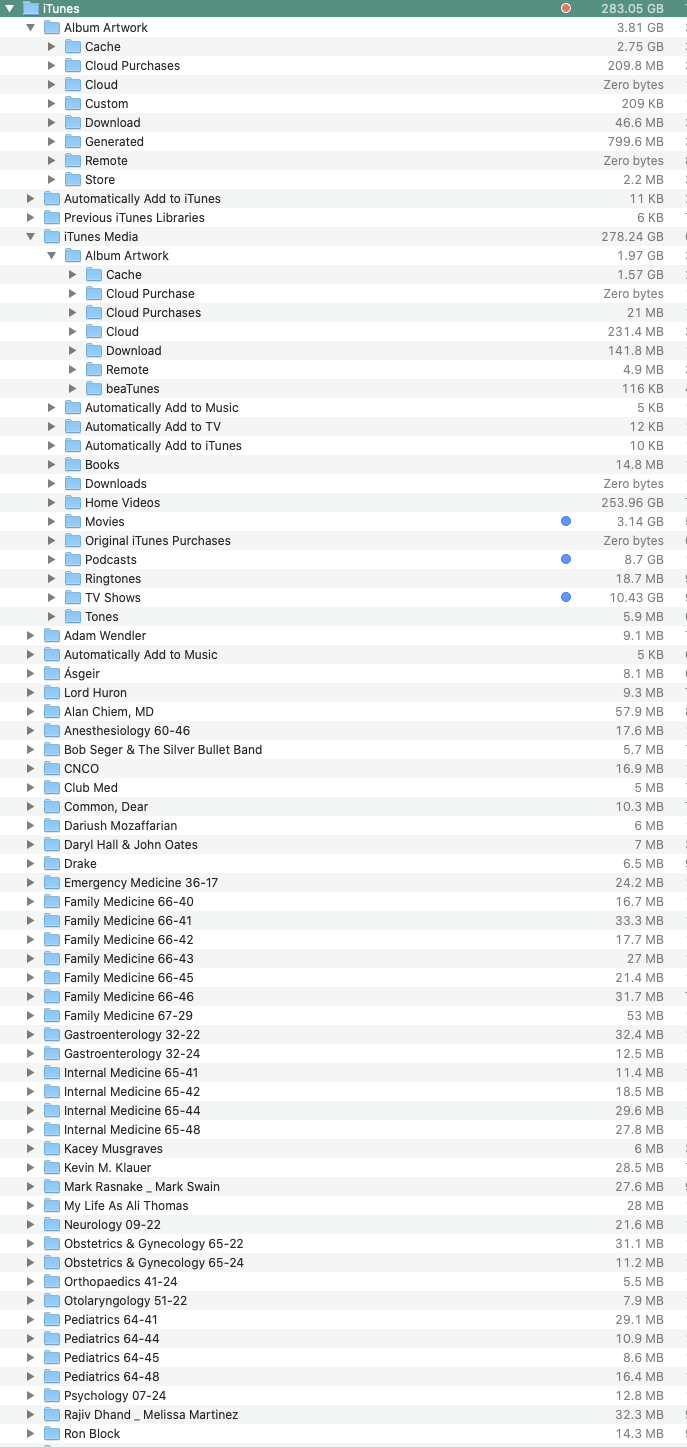
I did the 'reorganize files in the iTunes Mobile folder' instruction, and here's what happened. There is an 'iTunes' folder that contains an Artwork folder, Previous iTunes Libraries, and an iTunes Media folder that also contains Album Artwork, as well as Books, Movies, Home Videos, Podcasts, Tones, the library xml/itl files, and a smattering of music files. There is a Music folder with the Music Library.musiclibrary file, and a Media folder that is empty. I've attached two screen shots for a more clear view.


Below the Music folder, scattered loose on the root level of the drive, are close to 95% of my music file folders. I imagine there should be a more ordered organization of those files. Shouldn't there be a Music folder in the iTunes Media folder that holds the music files?


Can the two Artwork folders be combined without messing anything up?


Sorry for the confusing issue, and thanks in advance for your excellent advice.


This thread has been closed by the system or the community team. You may vote for any posts you find helpful, or search the Community for additional answers.

Music Library Organization, Catalina

Welcome to Apple Support Community
A forum where Apple customers help each other with their products. Get started with your Apple Account.