
Wifi connectivity error
I am unable to connect to my wifi. I did everything reset network setting, turned off private wifi but still no luck. I keep on getting this....
iPad, iPadOS 14
I am unable to connect to my wifi. I did everything reset network setting, turned off private wifi but still no luck. I keep on getting this....
iPad, iPadOS 14
Good afternoon kovidsrivart03,
Welcome to the Apple Support Communities!
It sounds like you are using a private address for Wi-Fi on your iPad with iOS 14.
If you have not already done so, please update to iOS 14.0.1.
Then restart your iPad to refresh it and reestablish a connection to the internet.
The resource below will help you address this issue:
Use private Wi-Fi addresses in iOS 14, iPadOS 14, and watchOS 7
"Turn private address off or on for a network
You can stop or resume using a private address with any network. For better privacy, leave the setting on for all networks that support it.
iPhone, iPad, or iPod touch
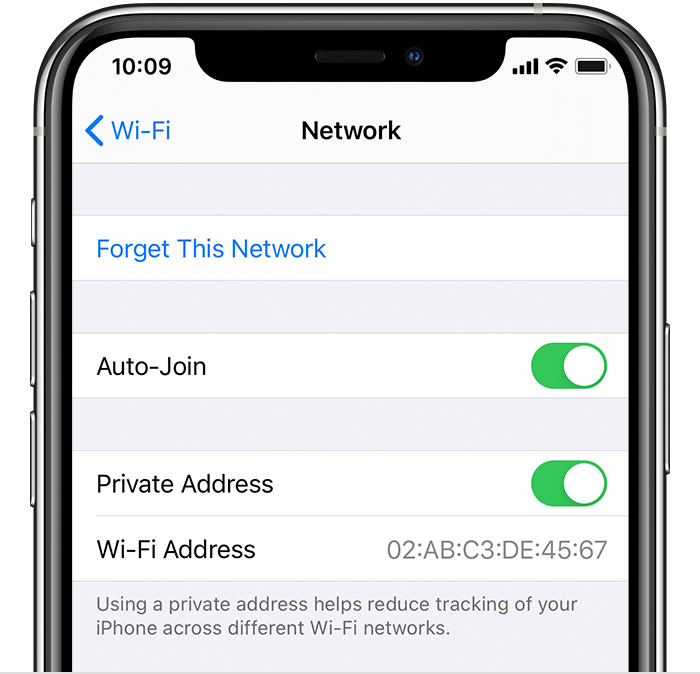
If the issue persists, please reply to this thread and we'll do our best to help you!
Take care.
Good afternoon kovidsrivart03,
Welcome to the Apple Support Communities!
It sounds like you are using a private address for Wi-Fi on your iPad with iOS 14.
If you have not already done so, please update to iOS 14.0.1.
Then restart your iPad to refresh it and reestablish a connection to the internet.
The resource below will help you address this issue:
Use private Wi-Fi addresses in iOS 14, iPadOS 14, and watchOS 7
"Turn private address off or on for a network
You can stop or resume using a private address with any network. For better privacy, leave the setting on for all networks that support it.
iPhone, iPad, or iPod touch
If the issue persists, please reply to this thread and we'll do our best to help you!
Take care.
Wifi connectivity error

