Startup Disk Nearly Full

Hello,


Received this warning 2 days ago.


Moved about 70Gb of files onto external hard drive.


Have been checking free disk space on main HD (capacity 250Gb) since and has fallen every day.


Last night 20Gb free. This morning 14Mb free.


Please advise.


Thanks


2010 MBP Snow Leopard 10.6.8

MacBook Pro

Posted on Oct 21, 2020 3:20 AM

Reply
Question marked as Top-ranking reply

Posted on Oct 21, 2020 3:59 AM

When I have problems like this, the best approach is to:

  • open Finder
  • Go to your root directory (Macintosh HD, in most of the cases)
  • Chose "list" mode
  • Press  Command + Shift + . (or the period)
  • Click View > Show View options and click Calculate all sizes
  • Click on the "Size"column to order from large to small
  • wait...wait...wait.


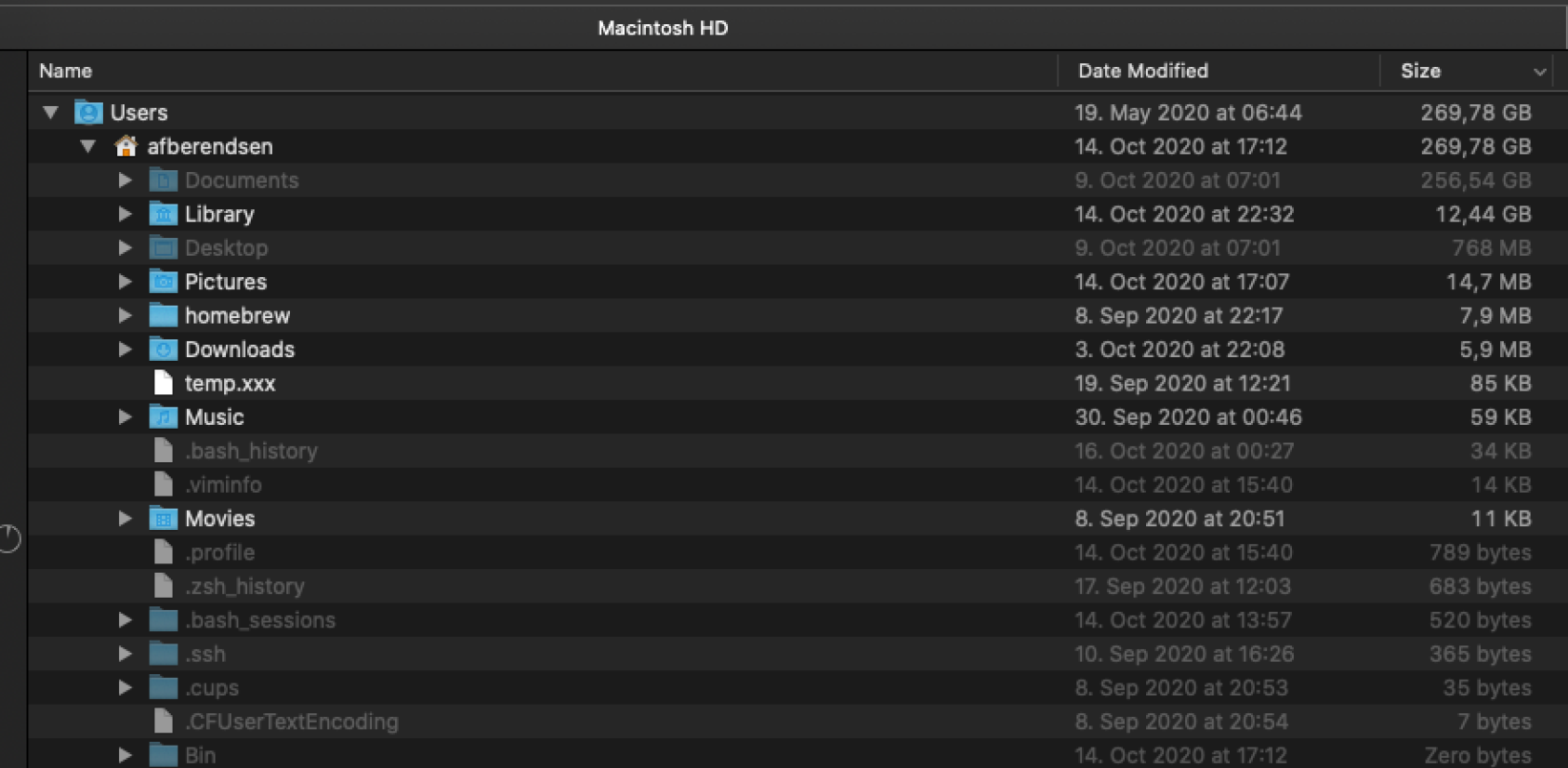
This will, slow, start showing how much space is in use by each directory. You can click the ">" on the left side to show sub-directories. Ignore System and Library directories.


With this information in hands, you can identify where the space of your Volumes is gone.


Remember that Documents is a link to iCloud. The space used by it can be adjusted to offload files if necessary.


This is how one of my computers looks like.

4 replies
Question marked as Top-ranking reply

Oct 21, 2020 3:59 AM in response to Zydas

When I have problems like this, the best approach is to:

  • open Finder
  • Go to your root directory (Macintosh HD, in most of the cases)
  • Chose "list" mode
  • Press  Command + Shift + . (or the period)
  • Click View > Show View options and click Calculate all sizes
  • Click on the "Size"column to order from large to small
  • wait...wait...wait.


This will, slow, start showing how much space is in use by each directory. You can click the ">" on the left side to show sub-directories. Ignore System and Library directories.


With this information in hands, you can identify where the space of your Volumes is gone.


Remember that Documents is a link to iCloud. The space used by it can be adjusted to offload files if necessary.


This is how one of my computers looks like.


This thread has been closed by the system or the community team. You may vote for any posts you find helpful, or search the Community for additional answers.

Startup Disk Nearly Full

Welcome to Apple Support Community
A forum where Apple customers help each other with their products. Get started with your Apple Account.